© 2006 Directed Electronics, all rights reserved
15
HD RADIO MODE
When HD signal was detected, current mode is changed from Analog Radio Mode
to HD Radio Mode and flashes the HD logo until the digital audio is acquired. The
several type of display will be shown according to the user selected.
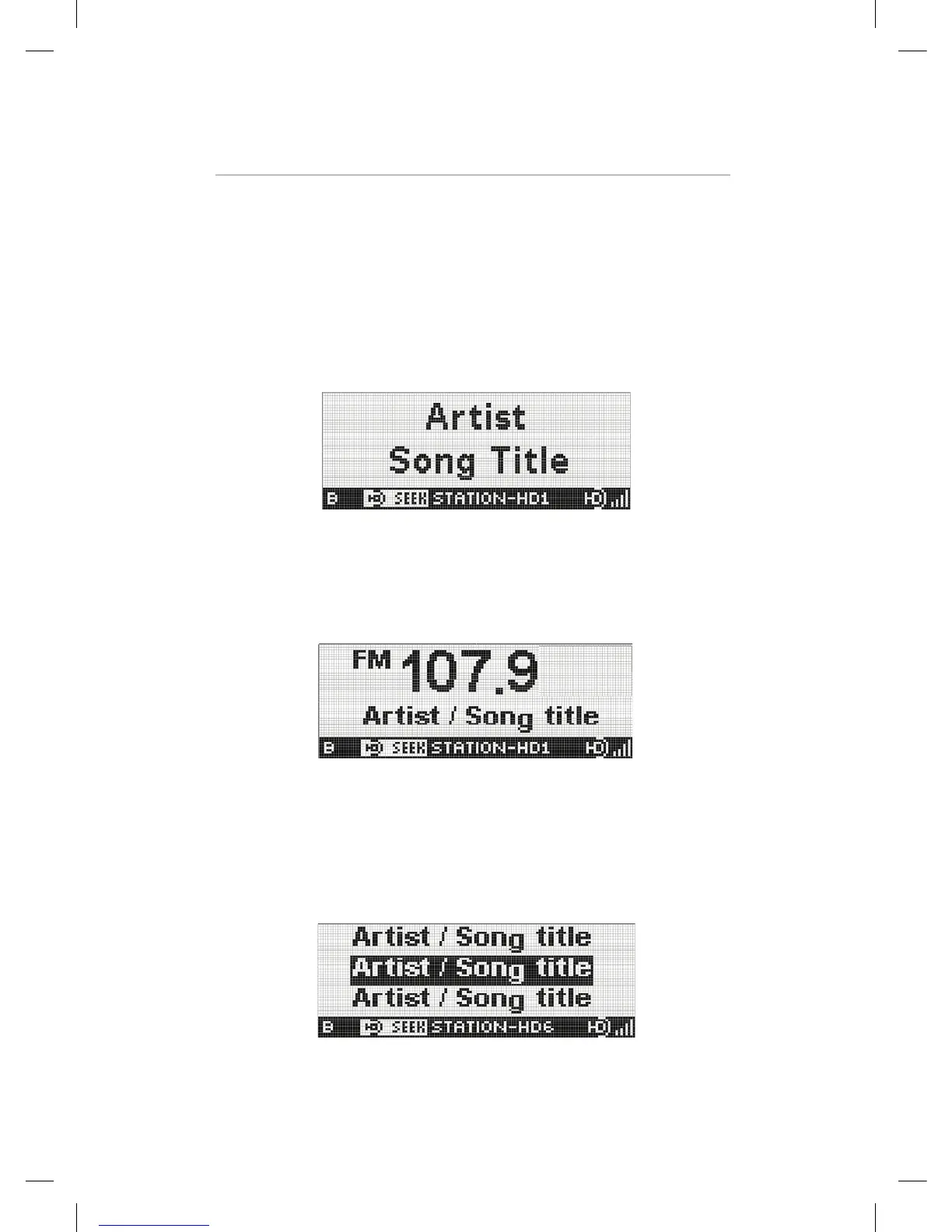
HD Display Mode 1
In Display Mode 1, Artist and Title on separate lines are displayed. And the preset
indicator, Seek indicator, Short Station name, HD logo and Signal strength bars are
displayed on Status Line.
EZHD User Interface Specification Rev 04
3.2.2 HD Radio Mode
When HD signal was detected, current mode is changed from Analog Radio Mode to HD Radio Mode and
flashes the HD logo until the digital audio is acquired. The several type of display will be shown according to the
user selected.
HD Display Mode 1
In Display
Mode 1, Artist and Title on separate lines are displayed. And the preset indicator, Seek indicator, Short Station
name, HD logo and Signal strength bars are displayed on Status Line.
HD Display Mode 2
In Display Mode 2, current tuned frequency and band are prominent in the center of the screen. And artist and
title on same line is displayed. The Status Line is same the Display Mode 1.
HD Display Mode 3
In Display Mode 3, when secondary audio is available, Multi-cast EPG is a list of available audio streams on the
currently-tuned frequency. The selected audio program is highlighted and maximum 3 lines total displayed on the
screen. The Status Line is same the Display Mode 1.
Kiryung Electronics Page 10of 22 Proprietary & Confidential
HD Display Mode 2
In Display Mode 2, current tuned frequency and band are prominent in the center of
the screen. And artist and title on same line is displayed. The Status Line is same
the Display Mode 1.
EZHD User Interface Specification Rev 04
3.2.2 HD Radio Mode
When HD signal was detected, current mode is changed from Analog Radio Mode to HD Radio Mode and
flashes the HD logo until the digital audio is acquired. The several type of display will be shown according to the
user selected.
HD Display Mode 1
In Display
Mode 1, Artist and Title on separate lines are displayed. And the preset indicator, Seek indicator, Short Station
name, HD logo and Signal strength bars are displayed on Status Line.
HD Display Mode 2
In Display Mode 2, current tuned frequency and band are prominent in the center of the screen. And artist and
title on same line is displayed. The Status Line is same the Display Mode 1.
HD Display Mode 3
In Display Mode 3, when secondary audio is available, Multi-cast EPG is a list of available audio streams on the
currently-tuned frequency. The selected audio program is highlighted and maximum 3 lines total displayed on the
screen. The Status Line is same the Display Mode 1.
Kiryung Electronics Page 10of 22 Proprietary & Confidential
HD Display Mode 3
In Display Mode 3, when secondary audio is available, Multi-cast EPG is a list
of available audio streams on the currently-tuned frequency. The selected audio
program is highlighted and maximum 3 lines total displayed on the screen. The
Status Line is same the Display Mode 1.
EZHD User Interface Specification Rev 04
Operation control in HD Radio Mode
Button Operation
POWER Power off
BAND Band toggle (AM / FM)
Ù
SEEK Same as Analog Radio mode
1-5 Same as Analog Radio mode
BANK
Same as Analog Radio mode
UP : Only main channel ÆTune up , with SPS channel Æ Next program
DOWN : Only main channel ÆTune down, with SPS channel Æ Previous program
RIGHT : Seek up according to currently active Seek mode.
LEFT : Seek down according to currently active Seek mode.
NAVIGATION
SEL : Select to desired channel
MENU Same as Analog Radio mode
Display Mode 1
Display Mode 2
DISPLAY
Display Mode 3 “Multi –Cast EPG” When secondary audio is available.
Kiryung Electronics Page 11of 22 Proprietary & Confidential


 To Next Page
 Loading...