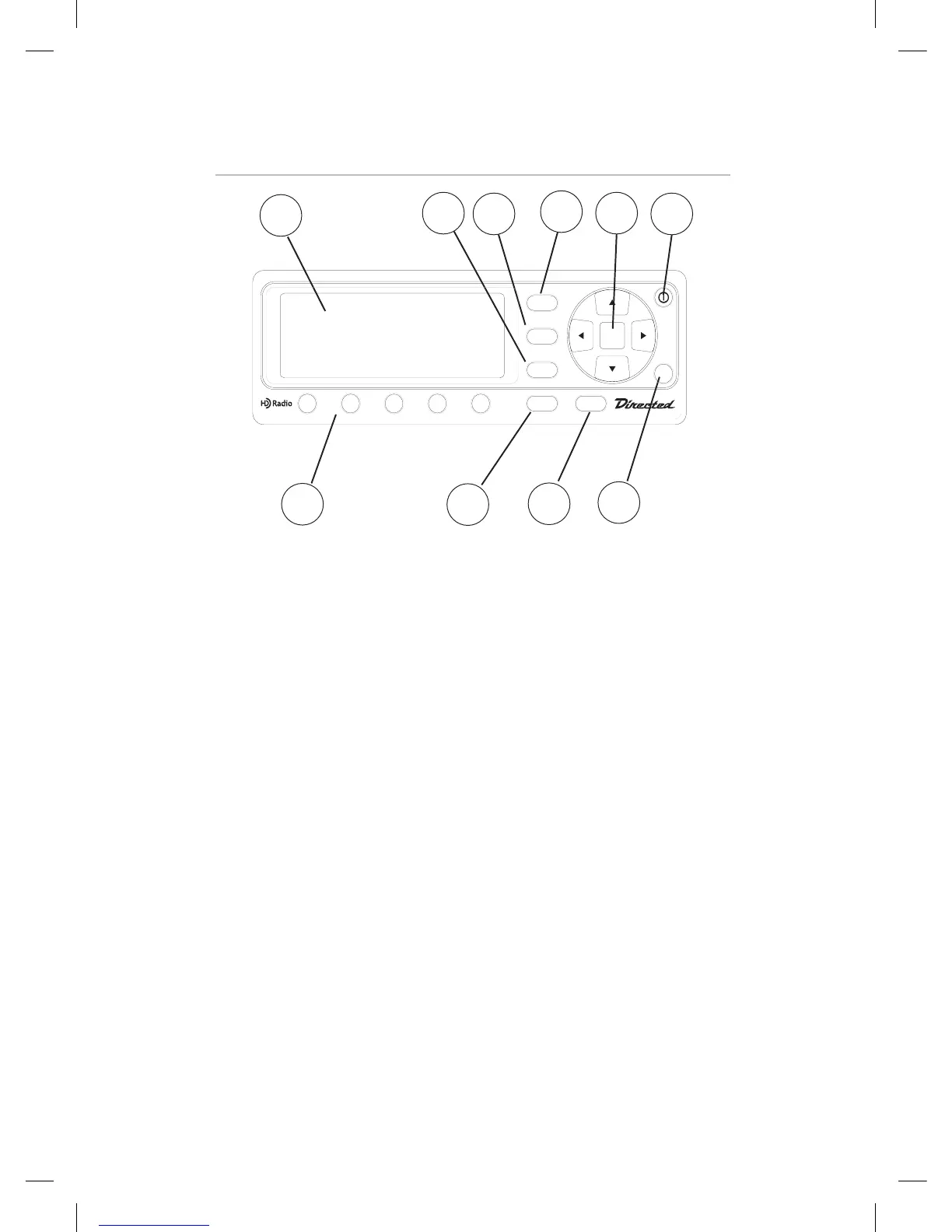
1. LCD
2. BAND BUTTON, The BAND Button selects AM or FM
3. DISPLAY BUTTON, Press the DISP button to cycle between the available display modes.
4. MENU BUTTON, MENU button will acces MENU options. It will also act as an EXIT
function when in a sub menu.
5. UP ARROW, Increases frequency selection
DOWN ARROW, Decreases frequency selection
RIGHT ARROW, Seek UP according to currently active Seek Mode
LEFT ARROW, Seek DOWN according to currently active Seek Mode
SEL, Used to select Menu options
6. POWER BUTTON, Pressing the Power Button will turn the unit ON or OFF
7. PRESET BUTTONS 1 - 5, Station presets
8. BANK BUTTON, The BANK button is used to select Preset Bank number for loading
and saving channel. Pressing and releasing this button changes the Preset Bank in a
circular list from A to D. When the bank changes, the radio tunes to the station last
accessed in the newly selected bank.
9. SEEK, Button selects between differnent modes
10. IR window


 To Next Page