© 2006 Directed Electronics, all rights reserved
12
ANALOG RADIO MODE
If unit is turn on, the unit enters to Analog Radio Mode. In this mode, current tuned
frequency and band are displayed on the screen. And the preset indicator, Seek
indicator and Signal strength bars are displayed on Status line. If current channel is
previous saved frequency in Preset Bank, the preset number will be displayed with
Preset Bank. If HD signal is acquired, unit is converted the mode to HD Radio Mode
automatically.
Operation control in Analog Radio Mode
Button Operation
POWER Power off
BAND Band toggle (AM / FM)
EZHD User Interface Specification Rev 04
3.2.1 Analog Radio Mode
If unit is turn on, the unit enters to Analog Radio Mode. In this mode, current tuned frequency and band are
displayed on the screen. And the preset indicator, Seek indicator and Signal strength bars are displayed on Status
line. If current channel is previous saved frequency in Preset Bank, the preset number will be displayed with
Preset Bank. If HD signal is acquired, unit is converted the mode to HD Radio Mode automatically.
Operation control in Analog Radio Mode
Button Operation
POWER Power off
BAND Band toggle (AM / FM)
Ù
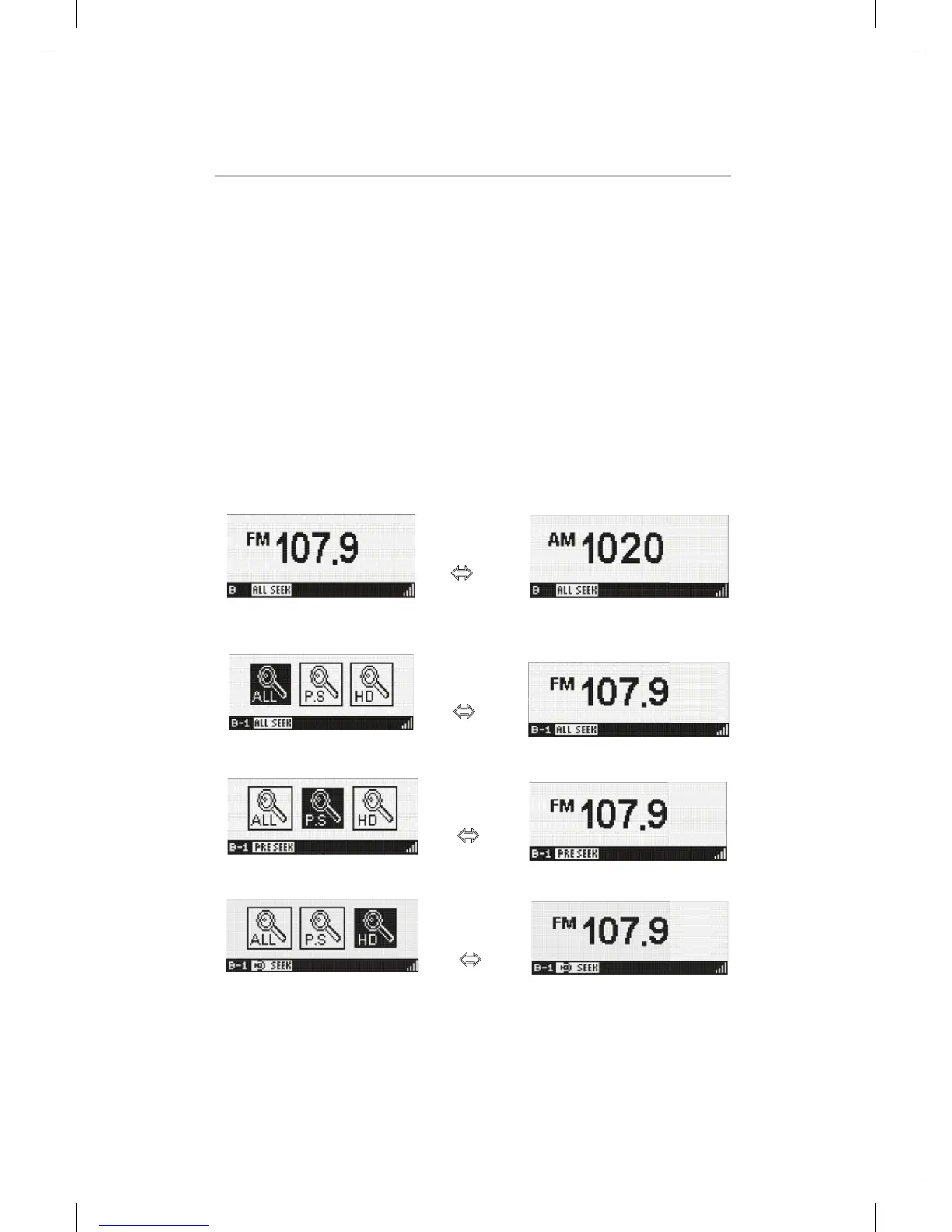
SEEK Select the Seek mode
Ù
Ù
Ù
The Seek mode icon is removed after a short time-out interval of about 5 seconds.
And return to lasted display screen.
1-5 Direct tune to preset frequency on current Bank
Press and Hold : Store current station to current Bank
Press and Release : Recall
Repeat : Repeated press of the same button cycles through secondary programs
on multi-casting stations.
Kiryung Electronics Page 8of 22 Proprietary & Confidential
SEEK Select the Seek mode
EZHD User Interface Specification Rev 04
3.2.1 Analog Radio Mode
If unit is turn on, the unit enters to Analog Radio Mode. In this mode, current tuned frequency and band are
displayed on the screen. And the preset indicator, Seek indicator and Signal strength bars are displayed on Status
line. If current channel is previous saved frequency in Preset Bank, the preset number will be displayed with
Preset Bank. If HD signal is acquired, unit is converted the mode to HD Radio Mode automatically.
Operation control in Analog Radio Mode
Button Operation
POWER Power off
BAND Band toggle (AM / FM)
Ù
SEEK Select the Seek mode
Ù
Ù
Ù
The Seek mode icon is removed after a short time-out interval of about 5 seconds.
And return to lasted display screen.
1-5 Direct tune to preset frequency on current Bank
Press and Hold : Store current station to current Bank
Press and Release : Recall
Repeat : Repeated press of the same button cycles through secondary programs
on multi-casting stations.
Kiryung Electronics Page 8of 22 Proprietary & Confidential
The Seek mode icon is removed after a short time-out
interval of about 5 seconds. And return to lasted display
screen.


 To Next Page
 Loading...