© 2006 Directed Electronics, all rights reserved
18
RADIO DATA SYSTEM (RDS) MODE
Note: RDS (Radio Data System): This technology allows stations to transmit additional
types of information via encoded digital signals that can be received and displayed by the
user's Radio. For instance: an RDS-capable Radio can display the title and artist or current
song playing, local traffic information, an advertiser's phone number while a commercial
is playing, etc.
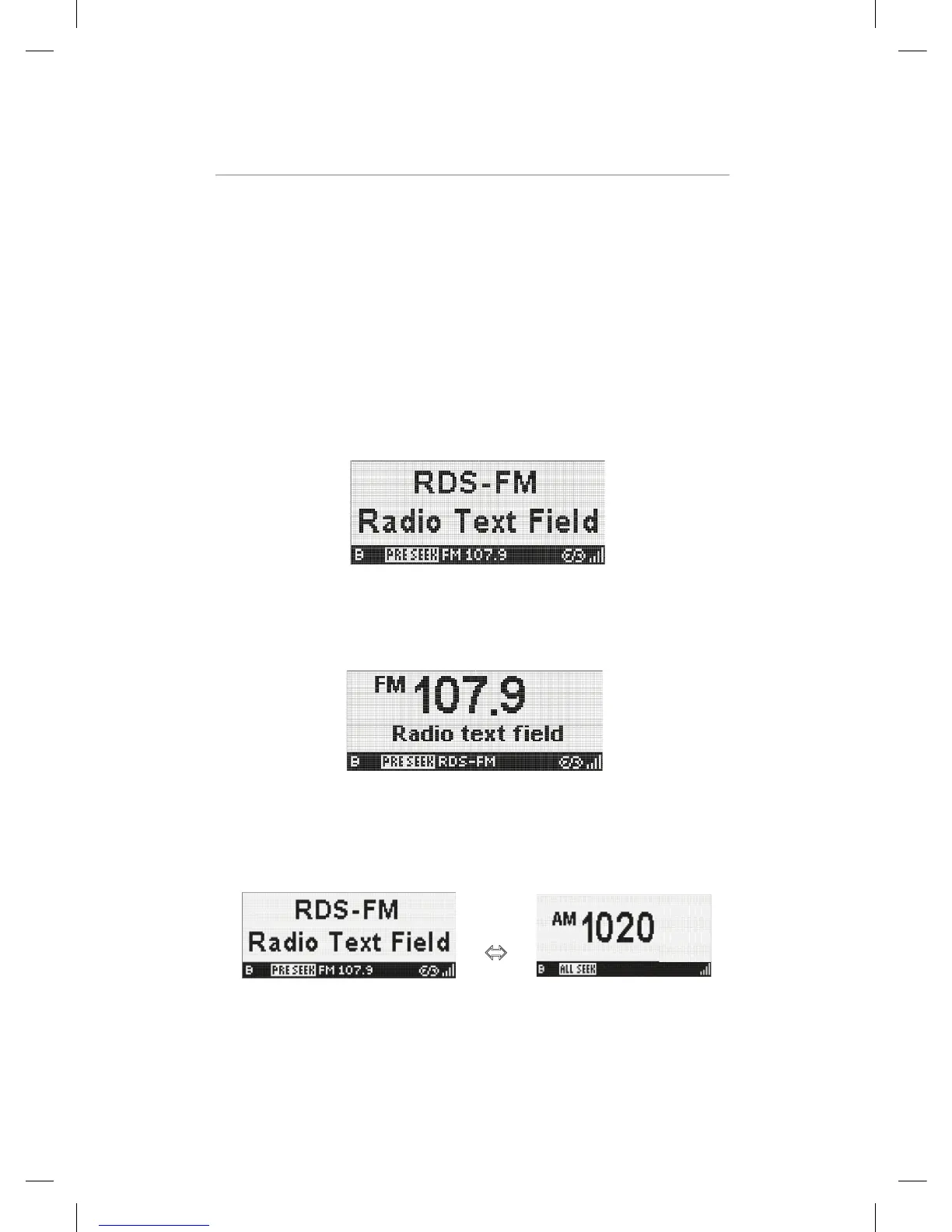
When RDS data was received, the display is changed as below automatically. The display
in RDS Mode has two types of Display Mode.
In Display Mode 1, Station name and Radio text information on separate lines are
displayed. And the preset indicator, Seek indicator, band, frequency, RDS logo and Signal
strength bars are displayed on Status Line.
EZHD User Interface Specification Rev 04
3.2.3 RDS Mode
When RDS data was received, the display is changed as below automatically. The display in RDS Mode has two
types of Display Mode.
In Display Mode 1, Station name and Radio text information on separate lines are displayed. And the preset
indicator, Seek indicator, band, frequency, RDS logo and Signal strength bars are displayed on Status Line.
In Display Mode 2, current tuned frequency and band are prominent in the center of the screen. Artist and Title on
same line is displayed. In this display mode, the station name is displayed to Status Line instead of band and
frequency.
Operation control in RDS mode
Button Operation
POWER Power off
BAND Band toggle (AM / FM)
Ù
SEEK Same as Analog Radio mode
1-5 Same as Analog Radio mode
Kiryung Electronics Page 12of 22 Proprietary & Confidential
In Display Mode 2, current tuned frequency and band are prominent in the center of the
screen. Artist and Title on same line is displayed. In this display mode, the station name
is displayed to Status Line instead of band and frequency.
EZHD User Interface Specification Rev 04
3.2.3 RDS Mode
When RDS data was received, the display is changed as below automatically. The display in RDS Mode has two
types of Display Mode.
In Display Mode 1, Station name and Radio text information on separate lines are displayed. And the preset
indicator, Seek indicator, band, frequency, RDS logo and Signal strength bars are displayed on Status Line.
In Display Mode 2, current tuned frequency and band are prominent in the center of the screen. Artist and Title on
same line is displayed. In this display mode, the station name is displayed to Status Line instead of band and
frequency.
Operation control in RDS mode
Button Operation
POWER Power off
BAND Band toggle (AM / FM)
Ù
SEEK Same as Analog Radio mode
1-5 Same as Analog Radio mode
Kiryung Electronics Page 12of 22 Proprietary & Confidential
Operation control in RDS mode
POWER Power off
BAND Band toggle (AM / FM)
DMHD-1000 User Interface Specification Rev 05
3.2.3 RDS Mode
When RDS data was received, the display is changed as below automatically. The display in RDS Mode has two
types of Display Mode.
In Display Mode 1, Station name and Radio text information on separate lines are displayed. And the preset
indicator, Seek indicator, band, frequency, RDS logo and Signal strength bars are displayed on Status Line.
In Display Mode 2, current tuned frequency and band are prominent in the center of the screen. Artist and Title on
same line is displayed. In this display mode, the station name is displayed to Status Line instead of band and
frequency.
Operation control in RDS mode
Button Operation
POWER Power off
BAND Band toggle (AM / FM)
Ù
SEEK Same as Analog Radio mode
1-5 Same as Analog Radio mode
Kiryung Electronics Page 12of 22 Proprietary & Confidential
EZHD User Interface Specification Rev 04
Operation control in HD Radio Mode
Button Operation
POWER Power off
BAND Band toggle (AM / FM)
Ù
SEEK Same as Analog Radio mode
1-5 Same as Analog Radio mode
BANK
Same as Analog Radio mode
UP : Only main channel ÆTune up , with SPS channel Æ Next program
DOWN : Only main channel ÆTune down, with SPS channel Æ Previous program
RIGHT : Seek up according to currently active Seek mode.
LEFT : Seek down according to currently active Seek mode.
NAVIGATION
SEL : Select to desired channel
MENU Same as Analog Radio mode
Display Mode 1
Display Mode 2
DISPLAY
Display Mode 3 “Multi –Cast EPG” When secondary audio is available.
Kiryung Electronics Page 11of 22 Proprietary & Confidential
SEEK Same as Analog Radio mode
1-5 Same as Analog Radio mode


 To Next Page
 Loading...