© 2006 Directed Electronics, all rights reserved
20
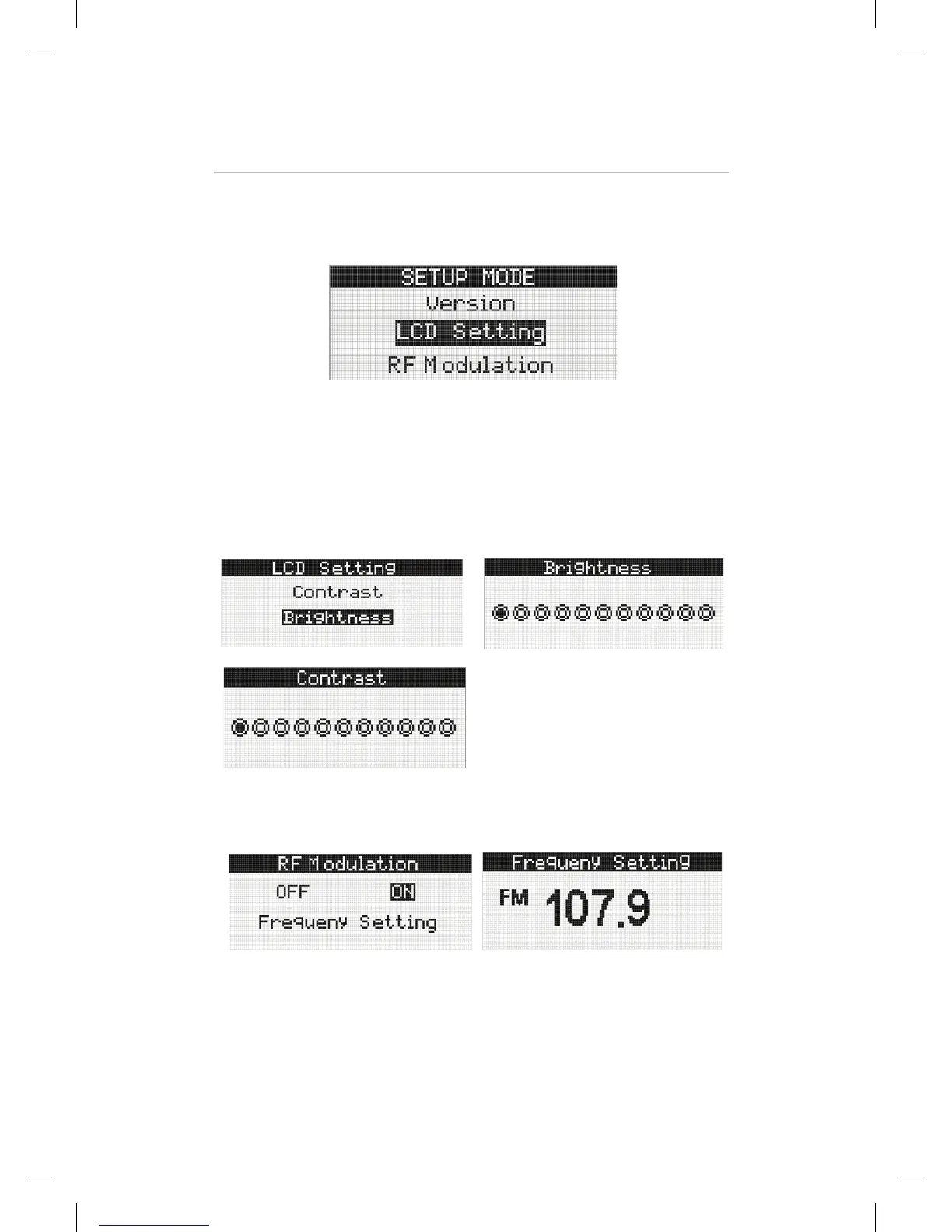
SETUP MODE
To enter Setup Mode, press the MENU button. Using the navigation keys, user can
select a desired item. To exit current menu tree, press the MENU button again or
wait for 5 seconds.
DMHD-1000 User Interface Specification Rev 05
3.2.4 Setup Mode
To enter Setup Mode, press the MENU button. Using the navigation keys, user can select a desired item. To exit
current menu tree, press the MENU button again or wait for 5 seconds.
Operation control in Menu mode
Menu Operation
Version This item is used to confirm current version.
LCD Control There are two items to control the LCD screen.
RF Modulation
The On/Off Field is toggled by user selecting.
Kiryung Electronics Page 14of 22 Proprietary & Confidential
Operation control in Menu mode
Version: This item is used to confirm current version.
LCD Control : There are two items to control the LCD screen.
3.2.4 Setup Mode
To enter Setup Mode, press the MENU button. Using the navigation keys, user can select a desired item.
To exit current menu tree, press the MENU button again or wait for 5 seconds.
� Operation control in Menu mode
Menu Operation
Version This item is used to confirm current version.
LCD Control There are two items to control the LCD screen.
RF Modulation
The On/Off Field is toggled by user selecting.
3.2.4 Setup Mode
To enter Setup Mode, press the MENU button. Using the navigation keys, user can select a desired item.
To exit current menu tree, press the MENU button again or wait for 5 seconds.
� Operation control in Menu mode
Menu Operation
Version This item is used to confirm current version.
LCD Control There are two items to control the LCD screen.
RF Modulation
The On/Off Field is toggled by user selecting.
The On/Off Field is toggled by user selecting.


 To Next Page