8 9
DitoGear™ OmniSlider
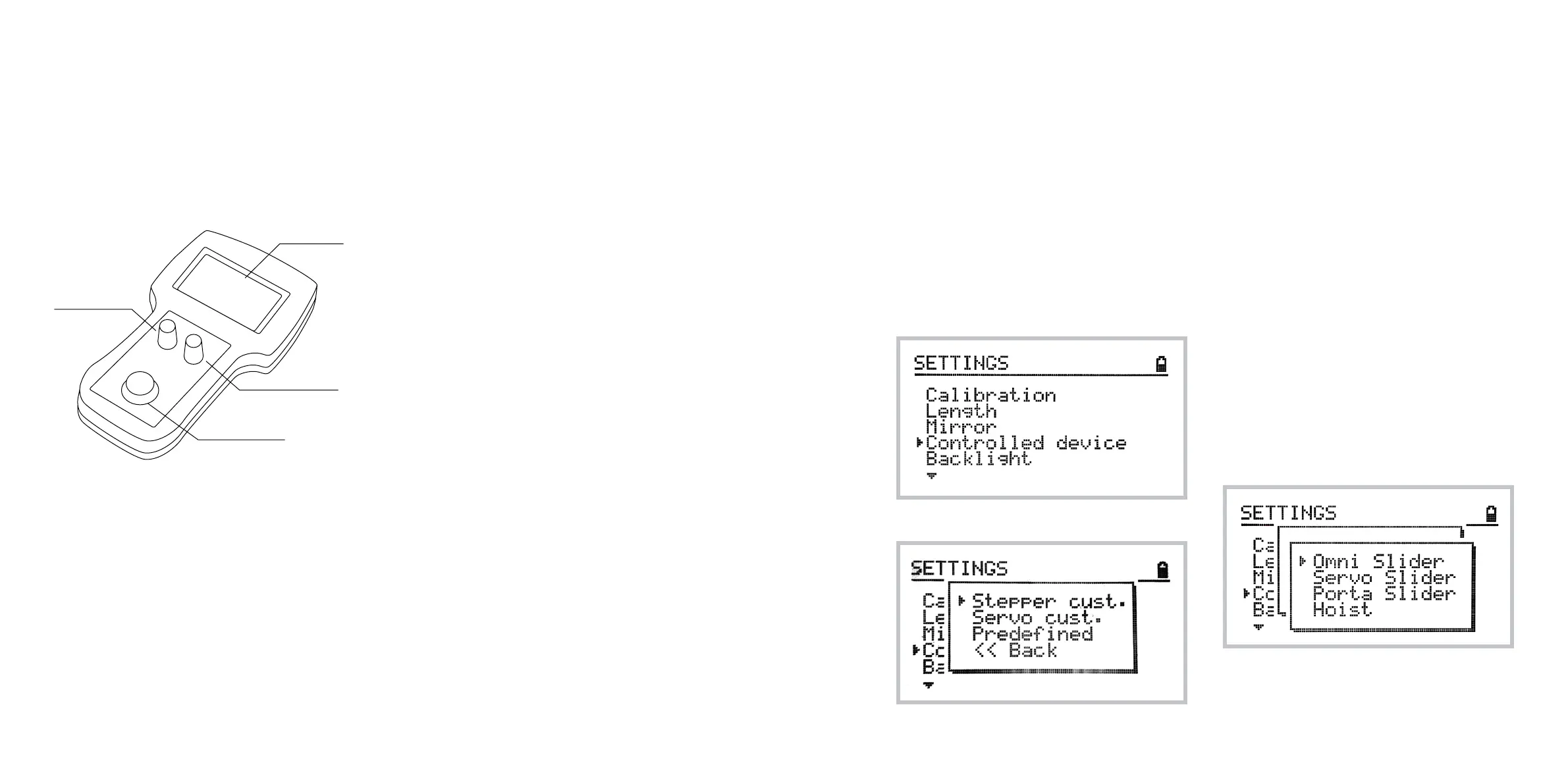
Controller Overview
The DitoGear™ OmniSlider Controller is an elec-
tronic device designed to control the slider with
ease and precision. The controller consists of the
following elements:
1 A cable socket at the back of the controller
2 A multiline LCD display
3 A 4-directional, 1-button analog joystick
used to navigate through the DitoGear™
OmniSlider Controller menu system and
control motion of the device. Press the
joystick to select the options in the menu
and access special functions (referred to as
[Select] in the manual)
4 The speed adjustment dial, situated on the
left of the controller, is used to adjust the
speed of the trolley (referred to as [D1] in
the manual)
5 The speed damping dial, situated on the right
of the controller, is used to adjust the speed
damping (acceleration and decceleration) of
the trolley (referred to as [D2] in the manual)
DitoGear™ OmniSlider
Servo Motor Internal Controller
The DitoGear™ OmniSlider Servo comes with an
advanced low-level motor controller capable of
preventing motor overload and overheating.
A built-in cooling fan is switched on every time the
motor or motor controller temperature reaches the
treshold point.
The DitoGear™ OmniSlider Servo Motor Controller
comes with a controller reset button located on
the front panel of the motor enclosure.
When the controller detects motor overload, the
power is disconnected to prevent hardware dam-
age. Such situation is indicated with continuous
sound alarm. If it happens (usually during calibra-
tion procedure when the trolley hits the end of the
track or while working under excessive load) sim-
ply press the reset button for a second to reset the
warning. Recalibration may be required.
Adjusting initial settings
In order to operate the device properly, the initial con-
figuration must be set. Some additional settings are
required after each power-up routine.
Setting the controlled device
In order for the slider to operate properly the correct
device should be chosen from the settings menu.
To select the device navigate to:
Home » Settings » Controlled device
The following options are available:
Stepper custom lets you operate a custom
DitoGear™ device based on a stepper motor.
Servo custom lets you operate a custom
DitoGear™ device based on a servo motor.
These options are designed for future applications
and for advanced users. Please contact DitoGear™
Support to obtain detailed instructions on how to
use them if necessary.
In most cases you will use the Predefined option
setting one of the devices, such as:
1 DitoGear™ OmniSlider Servo
2 DitoGear™ OmniSlider Stepper
3 DitoGear™ Crane Hoist
4 DitoGear™ PortaSlider
LCD Display
[D1] Speed
[D2] Speed damping
Joystick



 To Next Page