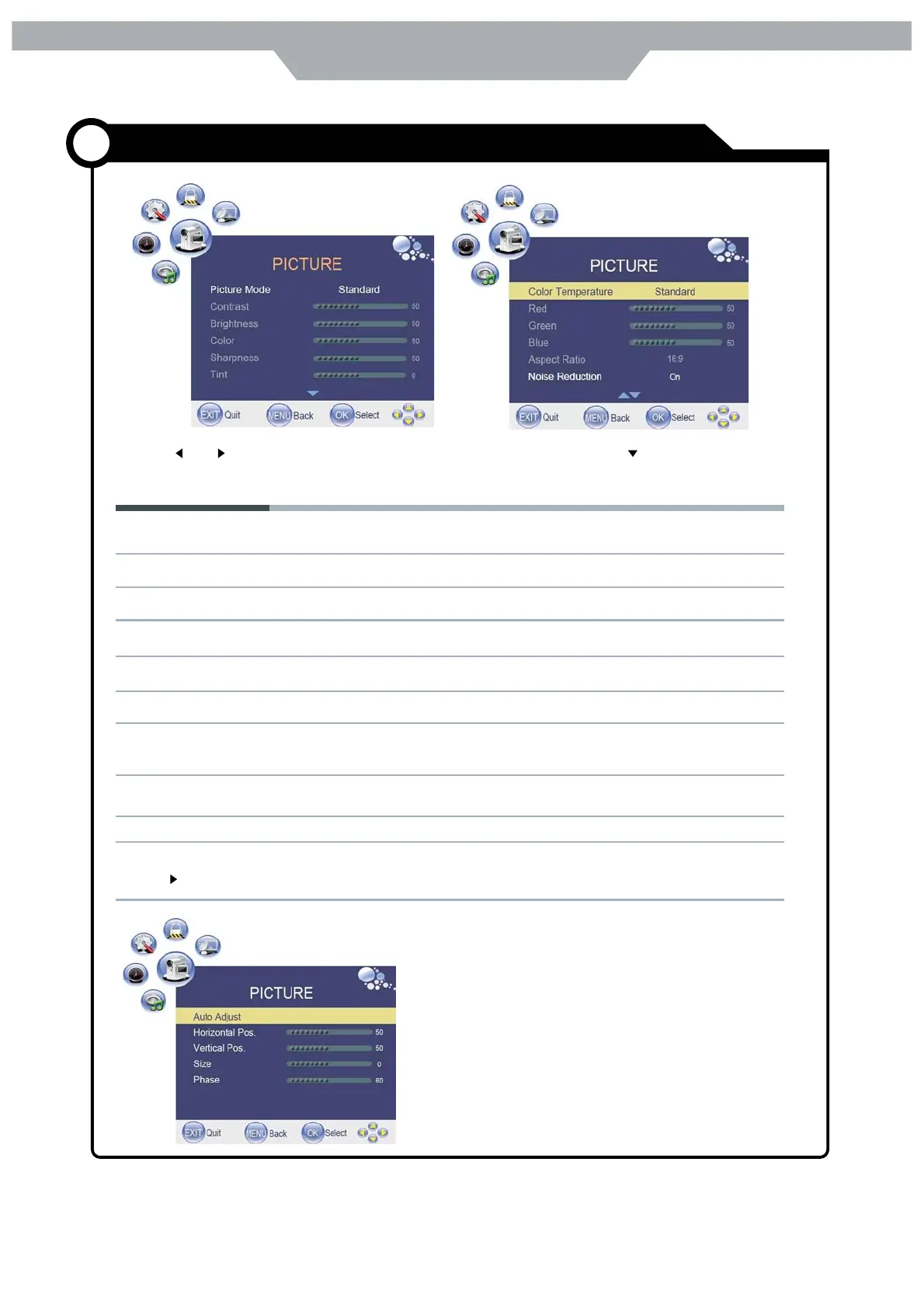
Picture Mode: Cycles among picture display modes : Standards ,Dynamic, User, Mild .
Contrast : Controls the difference between the brightness and darkest regions of the pictures .
Brightness : Controls the overall brightness of the picture
Color : Control the color
Sharpness : Increase the setting to see crisp edges in the picture; decrease it for soft edges
Tint : Control the tint
Color temperature : Cycles among colour modes : User , Cool, Standards ,Warm .When you select " User"
model, you could adjust the colours below ( Red, Green , Blue) by yourself .
Aspect Ratio: Cycles among screen display modes : Auto , 4: 3, 16:9, Zoom 1, Zoom 2
Noise Reduction : Reduce the noise point of the picture when you turn on the function by selecting " On "
PC Setup( only exists in PC- RGB mode)
Press button to enter the submenu to adjust the picture of screen
Use the and buttons to select the picture menu( as the picture above), press button to enter the
menu.
The picture menu includes the following options
20
Customizing the PICTURE Settings
Application


 To Next Page