1-34 (No.HD003<Rev.004>)
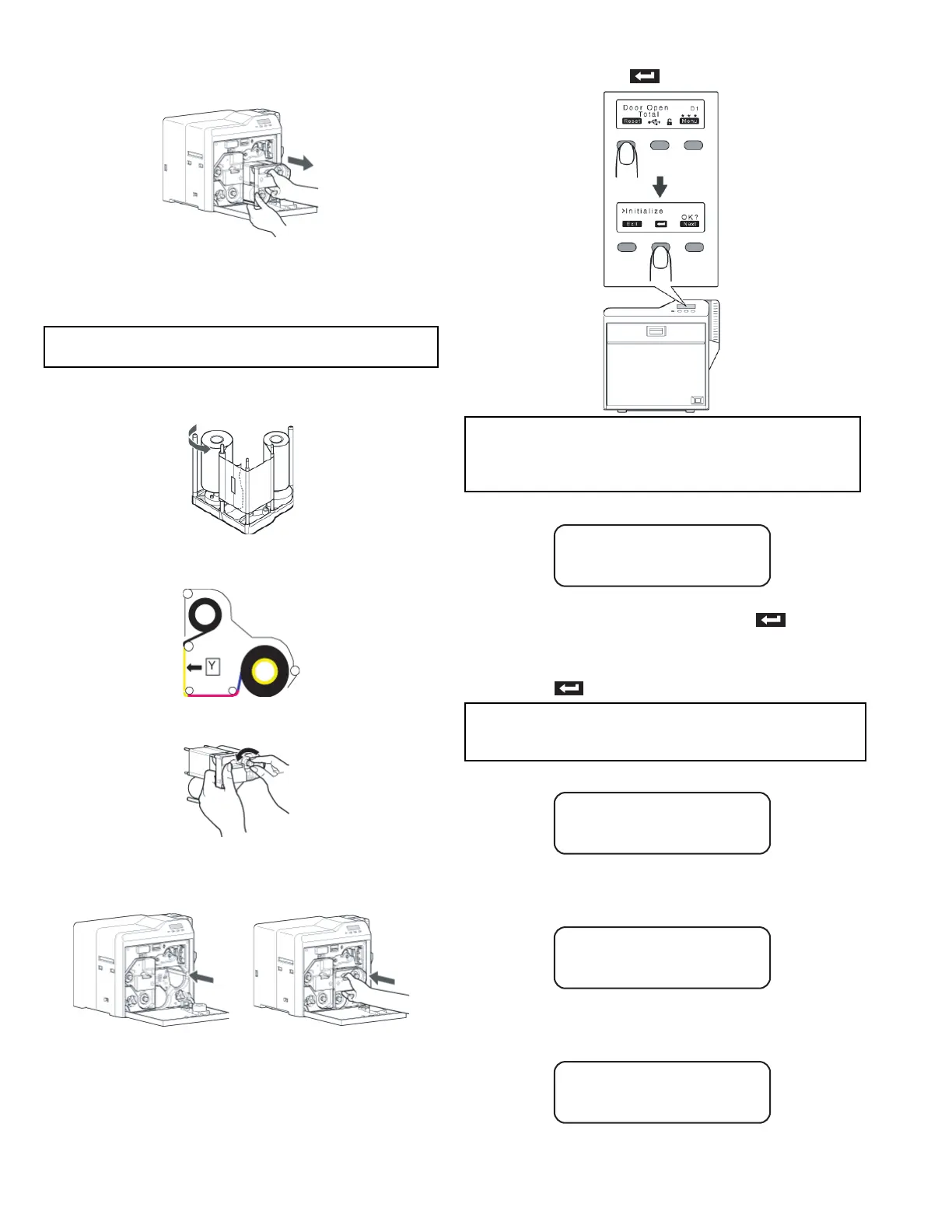
(2) Press and hold down the cassette button, and remove
the ink ribbon cassette. (on the right)
(3) Cut away the broken portion, and attach the unused portion
at the supply side to the other end at the take-up side using
an adhesive tape, while making sure that the joint surface
is even.
(4) Turn the take-up side using your hand until the broken por-
tion can no longer be seen.
• Align the yellow side of the unused portion with the arrow
indicated on the label of the cassette.
(5) Remove any slack in the ink ribbon.
(6) Insert the cassette all the way in along the guide rail until
a “click” sound is heard, followed by closing the printer
door.
(7) Press [RESET] to reset the printer.
5.1.12 Door Open D1
• The printer door is open.
Close the printer door, and Press [RESET] to reset the
printer.
• Cleaning unit is not installed.
Install the cleaning unit, close the printer door, and press
[RESET] to reset the printer.
5.1.13 Film Run Out A2
• Retransfer film has run out.
Replace with a new one.
5.1.14 Ink Run Out B2
• Ink ribbon has run out.
Replace with a new one.
5.1.15 Hardware 44
• A hardware failure has occurred on the printer.
Turn off and on the power again. If the same problem recurs,
turn off the power and consult our authorized dealers.
Cautions:
• Do not discard the used ribbon at the take-up side.
Memo:
• To avoid printing errors, it is recommended that you forward
by one or two images after installing the ink ribbon cassette
or retransfer film cassette.
Memo:
• The operation panel display appears blinking when the print-
er door is open or when the cleaning unit is not installed.
Door Open D1
Film Run Out A2
Ink Run Out B2
Hard ware 44



 To Next Page