(No.HD003<Rev.004>)1-43
(10) Cam Mo-Platen (Heater Cam Motor - Platen)
The heater cam motor rotates, keeps pressing the platen
for about 3 seconds, leaves the platen, then goes back to
the standby position.
(11) Cam Mo-HR (Heater Cam Motor - Heat Roller)
The heater cam motor rotates, keeps pressing the heat roll-
er for about 3 seconds, leaves the heat roller, then goes
back to the standby position.
5.3.3.2 Sensor
Correct operation of the sensor is checked. Confirm the valve is
changed, when the sensor is interrupted or reflected.
5.3.3.3 Memory
The picture memory SDRAM on the Main PWB is tested. The
buzzer sounds in case of an error. The error LED also will light.
5.3.3.4 Display
All the dots of LCD are displayed black. Confirm that there is no
missing dot.
5.3.3.5 Back Color
The back colors red, green, and blue are displayed for 3 seconds
and correct display of the back colors is tested.
5.3.3.6 Registers
This printer has four temperature-detecting thermistors:
(1) Retransfer heat roller thermistor
(2) Bend remedial heat roller thermistor
(3) Thermal head thermistor
(4) Ambient temperature thermistor
These thermistors output analog signals, which are applied to the
circuits for four channel 8bit A/D converter IC.
Each of these converted value in a hex decimal number as
shown below. Note that the following values are the values at the
moment the [ ] button is pressed.
The following table shows reference values.
5.3.4 Information
The information for the various firmware versions can be con-
firmed. For the thermal head, the serial No. and the head supply
voltage (Vth) are displayed.
And the total lighting time of the heaters (retransfer and bend
remedy) can be displayed. And it is possible to clear the total
lighting time to zero after replacing those heaters.
5.3.4.1 Assistance
The management data used when producing this printer.
5.3.5 Push and Pop
This printer has two EEPROMs for storage of data for the thermal
head and for user and service mode.
When the Main PWB is exchanged, the settings for user and ser-
vice mode must be done over again. The Parameter Push/Pop
function is provided to shorten this operation.
When initially "Push" is selected and the [ ] button is
pressed, the set values (including head, total counter) in the EE-
PROM on the Main PWB are written to the EEPROM in the head.
When then "Pop" is selected after the Main PWB has been ex-
changed and the [ ] button is pressed, these set values are
copied to the EEPROM on the Main PWB.
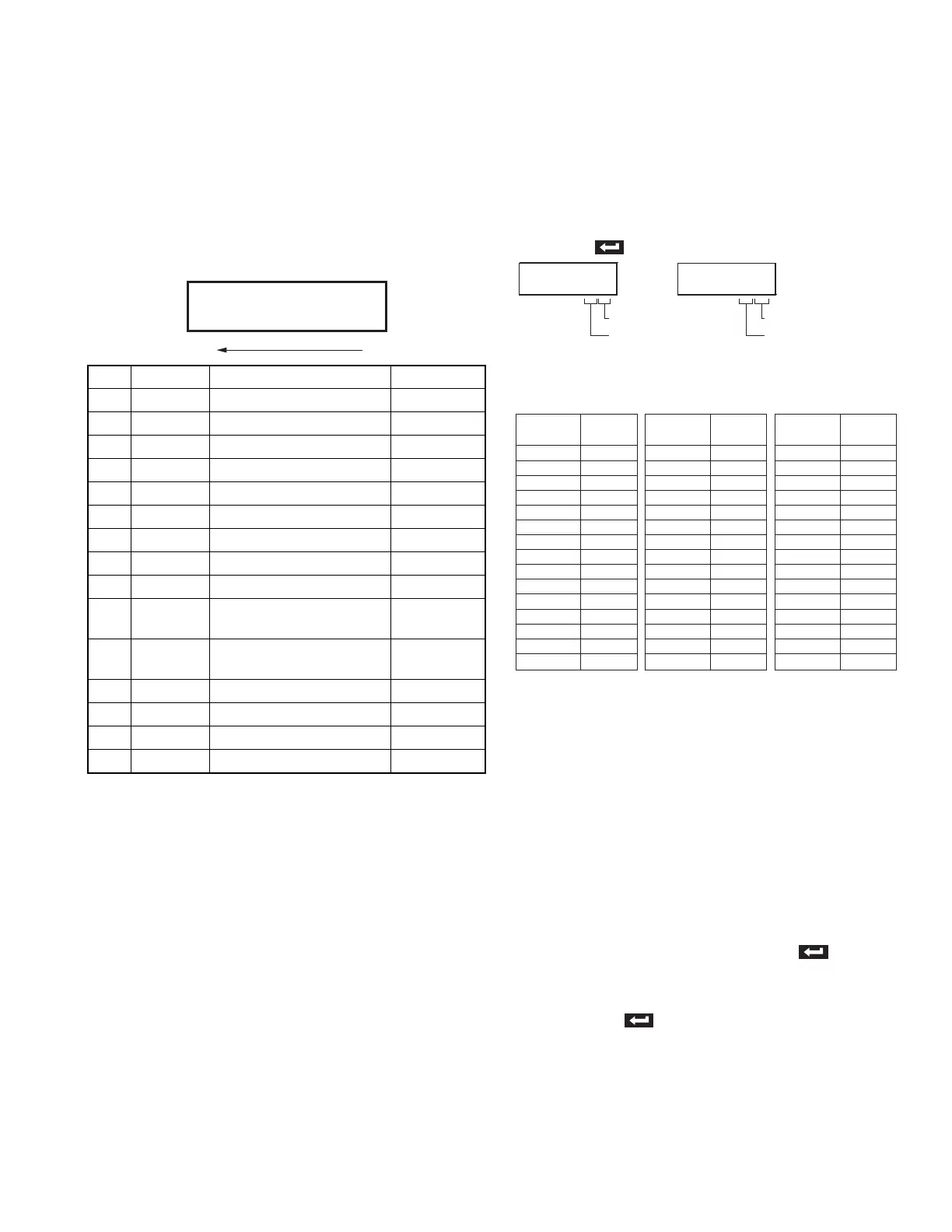
D0 NOCD Card existence Reflection : 0
D1 ICPOS IC Card position Reflection : 0
D2 MGCDPOS MG Card position Reflection : 0
D3 MGHDPOS MG Head position Reflection : 0
D4 TURNPOS Turnover initial position Reflection : 0
D5 EDGE Card edge Reflection : 0
D6 CDOUT Card outlet Reflection : 0
D7 Not used
D8 INK Ink start position Interruption : 0
D9 MEDIA Film mark Reflection : 0
D10 CAM A Retransfer heat roller/Platen
roller position
Reflection : 0
D11 CAM B Retransfer heat roller/Platen
roller position
Reflection : 0
D12 Not used
D13 Not used
D14 Not used
D15 Not used
>>
Sensor
D15 D0
0000011001111010
>>ADPORT0
C277
>>ADPORT1
FCFC
Ambient temperature
Thermal head
Retransfer heat roller
Bend remedial heat rolle
Temperature
(
O
C)
0
20
50
80
100
130
140
150
160
170
180
190
200
210
220
Indicated
Value
FE
FC
F5
E2
CC
9E
8D
7D
6D
5E
51
46
3B
33
2B
Temperature
(
O
C)
-5
0
10
15
20
25
30
35
40
45
50
55
60
65
70
Indicated
Value
E7
E0
CD
C1
B3
A5
96
87
78
6A
5C
50
45
3B
32
Temperature
(
O
C)
0
5
10
15
20
25
30
35
40
45
50
55
60
65
70
Indicated
Value
E8
E2
DB
D3
C9
BF
B4
A8
9C
90
83
77
6C
61
57
Heat roller
thermistors
Ambient temperature
thermistor
Thermal head
thermistor


 To Next Page
 Loading...










