- 25 -
English
Monitor, Setup and Operation
The monitor can act as a video recorder. You can make snapshots and videos, which are stored on the
microSD card.The internal memory can not be used for records.
Before you inside the microSD card, turn the monitor off.
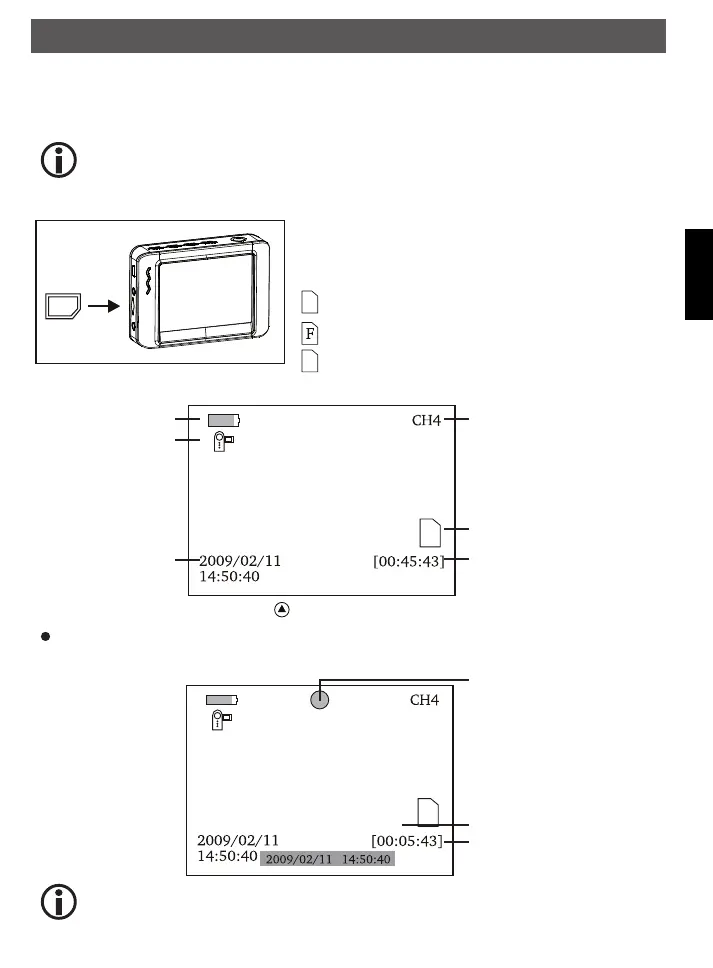
Insert microSD Card (the microSD card is optional)
The microSD card slot has a built-in spring mechanism. After pushing
the card it locks in place. If you have not pushed it in completely, it might
jump away because of the power of the spring and low weight.
A microSD card is in the slot.
The memory in the SD card is full
No SD card in the slot
To record a video
Capacity Of Battery
VIDEO icon
Date/ time
Current Channel
SD Card Icon
remaining time
In the realtime monitoring status, press button to enter VIDEO status as follows:
Press OK button to start the record.
After the recording is started the display shows:
To stop recording press OK button again.
Recording time
timestamp
Recording indicator
The video is automatically saved in a file every 30 minutes.
Operation
FindooMicroCamDEFN.indd 25 01.11.2010 14:03:42



 To Next Page