- 32 -
English
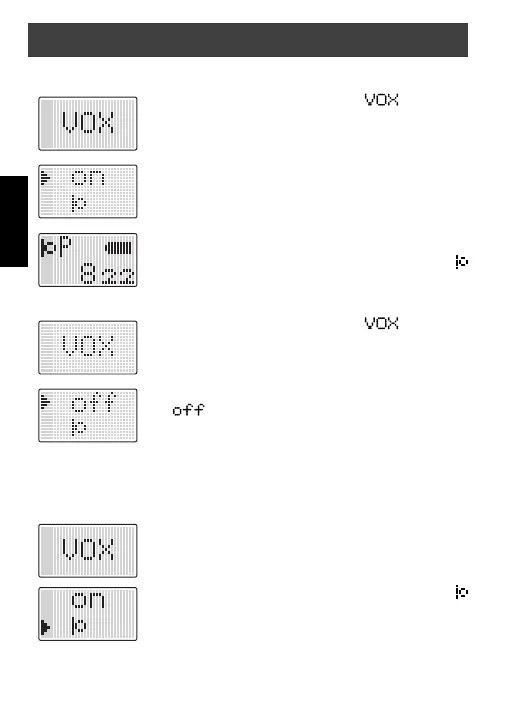
To enable VOX mode proceed as follows:
1. Press the
Up-/Down
button until appears on
the display.
2. Press the
On/Off
button to confi rm.
3. Use the
Up-/Down
button to move the arrow to on.
4. Press the
On/Off
button to confi rm.
In the upper left corner of the display you can see a
Mic. icon for VOX mode.
To turn off the VOX mode proceed as follows:
1. Press the
Up-/Down
button until appears on
the display.
2. Press the
On/Off
button to confi rm.
3. Use the
Up-/Down
button to move the arrow to
.
4. Press the
On/Off
button to confi rm.
VOX / Baby monitor sensitivity
The VOX sensitivity is adjustable in 4 steps.
To change the VOX sensitivity proceed as follows:
1. Press the
Up-/Down
button until VOX appears on
the display.
2. Press the
On/Off
button to confi rm.
3. Use the
Up-/Down
button to move the arrow to
Mic. Icon.
4. Press the
On/Off
button to confi rm.
General operation


 To Next Page