- 36 -
English
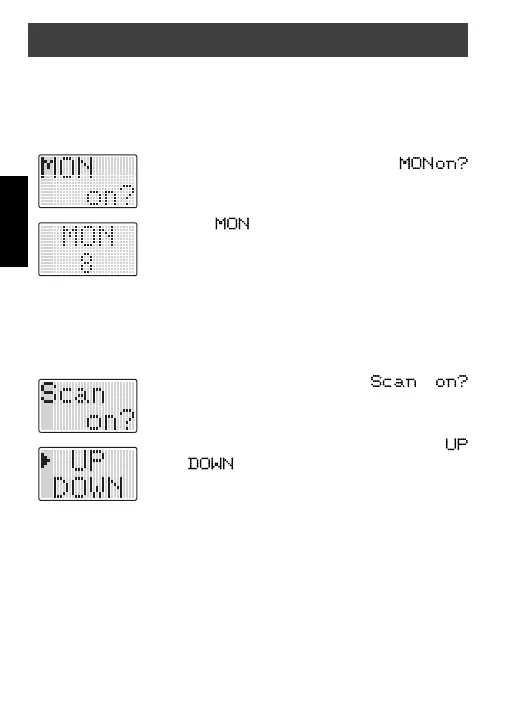
Monitor function
With the monitor function you can switch off the automatic squelch to
listen to the weakest signals, which are cut from the automatic squelch.
To activate the monitor function proceed as follows:
1. Press the
Up-/Down
button until
appears on the display.
2. Press the
On/Off
button to confi rm. The display
shows , the channel no. and noise of weak
signals is heard.
3. To switch off the monitor function press the
On/Off
button again.
Channel scan
Busy channels can be automatically scanned.
To start the scan function proceed as follows:
1. Press the
Up-/Down
button until
appears on the display.
2. Press the
On/Off
button to confi rm.
3. Use the
Up-/Down
button to move the arrow to
or to set the scan direction.
4. Press the
On/Off
button to start scanning.
5. To stop scanning press the
On/Off
button again or
PTT.
When the radio detects channel activity, it stops scanning and stays
at that channel for 10 seconds. If the
PTT
button is pressed within the
10 seconds the radio will stay on that new channel, stores channel and
CTCSS code from the received signal, otherwise it will continuously scan
up to the next channel.
General operation


 To Next Page