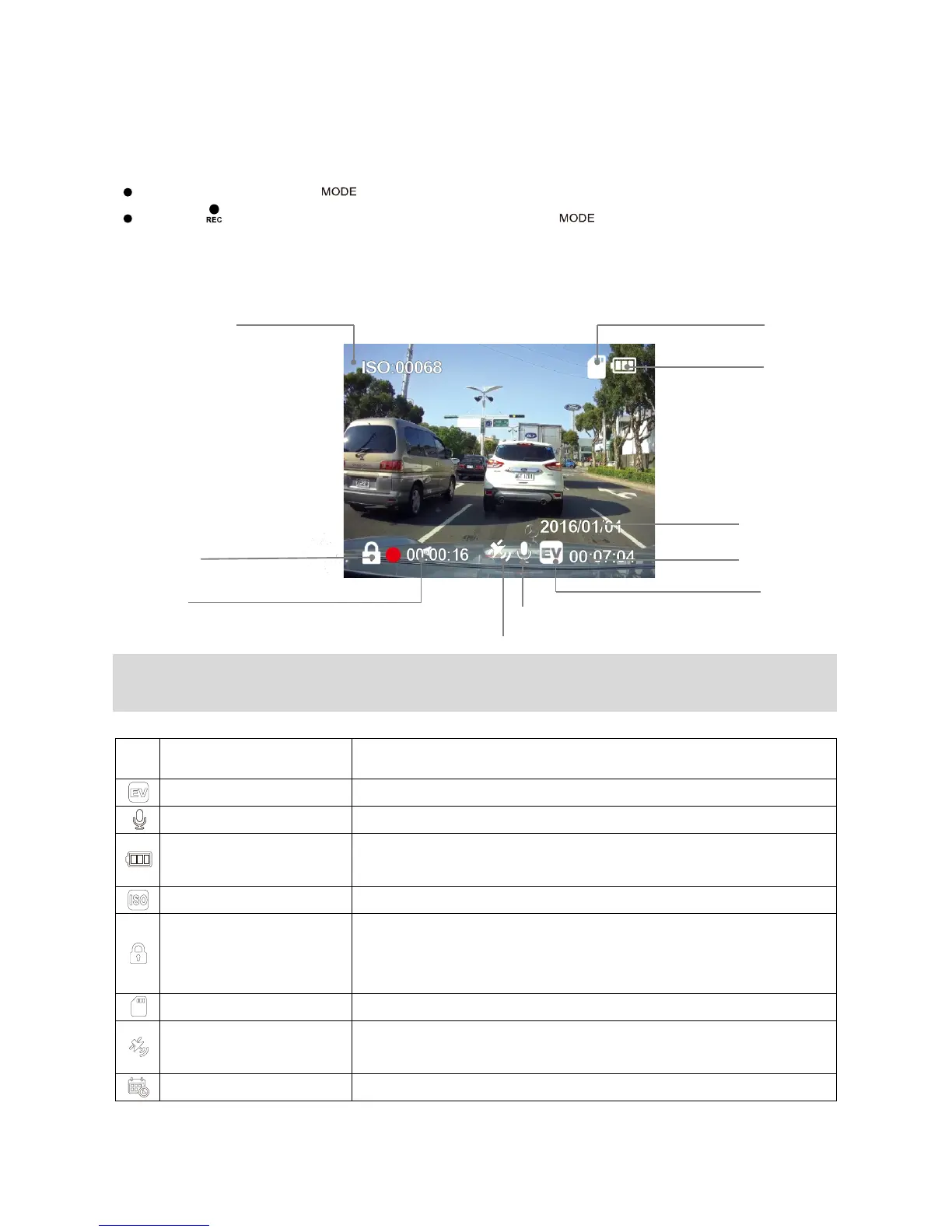
Standby Mode: Press【 】to switch in between Video Recording and Playback Mode.
Press 【 /OK】to stop recording before pressing 【 】to switch modes.
1.Recording Mode
Note: GPS icon flashes when it searches for GPS signal. HUD, Over-Speed Warning and
Speed Camera alerts only work when the GPS signals is stable.
●
Recording Status
Flashes when recording.
Indicates the current exposure value setting.
Indicates if the audio recording is on or off.
Power Status
Indicates the power source and the battery status if external
Indicates the current ISO value.
SOS File Lock
Indicates current recording file is locked and
can be triggered by G-sensor or by pressing the SOS file
lock button,
Indicates if a memory card is inserted.
GPS Status
Flashes whilst the device is searching for satellites. Once the
positioning is done, the icon will be solidly displayed.
Recording Time
Exposure Value
Memory Card Status ISO Sensitivity



 To Next Page