15
EN
Elite Control Operation
– Once this parameter is set, the only allowable
modes are OFF, COOL, AUXILIARY HEAT, and
DEHUMIDIFICATION.
– If the AUTOMATIC mode is selected and the
thermostat calls for heat, the compressor will
run. Since there is no reversing valve, the air
conditioning unit will supply cool air when
heating is desired. Cool-only units do not heat
unless equipped with auxiliary heating.
Parameter settings are used to program and fine-tune
the system for the most efficient operation within an
installation and to adjust operating parameters for your
particular needs. Aer new values are entered and
memorized, the factory defaults are overwritten and the
new parameters become the default values.
Should the Elite lose power, the operating parameters
are retained. When power is restored, the control
resumes operating as last programmed.
The control has factory default values stored in
permanent memory (memorized factory default settings)
that can be recalled if you have any programming
difficulties. You can restore the original factory default
parameters manually. Refer to “Selecting a Parameter”
on page 16 for a summary of the parameters, the
permitted values, and original factory default settings.
7.4.1 Entering Programming Mode
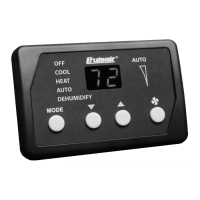
1. While the control is in the OFF mode, press the
following buttons in this order: Mode, Up, Down,
and Mode to enter the programming menu. P-1
appears on the display. The display will alternate
between the parameter number and the current
setting.
2. Use the Mode and Fan buttons to navigate to
different parameters (P-1, P-2, P-3, etc.).
3. Press the Up and Down buttons to adjust a
parameter setting.
4. Press the Power button once to save any changes
and to return to OFF mode. If no button is pressed for
50 seconds, the system will exit the Program mode
and return to OFF mode automatically.



 To Next Page
 Loading...