Q3 & Qht Controls for Chilled Water Systems Digital-Controls Troubleshooting
L-2962 ENGLISH 15
DIGITAL-CONTROLS TROUBLESHOOTING
See also “General System Troubleshooting” on page 14.
Contact an authorized Dometic servicing dealer if the problem continues or for replacement parts.
Table 7: Digital-Controls Troubleshooting
PROBLEM POSSIBLE REASON/SOLUTION
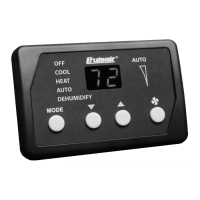
Digital display panel is not
lit.
1. No power. Turn circuit breaker on.
2. Wrong power board. Control must be connected to a Q-Logic or U-Board. It will not
work with an SMXII Power Board. Replace with Q-Logic or U-Board.
3. Check CXP and TSEP cable and connections. Replace CXP or TSEP cables if
necessary.
4. Failed equipment. Replace control, or Q-Logic or U-Board.
Erratic temperature display. 1. Shut power to the unit off and back on.
2. Perform Restore Factory Settings.
3. Check sensor cable and connections.
4. Ensure the temperature sensor is installed properly.
5. Calibrate temperature.
6. Replace Q-Logic or U-Board.
Erratic system operation. 1. Shut power to the unit off and back on.
2. Check CXP cable and connections.
3. Checktemperature sensor, cable and connections.
4. Replace control.
5. Replace Q-Logic or U-Board.
Fan is not running or runs
continuously.
Digital control is programmed for either fan cycling with cooling/heating demand
or continuous fan operation.
Change Programmable Function 6. Note: When configured
for aux heat, after a heat cycle ends the fan will stay on for 30 seconds even if the fan is set to
cycled operation.
Fan is not running but a
cooling/heating demand
exists.
Failed triac on circuit board. Send for repair or call local service technician.
Fan runs continuously
although it is set to cycle
with cooling/heating
demand.
Failed triac on circuit board. Send for repair or call local service technician.
System runs continuously. Improper air sensor location. Verify air sensor location with criteria found in the control
manual. Ensure that sensor is located out of direct sunlight and away from open doors or
hatches.
"Ar / FL" is flashing.
(Filter Reminder)
Filter needs to be cleaned or replaced. Clean or replace filter. Reset and stop flashing by
pressing the FAN, UP, and DOWN buttons simultaneously.
"- -" is flashing. Display connected to SMXII unit instead of a Q-Logic or U-Board. Replace with Q-
Logic or
U-Board.












 To Next Page