ENGLISH
9
CONNECTING THE DEVICE
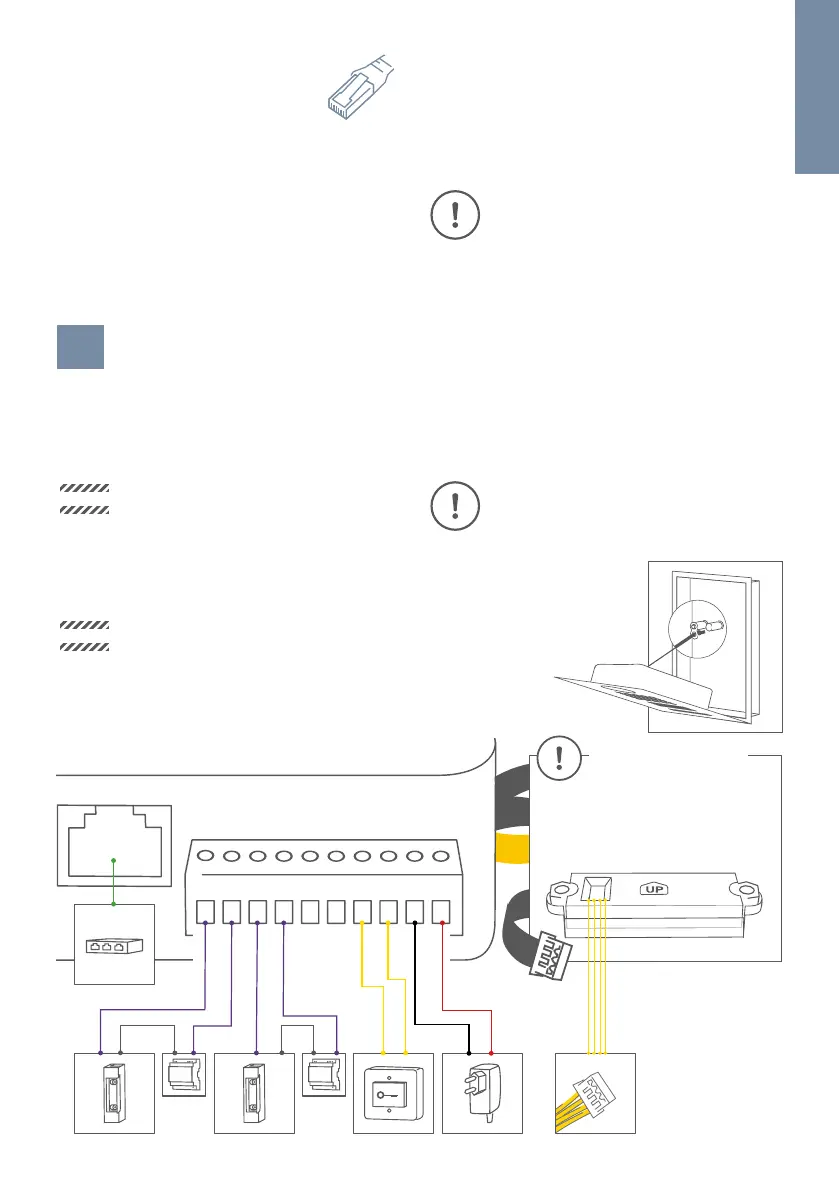
It is possible to connect the cables and wires to the device conveniently and safely via labelled connection ports.
You can connect all necessary cables and wires to the device now. Please remove any cables and wires from the
connection ports of the device that you do not need. Remove about 5 mm of insulation material at the end of
the wires that you would like to connect to the green screw connection terminal of the device.
OPTION
Power supply and network connection
using PoE (Power over Ethernet)
To power the device via a PoE-Switch (e.g. D-Link
DGS-1008P) or PoE-Injector (e.g. DoorBird Gigabit PoE
Injector A1091) in accordance with the PoE standard
IEEE 802.3af Mode A, the four wires bearing the
numbers 1, 2, 3 and 6 of a Cat.5 cable or better are
to be used. A Cat.5 cable or better must be used
as network signals can only be transmitted over
completely insulated, shielded and twisted cables.
If you use PoE as a source of power the four wires for
PoE then simultaneously form the data link.
DOORBIRD D21x
Only related for devices
with call button(s)
4 Pin
Each Call Button is
equipped with one jack.
REL REL VDCEXT
The device won’t start if your PoE-Switch/PoE-Injector
does not support the PoE Standard IEEE 802.3af
Mode A (see Diagnostic-LED and Diagnostic-Sounds).
1. Disconnect the PoE-Switch or PoE-Injector
from the power grid.
2. Run the network cable to the installation
location of the device.
You can use the nylon cord
to temporary fix the front
panel to the mounting
housing (backbox) while
connecting the cables and
wires to the device.
NOTICE
Please take care when connecting the cables
and wires. Connecting the cables and wires
the wrong way may damage the device.
Wires without insolation material must not
protrude out of the green screw connection
terminal, it may lead to electrical short and
damage the device.
NOTICE
The yellow, green, and red cables that lead
out from the side of the Main Electrical Unit
must only be used to connect components
certified by Bird Home Automation.
Handle the front panel with care. The surface
of the front panel could be scratched or
otherwise damaged if handled without care.


 To Next Page