English
Status
Scroll through the Status list to get further information about the icons
shown on top of your display. Icons shown on the display varies depending
on your phone status.
1. Press Menu
More Status.
2. Use
or to scroll the list.
3. Press Back to return to standby mode.
Reset settings
1. Press Menu Settings Security.
2. Select Reset settings to reset the phone settings. All the changes that
you have made to the phone settings will be reset to default settings.
3. Enter the phone code and press OK to reset.
Tip: The default phone code is 1234.
Reset all
1. Press Menu
Settings Security.
2. Select Reset all to delete phone settings and content such as con-
tacts, number lists and messages (SIM memory is not affected).
3. Enter the phone code and press OK to reset.
Tip: The default phone code is 1234.
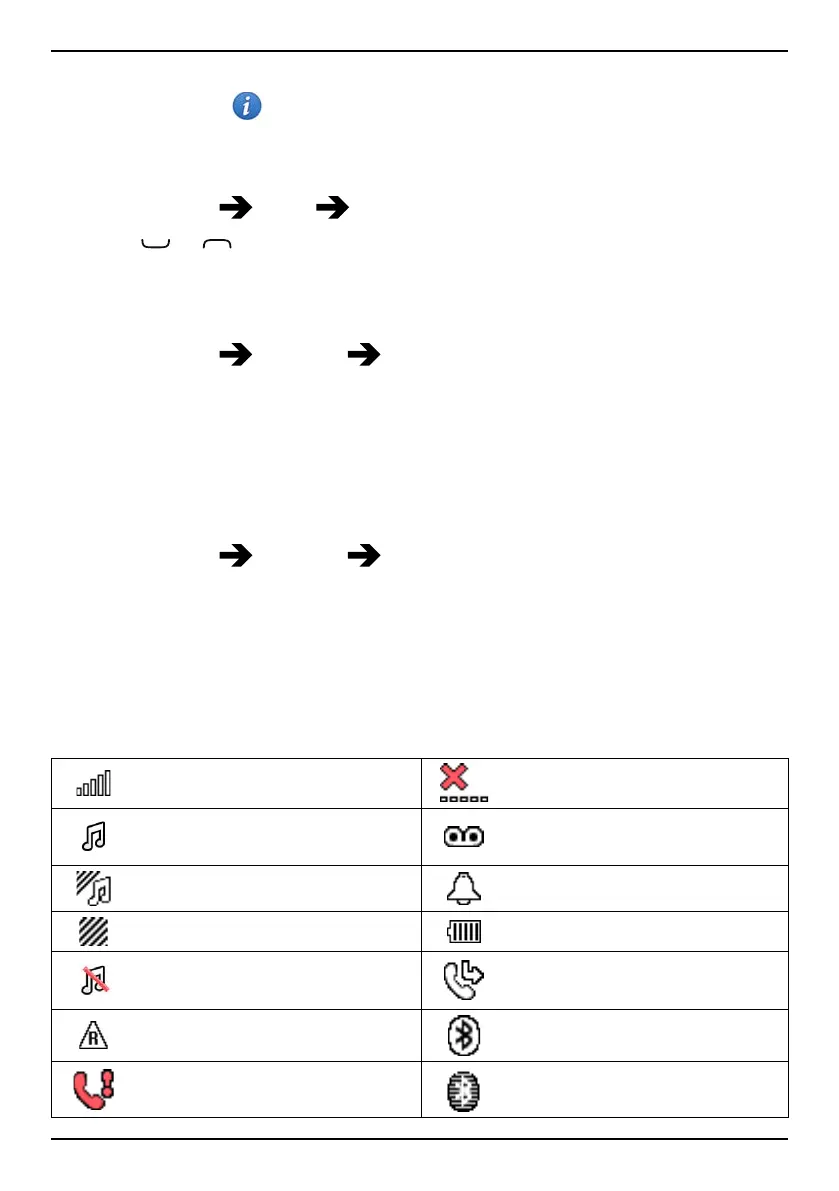
Display status symbols
Signal strength
No network coverage
Ring only Voice mail message received
Ring + vibration
Alarm active
Vibration only Battery level
Silent Call divert activated
Roaming (in other network)
Bluetooth on, visible to
others
Missed call
Bluetooth on, invisible to
others
32



 To Next Page