English
Congratulations on your purchase
Doro 5030 is a good-looking phone bringing you widely spaced, convex
keys, predictive text, direct memories and an SMS button for easy dialling
and texting. A crisp colour display and enhanced sound simplify usage even
more. Other practical features include a torch, reminders, wake-up alarm,
vibrating ringer and one-touch assistance dialling with SMS alerts. For more
information about accessories or other Doro products please visit www.
doro.com.
Get started
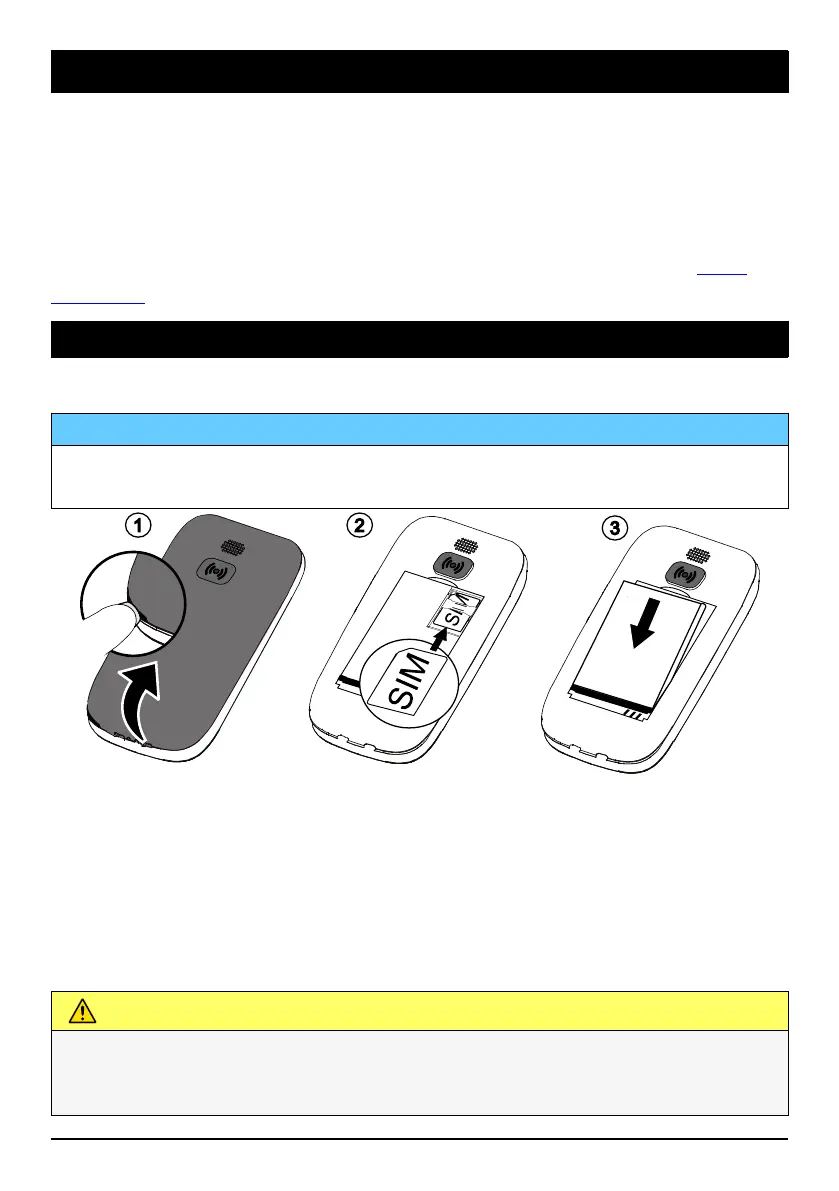
Insert the SIM card and battery
IMPORTANT!
Turn off the phone and disconnect the charger before removing the
battery cover.
1. Remove the battery cover and the battery if it is already installed.
2. Insert the SIM card as shown, by gently sliding it into the holder. Take
care not to scratch or bend the contacts on the SIM card.
3. Insert the battery by sliding it into the battery compartment with the
contacts facing downwards to the right. Replace the battery cover.
Charge the phone
CAUTION
Only use batteries, chargers and accessories that have been approved for
use with this particular model. Connecting other accessories may be
dangerous and may invalidate the phone's type approval and warranty.
1



 To Next Page