English
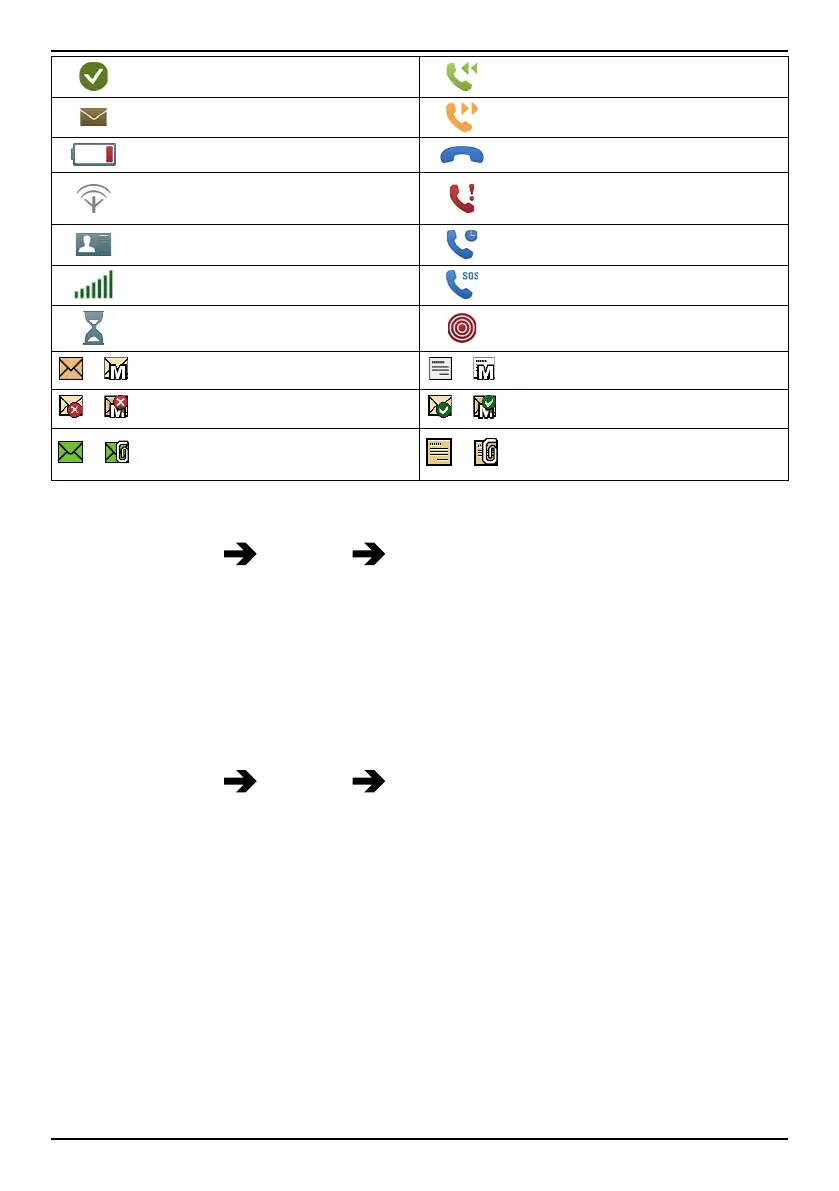
Done (confirmed)
Incoming call
New message
Outgoing call
Battery level low
Call ended
Searching
Missed call. Press Read to
see the missed calls.
vCard message
Call on-hold
Volume control
SOS calls only
Processing, please wait
Assistance button call
/
SMS/MMS unread
/
SMS/MMS read
/
SMS/MMS unsent
/
SMS/MMS sent
/
E-mail without and with at-
tachment unread
/
E-mail without and with at-
tachment read
Reset settings
1. Press Menu Settings Security.
2. Select Reset settings to reset the phone settings. All the changes
that you have made to the phone settings will be reset to default
settings.
3. Enter the phone code and press OK to reset.
Tip: The default phone code is 1234.
Reset all
1. Press Menu
Settings Security.
2. Select Reset all to delete phone settings and content such as con-
tacts, number lists and messages (SIM memory is not affected).
3. Enter the phone code and press OK to reset.
Tip: The default phone code is 1234.
56



 To Next Page