English
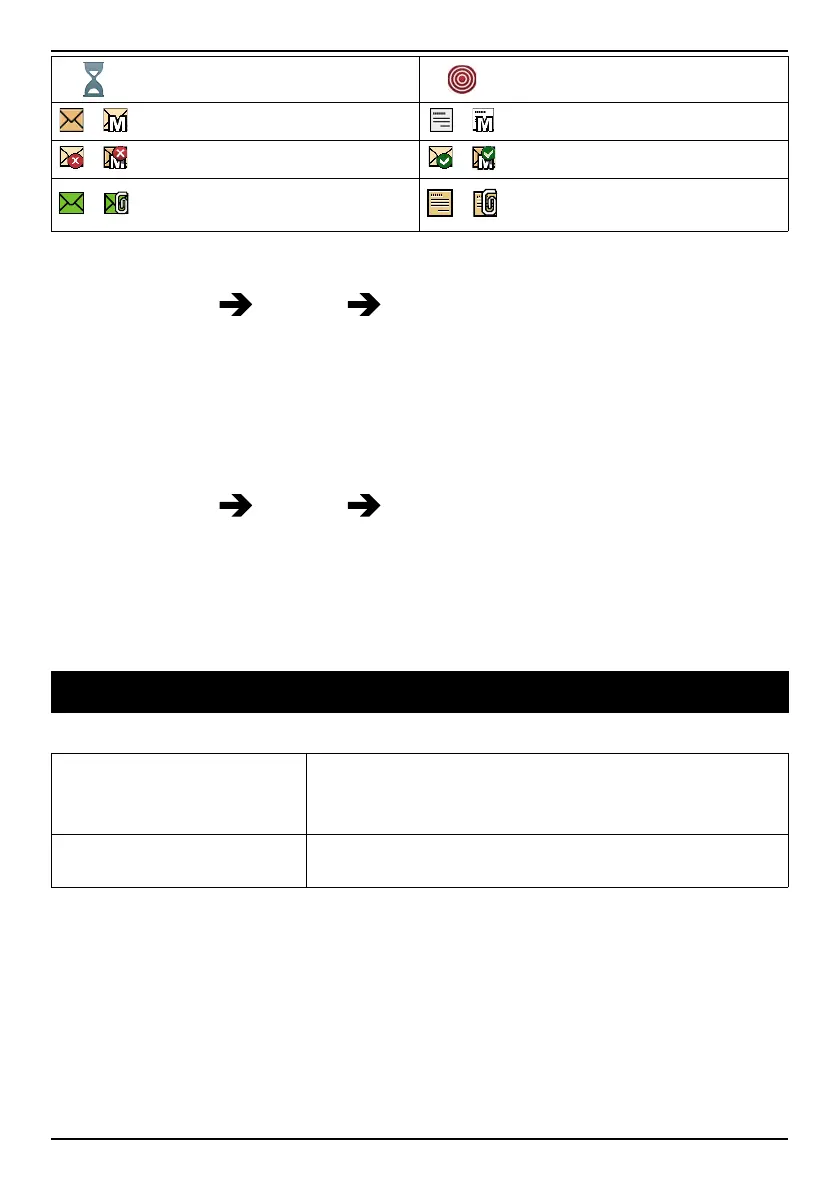
Processing, please wait
Assistance button call
/
SMS/MMS unread
/
SMS/MMS read
/
SMS/MMS unsent
/
SMS/MMS sent
/
E-mail without and with at-
tachment unread
/
E-mail without and with at-
tachment read
Reset settings
1. Press Menu Settings Security.
2. Select Reset settings to reset the phone settings. All the changes that
you have made to the phone settings will be reset to default settings.
3. Enter the phone code and press Ok to reset.
Tip: The default phone code is 1234.
Reset all
1. Press Menu
Settings Security.
2. Select Reset all to delete phone settings and content such as contacts,
number lists and messages (SIM memory is not affected).
3. Enter the phone code and press Ok to reset.
Tip: The default phone code is 1234.
Troubleshooting
Phone cannot be switched on
Battery charge low
Connect the power adapter and charge the bat-
tery for 3 hours. Full battery capacity is reached
after the battery has been charged 3–4 times.
Battery incorrectly
installed
Check the installation of the battery.
51


 To Next Page