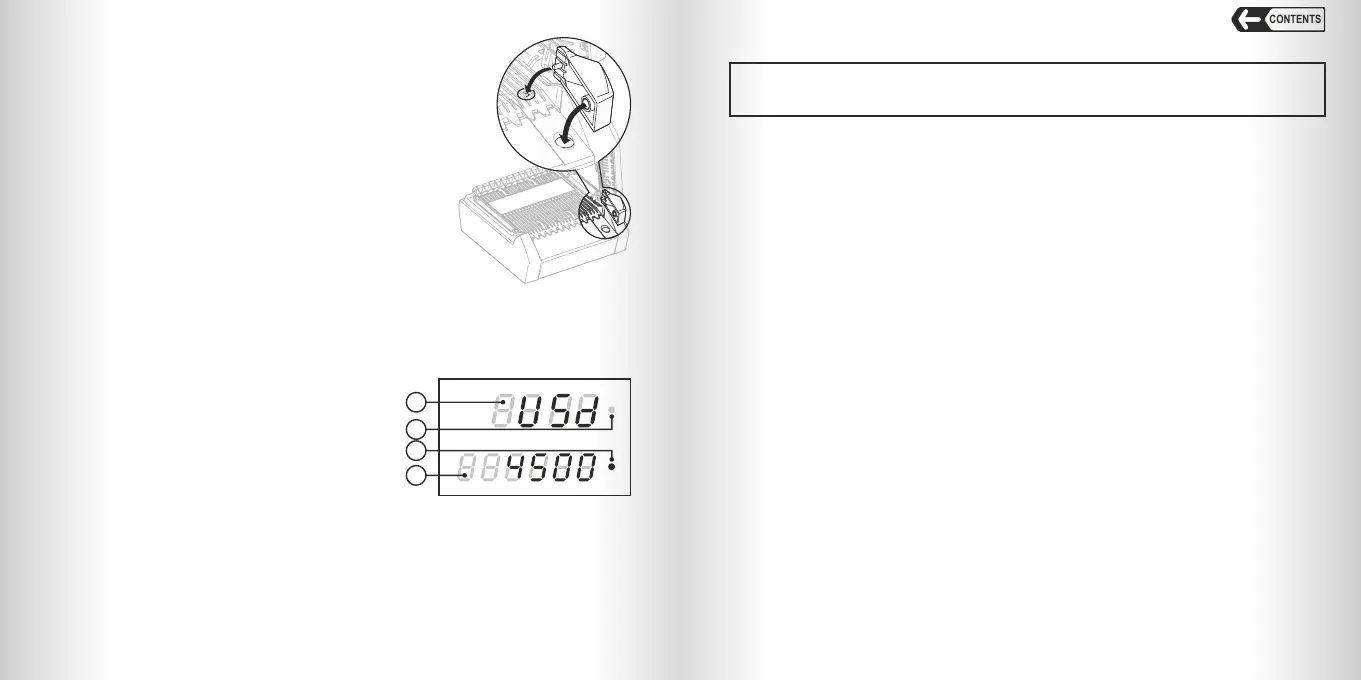
The display shows:
1. Currency (USD, RUB etc). Push REPORT /
CLEAR key to check available currencies or the
quantity of the banknotes of a certain
denomination in the report mode;
2. Detected amount or denomination;
3. Valid banknote forward output indicator;
4. Valid banknote reverse output indicator.
The detector is ready for operation with recent saved settings. At the first switching
on the detector is ready for the banknotes verification with the factory settings as
follows:
– Beep signal is switched on;
– «Back» output mode is switched on.
1. Make sure that the safety precautions given in the
corresponding section of the manual have been complied;
2. If the detector works from the battery (option) then go to item 5;
3. Connect power adapter to the detector;
4. Plug the adapter to the mains socket;
5. If required, install the banknote guide.
It can also be installed any time during
the operation (see. Fig.2);
6. If required, install the removable tray.
It can also be installed any time during the operation.
54
GETTING STARTED:
Press ON / OFF key and hold it for 1 second to switch on the detector. After being
switched on the detector will run self-test and blue indicator will flash.
As soon as self-test is over you hear the beep signal (if Sound option is on) and the
blue indicator switches on.
WARNING:
Open the top cover of the detector
to install or remove the banknote guide.
Fig. 2
OPERATION
CONTENTS
AUTOMATIC DETECTOR DORS 200 AUTOMATIC DETECTOR DORS 200
Fig. 3
2
1
3
4
AUTHENTICITY VERIFICATION:
Warning: The errors may appear when checking genuine wrinkled, unfit,
dirty, washed, damaged, taped, de-inked banknotes, banknotes with graffiti and
banknotes being exposed to aggressive environment.
To verify a banknote, insert it into the input tray to be taken by the pulling rollers.
Align the banknote to the left side when feeding.
The detector takes a banknote and verifies its authenticity.
If the banknote is genuine, the green indicator will switch on, the currency code,
denomination and quantity of verified banknotes of this denomination will be displayed.
If a banknote is detected as suspicious, it will return into the input tray, the red
indicator will switch on, and the detector will beep (if «Sound Signal» or «Back»
direction option is switched on).
If the banknote is not recognized as authentic three times, its authenticity shall be
verified by some other methods.
The information about the currency of the last checked note and amount of verified
banknotes of this currency will appear on display in 5 sec. after the last verification.
Report:
Press REPORT / CLEAR key to view information about the verified banknotes.
The display will show ‘report’.
At each pressing of the key the information displays sequentially:
1. Currency (top row);
2. If any banknotes have been detected:
– denomination (bottom row) and quantity of the banknotes (top row);
– currency (top row) and detected amount of this currency (bottom row).
In multi-currency version this information is displayed sequentially for each
currency.
Press and hold the REPORT / CLEAR key to clear the data of all previously
verified banknotes.
Shortly push ON / OFF key or feed a banknote to exit report mode.
Operation of Detector from Built-in Battery (option):
The detector may be equipped with a rechargeable battery. Shortly push ON / OFF
key to display battery level:
1. «ACC СН» - the battery is charging from power adapter.
2. «ACC FULL» - battery is fully charged.



 To Next Page
 Loading...