63
Electrical System
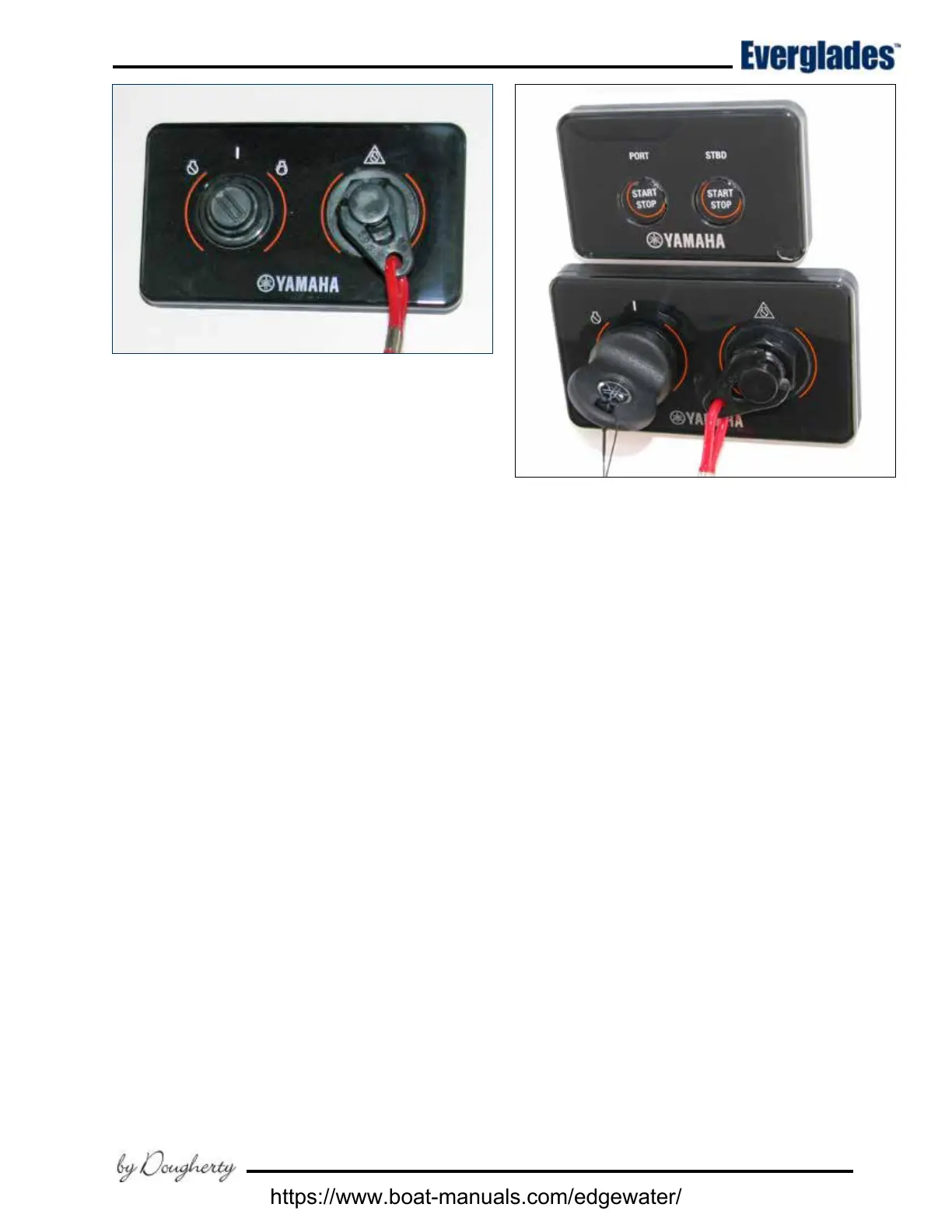
Typical Twin Engine Yamaha Command Link Ignition
& Engine Start/Stop Switch System
Typical Single Engine Yamaha Command Link Ignition
6.5 Ignition Switch Panels
Ignition Switch Panels
Ignition switch panels are unique to each engine
manufacturer and the engine control options
selected. Your dealer will provide you with the
proper starting procedure for your boat at the time
of delivery. Additional information for the ignition
switch system installed in your boat is located in
the engine and control system operating manuals
included in your information packet.
Single Engine Yamaha Command Plus
®
Link Ignition
Most single engine Everglades boats are equipped
with a Yamaha engine and the Command Link or
Command Link Plus
®
ignition key panels that oer
the latest in technology and durability.
The ignition switch is a key activated switch, lo-
cated near the helm below the steering wheel,
which starts and stops the engine. The switch
has OFF - ON and momentary START positions.
Starting procedure
Make sure the engine is down with the shift lever in
the neutral position and your hand on the control
lever. Turn the ignition key to the ON position to
activate the fuel pump and ignition system. Wait
5 seconds for the fuel pump to pressurize the sys-
tem, then turn the key to the start position. When
the engine starts, release the key and the switch
will automatically go to the run position. Stop
the engine by turning the key to the OFF position.
The engine ignition circuits are protected by fuses
or circuit breakers located on each engine.
Twin Engine Yamaha Command Link
Plus
®
Ignition
Most Everglades boats are equipped with Yamaha
engines and Command Link Plus
®
ignition key
panels that oer the latest in technology and du-
rability. For twin engine installations, these are
“key” panels; which energize the ignition system
of multiple outboards with only one key.
The Start/Stop panel is used in conjunction with the
key panel and features lights which indicate when
outboards are running and a START/STOP button
for each engine. This system greatly simplies the
starting and stopping process of your engines. For
convenience and protection, engines can not be
restarted while running.
Starting procedure
Make sure the engines are down with the shift le-
ver in the neutral position and your hand is on the
control lever. Turn the ignition key to the ON posi-
tion to activate the START button for both engines.
Press and release the START/STOP button for the
port engine. The computer will automatically check
all engine systems and start the engine. When the
engine stabilizes, repeat the starting procedure for
the starboard engine. Stop the engines by pressing
the START/STOP buttons again.
The engine ignition circuits are protected by fuses
or circuit breakers located on each engine.
https://www.boat-manuals.com/edgewater/



 To Next Page