16
6.4 Connect Batteries in Parallel
A maximum of eight batteries can be connected to one PCS in parallel.
!
W
Ensure batteries in parallel connection are from the same batch, same model and same manufacturer. Do
batteries.
Batteries can be connected in parallel in the following way:
Step 1.
1.
Power on the batteries without load and use a multi-meter to measure their voltages.
2.
3.
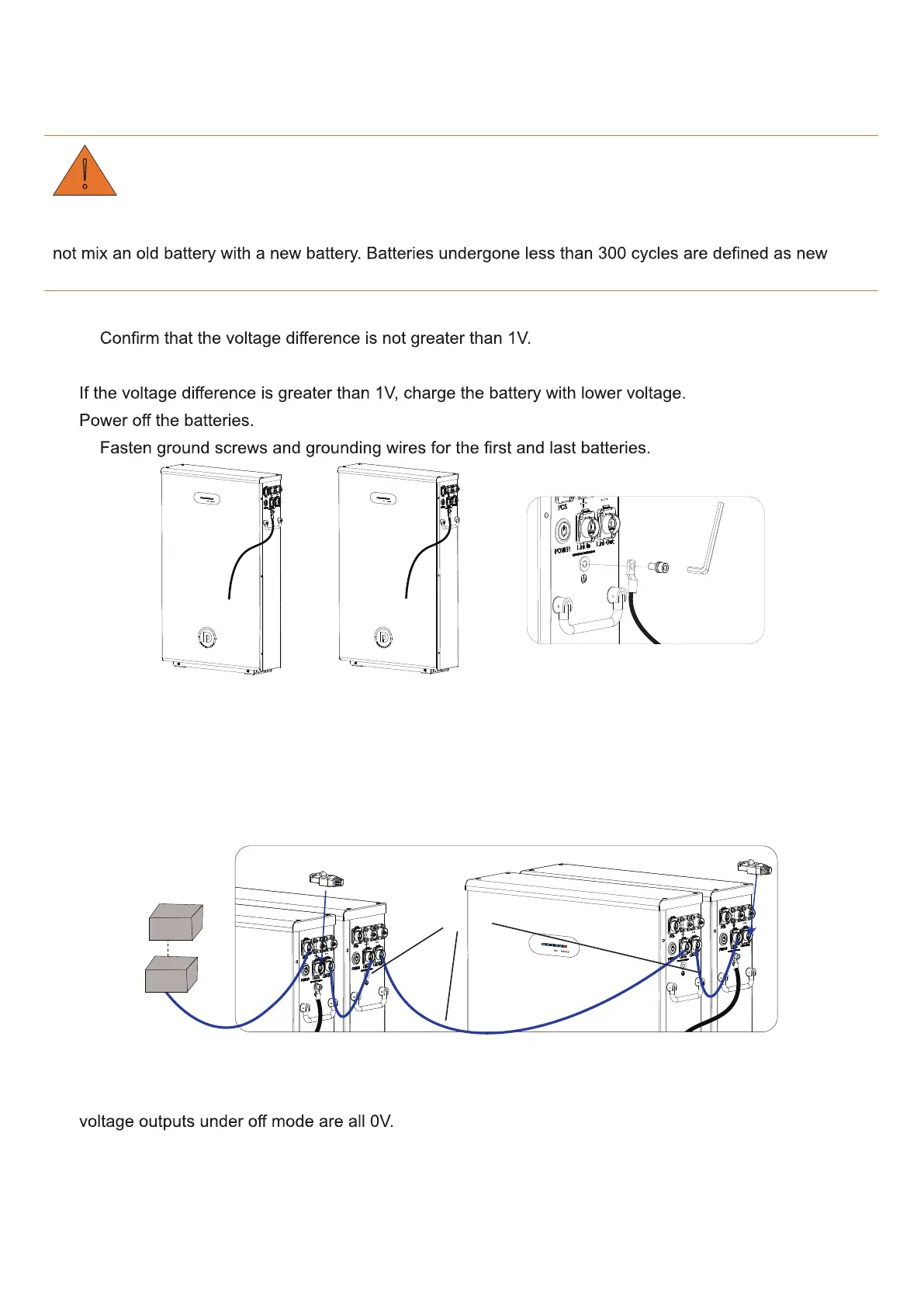
Step 2.
Battery 1 Battery N
Step 3.
Insert network cables into battery terminals.
1.
Connect the PCS port of Battery 1 to the gateway by using network cable A.
2.
Connect the Link-Out port of Battery 1 to the Link-In port of Battery 2 by using network cable B.
The process goes on until the last battery is connected.
3.
Insert two terminators into the Link-In port of Battery 1 and the Link-Out of Battery N respectively.
Terminator
Terminator
Gateway
PCS
1 N
Network cable B
Network cable A
Step 4.
Insert power cables into battery terminals.
1.
Measure the positive and negative terminal blocks of each battery with a multi-meter, and ensure the
2.
Plug one end of positive and negative power cables into DC breaker.
3.
Plug the other end of power cables into battery terminals.
4.
Connect DC Breakers with one PCS.



 To Next Page