Need help?
Do you have a question about the Dowell iPack C3.3 and is the answer not in the manual?
Describes application scenarios, installation, connection, commissioning, and troubleshooting of the iPack C3.3 battery.
Identifies installer, operator, commissioning, and maintenance personnel as the intended readers.
Explains warning and caution symbols used in the document for safe operation.
Details various symbols and their meanings related to battery safety and handling.
Lists precautions for handling batteries, focusing on risks of electrolyte leakage and impact.
Advises on avoiding fire hazards like direct sunlight, conductive objects, and improper disposal.
Highlights precautions against touching with wet hands and professional installation requirements.
Covers keeping distance from water, avoiding high voltage, and proper surface placement.
Provides recommended actions for leakage, fire, wet battery conditions, and damaged batteries.
Illustrates typical uses of the battery in residential energy storage systems with PV and grid.
Highlights improved performance, longer life, and BMS monitoring capabilities for parallel connections.
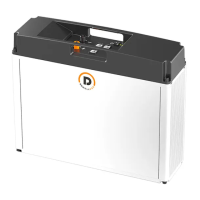
Describes the battery's physical composition and identifies power and signal terminals.
Details the battery's dimensions, weight, and installation types (rack-mounted or wall-mounted).
Defines the pin assignments for PCS, Link-In, and Link-Out network ports.
Explains the meaning of different LED states for charging and standby/discharging modes.
Specifies temperature, humidity, and environmental conditions for storing batteries.
Outlines regulations and procedures for transporting the battery, including UN38.3 classification.
Lists essential tools for installation and maintenance, including strippers, crimpers, screwdrivers, and multimeters.
Recommends wearing PPE like gloves, goggles, and safety shoes during operation and maintenance.
Guides on checking package and product for damages and verifying included accessories.
Specifies acceptable battery installation orientations and the maximum parallel connection limit.
Details components and quantities required for wall-mounting multiple batteries in parallel.
Provides instructions for drilling holes and mounting the battery bracket on the wall.
Instructs on drilling holes and fixing the junction box to the wall using screws and expansion tubes.
Details the pin definitions for network ports and specifications for power terminals.
Guides on preparing power wires and network cables, emphasizing proper crimping techniques.
Illustrates the steps for stripping cable sheaths, inserting wires, and securing power connections.
Details the process for preparing Network Cable A, including stripping, wire alignment, and crimping.
Explains how to prepare Network Cable B, ensuring consistent wire colors at both ends.
Provides step-by-step instructions for connecting network and power cables for a single battery.
Guides on connecting multiple batteries in parallel to increase capacity, including voltage matching.
Describes methods to power on the battery using charging voltage or the POWER button.
Details the procedure for powering off the battery by holding the POWER button and turning off the PCS.
Provides steps for safely replacing a faulty or end-of-life battery, including necessary precautions.
Outlines the process for installing BMS software and upgrading battery firmware via a computer.
Lists common issues, display logic (LEDs), and recommended actions for diagnosing and resolving problems.
 General
| Sequential Read Speed | Up to 550 MB/s |
|---|---|
| Operating Temperature | 0°C to 70°C |
| Storage Temperature | -40°C to 85°C |
| Capacity | 256GB |
| Interface | SATA III (6Gbps) |
| Form Factor | 2.5 inch |
| Shock Resistance | 1500G |
| Vibration Resistance | 20G (20-2000Hz) |

 To Next Page