18
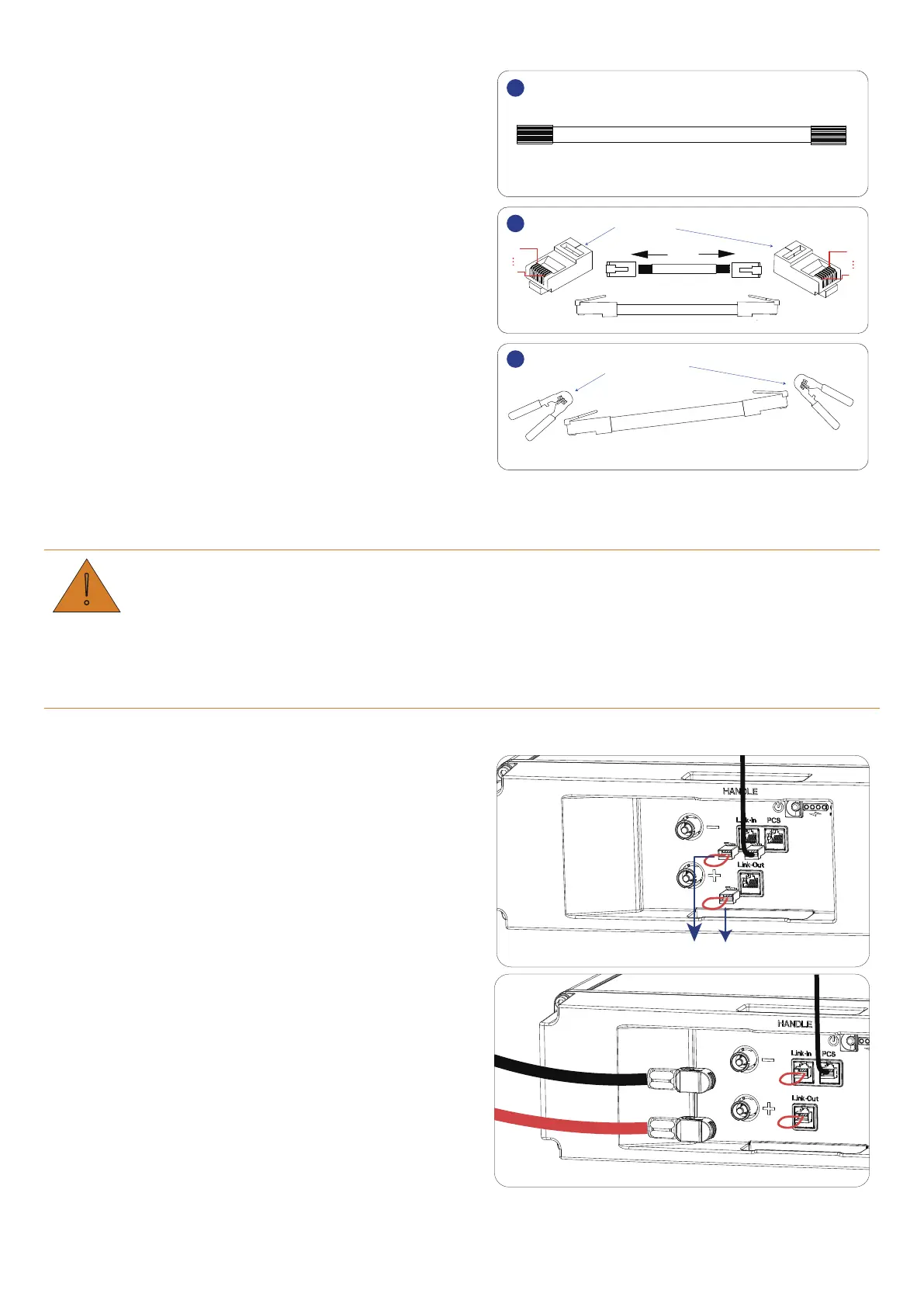
Step 3.Make straight through network cable B.
1. Strip cable sheaths for 15±0.5 mm first.
Network Cable B
1
2
3
1
8
1
8
RJ45 plug
Wire crimper
2. Insert eight wires into RJ45 plugs.
Ensure that the colors of wires stay consistent at
both ends of network cable B.
3. Crimp RJ45 plugs with a wire crimper.
6.3 Connect One Battery
• Before connecting the cables, ensure that the battery is in off mode.
• Wear protection equipment when wiring batteries.
• Ensure all cables are smooth and not twisted.
Keep the battery in off mode and connect it in the following way:
Step 1.Connect network cable.
1. Plug one end of Network Cable A into the PCS port
of the battery and the other end into the network
port of PCS.
2. Insert two terminators (a crystal plug with pin 4 and
pin 5 short circuited) into Link-Out and Link-In
respectively.
Terminator
Step 2.Connect power wires.
1. Use the positive power wire to connect the + port of
battery and PCS.
2. Use the negative power wire to connect the - port of
battery and PCS.


 To Next Page