Operation
77
Operating Instructions Caleo, Software 2.n
Using Skin Temperature Control
1 Turn rotary knob clockwise to increase setpoint.
1 Turn rotary knob counterclockwise to decrease setpoint.
1 Press rotary knob to confirm the new setting.
If you do not wish to change the settings:
The display returns to the standard screen. The previous
setpoint is retained.
Or
– Wait for 7 seconds: Caleo emits 4 short beeps to prompt the
user to press the rotary knob. The display will immediately
return to the standard screen. The previous setpoint will be
retained.
Using the extended setpoint range for skin temperature
control
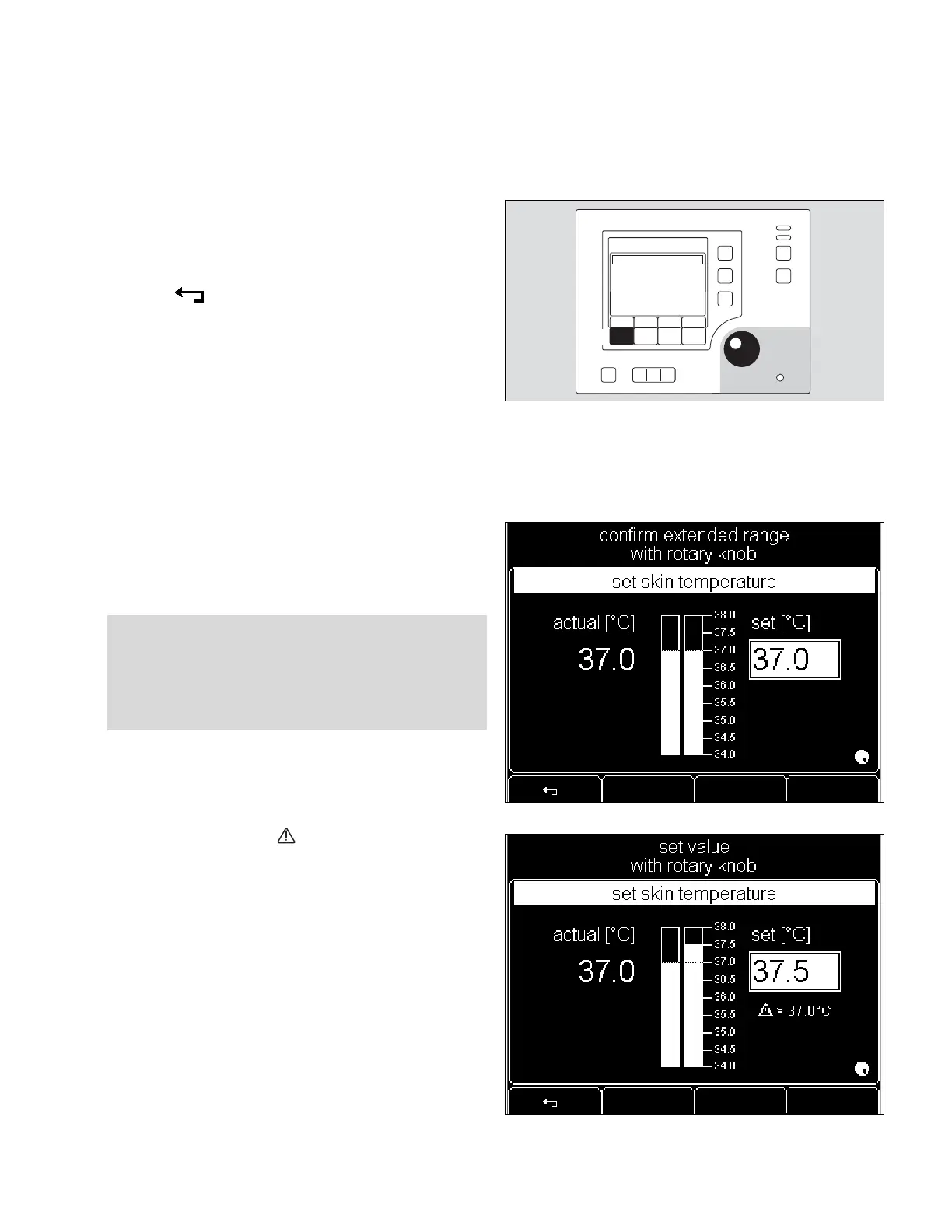
If the standard setpoint range is exceeded:
– The advisory message
»confirm extended range with rotary knob«
will appear on screen.
1 Press rotary knob to activate extended range.
1 Turn rotary knob clockwise to increase setpoint further.
– The advisory message » > 37.0
o
C« appears on screen.
– The following message appears at the top of the screen:
»set value with rotary knob«.
1 Press rotary knob to confirm the new setpoint.
2 Press and the new settings will be cancelled.
WARNING !
When the extended setpoint range for skin temperature
is used, particular care must be taken to monitor infant
temperature.












 To Next Page