EasyManua.ls Logo

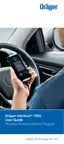
Dräger Interlock 7000 - User Manual

Dräger Interlock 7000
108 pages
Print Icon
To Next Page IconTo Next Page
Loading...
Dräger Interlock
®
5000 / 7000
i
en
Instructions for Use
3
de
Gebrauchsanweisung
20
sv
Bruksanvisning
37
fr
Notice d’utilisation
54
fi
Käyttöohje
71
no
Bruksanvisning
88

Table of Contents

Other manuals for Dräger Interlock 7000

Questions and Answers

  • V
    Victoria GloverSep 1, 2025
    Why is there no display message on my Dräger Safety Equipment handset?
    • W
      wellswilliamSep 1, 2025
      If there is no display message on the Dräger Safety Equipment handset, it indicates no connection between the handset and control unit. Check the connecting cable plugs, disconnect the plug from the handset, and reconnect it. If no messages are still shown, further assistance is needed.
  • C
    Caleb CruzSep 2, 2025
    What to do if Dräger Safety Equipment shows 'Control unit error'?
    • B
      bobbynavarroSep 2, 2025
      If the Dräger Safety Equipment displays 'Control unit error', it indicates an error in the control unit. Try switching the ignition off and on, then repeat the test. If the error message reappears, further assistance is needed.
  • B
    Brian MooreSep 3, 2025
    How to fix 'Low Temperature' error on Dräger Safety Equipment?
    • J
      Joel ColeSep 3, 2025
      If the Dräger Safety Equipment displays 'Low Temperature', it means the handset temperature is too low. Detach the handset and take it to a place with a moderate temperature. Connect the handset again and perform the test.
  • X
    xlynchSep 3, 2025
    What to do if Dräger Safety Equipment displays 'High Temperature'?
    • S
      Sarah BrownSep 4, 2025
      If the Dräger Safety Equipment displays 'High Temperature', it means the handset temperature is too high. Detach the handset and take it to a place with a moderate temperature. Connect the handset again and perform the test.
  • N
    Nicholas Manning MDSep 4, 2025
    What does 'Please retry' mean on Dräger Safety Equipment?
    • S
      sean28Sep 4, 2025
      If the Dräger Safety Equipment displays 'Please retry', it means a fault was detected during the delivery of the breath sample. Deliver the breath sample again when requested by the instrument.
  • J
    Jacob ArmstrongSep 5, 2025
    How to fix 'Blow harder' on Dräger Safety Equipment?
    • C
      Christine KleinSep 5, 2025
      If the Dräger Safety Equipment displays 'Blow harder!', it means the breath sample was blown too softly. Repeat the test, blowing harder this time.
  • T
    terryryanSep 6, 2025
    What to do if Dräger Safety Equipment says 'Blow softer'?
    • L
      leeowenSep 6, 2025
      If the Dräger Safety Equipment displays 'Blow softer!', it means the breath sample was blown too hard. Repeat the test, blowing softer this time.
  • J
    jared71Sep 6, 2025
    How to resolve 'Blow longer' message on Dräger Safety Equipment?
    • R
      Ruth RussellSep 7, 2025
      If the Dräger Safety Equipment displays 'Blow longer!', it means the breath sample was blown too short. Repeat the test, blowing longer this time.

Summary

For Your Safety

General Safety Statements

Key safety guidelines for product usage and handling, including warnings and compliance requirements.

Alert Icon Definitions

Explains the meaning of warning, caution, and notice icons used throughout the document.

Product Description and Features

Product Overview

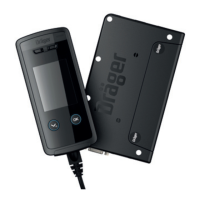
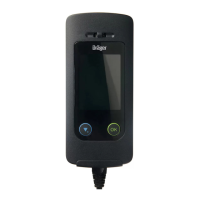
Visual introduction and identification of the Dräger Interlock 5000 and 7000 components.

Functional Description

Detailed explanation of how the Dräger Interlock 5000/7000 operates, including optional features like camera and GPRS module.

Intended Use and Approvals

Specifies the designated purpose of the instrument and lists its product approvals.

Using the Dräger Interlock

Installation and Measurement Requirements

Guidance on vehicle installation and essential conditions prior to performing a breath alcohol measurement.

Performing a Measurement

Step-by-step instructions for activating the instrument and providing a breath sample.

Test Results and Outcomes

Explains how to interpret 'Test Passed' and 'Test Failed' results and subsequent actions.

Travel Interruption and Retests

Covers procedures for switching off the vehicle and handling retest requirements during operation.

Menu Navigation and Settings

Menu Overview and Basic Functions

Introduces the menu system, access to breath tests, service, and device information.

Device Information Details

Accessing specific details like handset, control unit, camera, GPS info, and standby times.

Security and Configuration Options

Procedures for unlocking the device, using access codes, and managing configuration settings like display and language.

Troubleshooting

Maintenance, Disposal, and Technical Data

Maintenance and Cleaning Procedures

Instructions for instrument calibration, adjustment, and proper cleaning procedures.

Disposal and Technical Specifications

Guidelines for product disposal and key technical data including ranges, conditions, and dimensions.

Adjustable Parameters

Order List

Installation Certificate

Dräger Interlock 7000 Specifications

General IconGeneral
Device CategoryAlcohol Interlock Device
TypeIgnition Interlock Device
PurposePreventing driving under the influence of alcohol
Power Supply12/24 VDC
Measurement Range0.00 to 2.50 mg/L
Response/Analysis TimeTypically within seconds
DisplayLCD or LED screen for user feedback
ConnectivityData download via USB or Bluetooth
Sensor TechnologyElectrochemical sensor
Data LoggingYes
Data StorageYes
Tamper ResistanceYes
Warm-up timeTypically less than 1 minute
MemoryInternal memory for data storage
Humidity range5 to 95% RH
ComplianceMeets national and international standards for BAIIDs

Related product manuals