11 12
Device Reset
You may reset your tablet when necessary. Such as forgotten password or PIN of tablet.
You can reset your tablet. This will clear all info in your tablet and get your device back to
factory mode.
WARNING!
If you perform a Hard Reset, all user applications, user data will be deleted. Please
remember to backup any important data before per-forming a Hard Reset.
OPTIONAL CONNECTIONS
SPECIFICATIONS
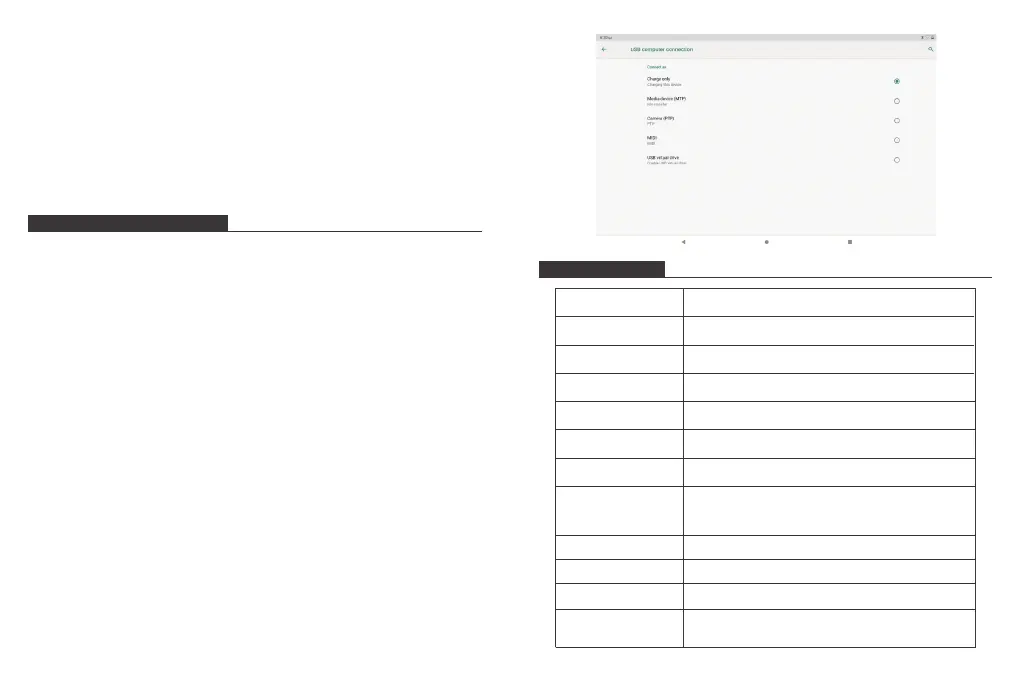
Connecting to a Computer
Connect the tablet to a computer to transfer files.
1. Connect your tablet to the computer.
With the included USB cable: Plug the small end of the cable into the USB 2.0 high speed
connector of the tablet. Plug the large end of the cable into an available USB 2.0 high
speed port on the computer.
2. When your tablet is connected, slide down the USB icon then touch icon USB
connected.
3. Mount the storage.
Tap button Transfer files (MTP) to mount the tablet’s built-in storage. When it is mounted,
you can copy files to or from your tablet.
Processor
RAM
Storage
Display
Wi-Fi Networking
Audio Output
PC Interface
Additional Features
Operating System
Power
Playback Time
(hours)
SC9863A Octa-Core 4*A55 1.6GHz + 4*A55 1.2GHz
2GB
32GB flash built-in; Micro SD card slot (max.128GB supported)
10.1” 1200*1920 G+G Capacitive Touchscreen
IEEE 802.11 b/g/n/ac (2.4g-5g)
3.5mm headphone
USB 2.0 high speed
Up to 8 hours music, 5 hours video, 5 hours web browsing
Built-in microphone 2X1W speaker
Front facing camera 2.0MP Rear camera 2.0MP
Android 9.0 Pie
Rechargeable Li-poly battery Power Adapter(USB 5V, 2A)
Bluetooth 4.0


 To Next Page