Home
Dragonfly
Camera Accessories
4 pro
Page 32 (Add New Records and Importing)
Dragonfly 4 pro - Add New Records and Importing
88 pages
Manual
Save Page as PDF
To Next Page
To Next Page
To Previous Page
To Previous Page
Loading...
Dragonfly Manual Ver
sion 3©
Page
32
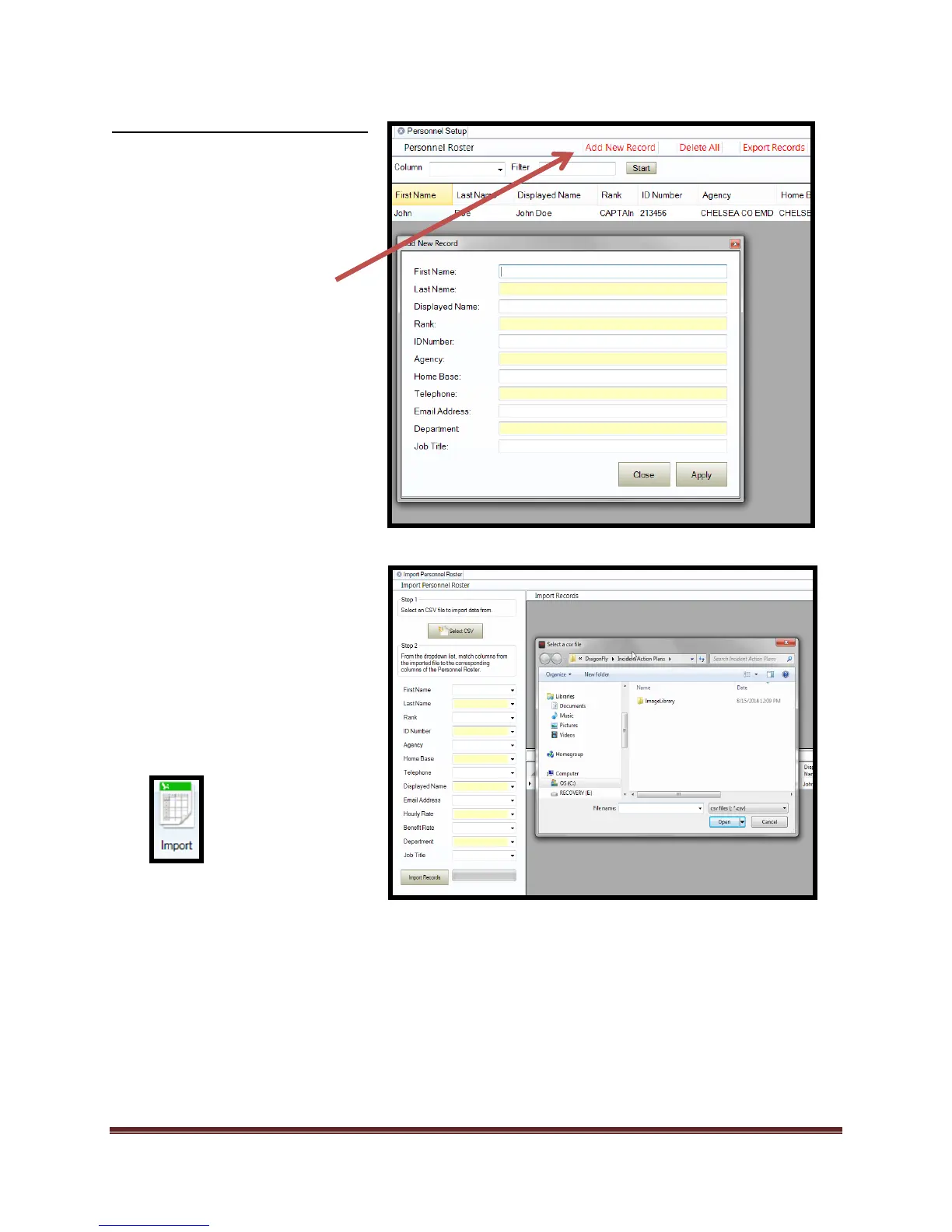
Add New Records and Importing
Add New Record
tool is
accessed from the
Per
sonnel,
Ambulance, Hospital, and
Communication
s
tab
Importing personnel,
ambulances, hospital
s, and
communications can b
e
performed from the
I
mport
tab
. Importing is completed
through the u
se of .csv files
and field mapping. Simply
browse to the file locat
ion,
map the fields, and
import.
31
33
Table of Contents
Main Page
Default Chapter
2
Table of Contents
2
End User License Agreement
5
Dragonfly™ Software Is Used to
7
Printing
8
Disclaimer
8
Minimum Installation Requirements
9
Verifying System Requirements
10
Starting Dragonfly
11
Updating Software
12
Method 1
12
Method 2
14
Incident Tab
15
New Icon
15
Open Icon
15
Backup Icon
16
Restore Icon
16
Purge Icon
16
Org List Icon
17
Org Chart Icon
17
Complex Icon
17
Structure Tab Icon
18
Planning "P" Tool Icon
18
Format Tools
19
Print Iap Tool
19
Weather Tool Icon
20
Map Tool Icon
20
Mind Map Tool Icon
21
Op Period Icon
21
Chart Tool-Map Tools
22
Salamanderlive Com™ Icon
22
Salamander™ Legacy Tool Icons
23
Related product manuals
Battle Born Batteries GC3
8 pages



 To Next Page