Dragonfly Manual Version 3© Page 44
Completing the ICS 204 Assignment List
Within Dragonfly™, the ICS 204 can be created for any position. Additionally, a “Summarized”
ICS 204 is available if required. The ICS 204 can be completed from four locations within
Dragonfly™.
ICS 204 Form tool
Organization Chart>right mouse click
Organization Chart>Resource tool tab.
ICS 215 Operational Planning Worksheet
The completion of the forms is nearly identical in either instance. There are slight differences.
These differences will be explained as the instructions are completed.
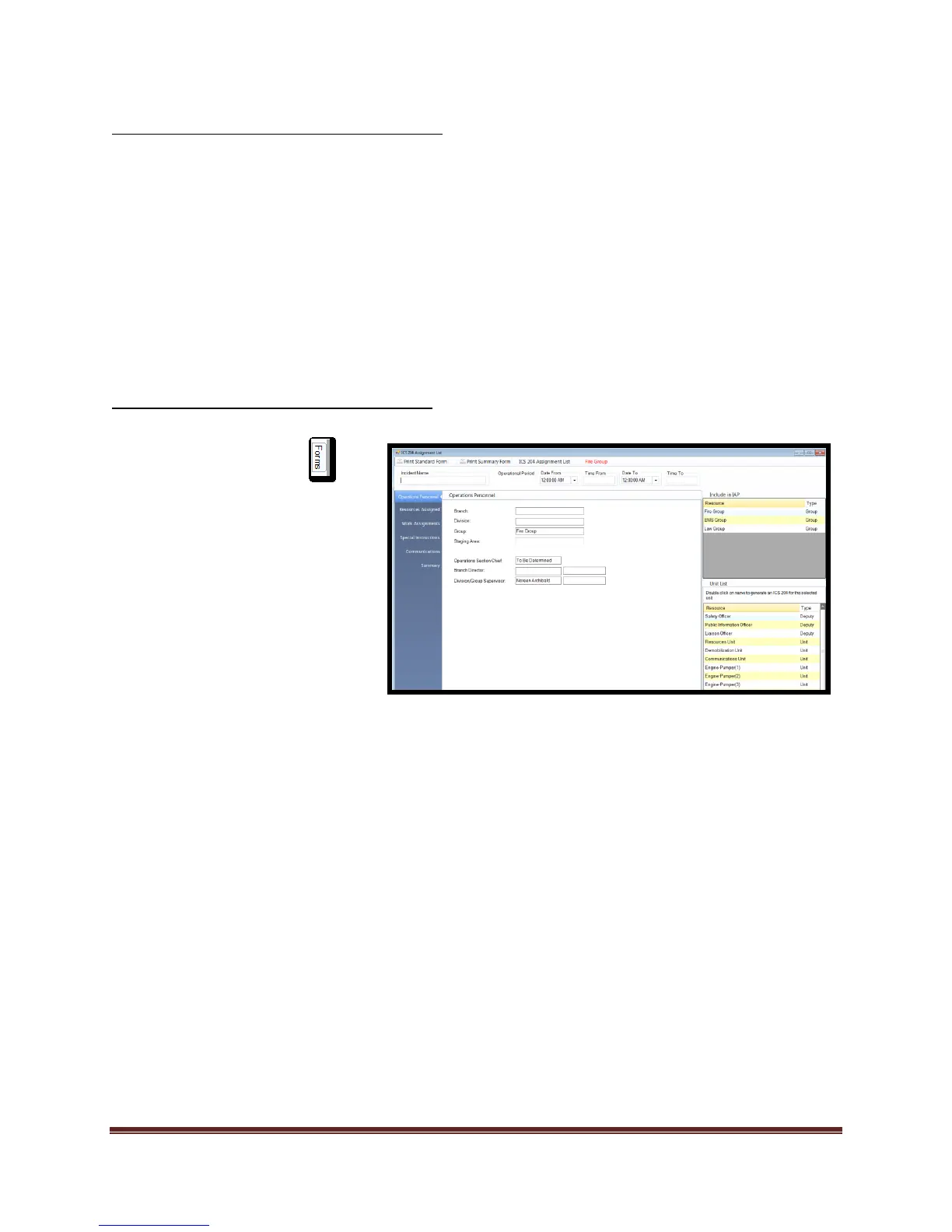
Completing the ICS 204 from “Forms” tab:
1. Select the Forms tab
2. Double click on the ICS 204
form. This will open the form
for editing.
3. Add/Verify “Incident Name”
and “Operational Period”.
4. Select the “Tactical” position
that you want to edit from the
“Include in IAP” window.
If position is not in the
“Include in IAP” window, it
is located in the “Unit list”
window.
Double click unit and it will
now appear in the
“Include in IAP” window.
The “Operations
Personnel” fields are auto
completed by the
program. Editing is not
allowed in these fields.
If a unit is added by
mistake, select delete on
your key board and select
“Yes” from the dialogue
box. This will remove the
unit from the IAP list but
not delete the position
from the plan.



 To Next Page