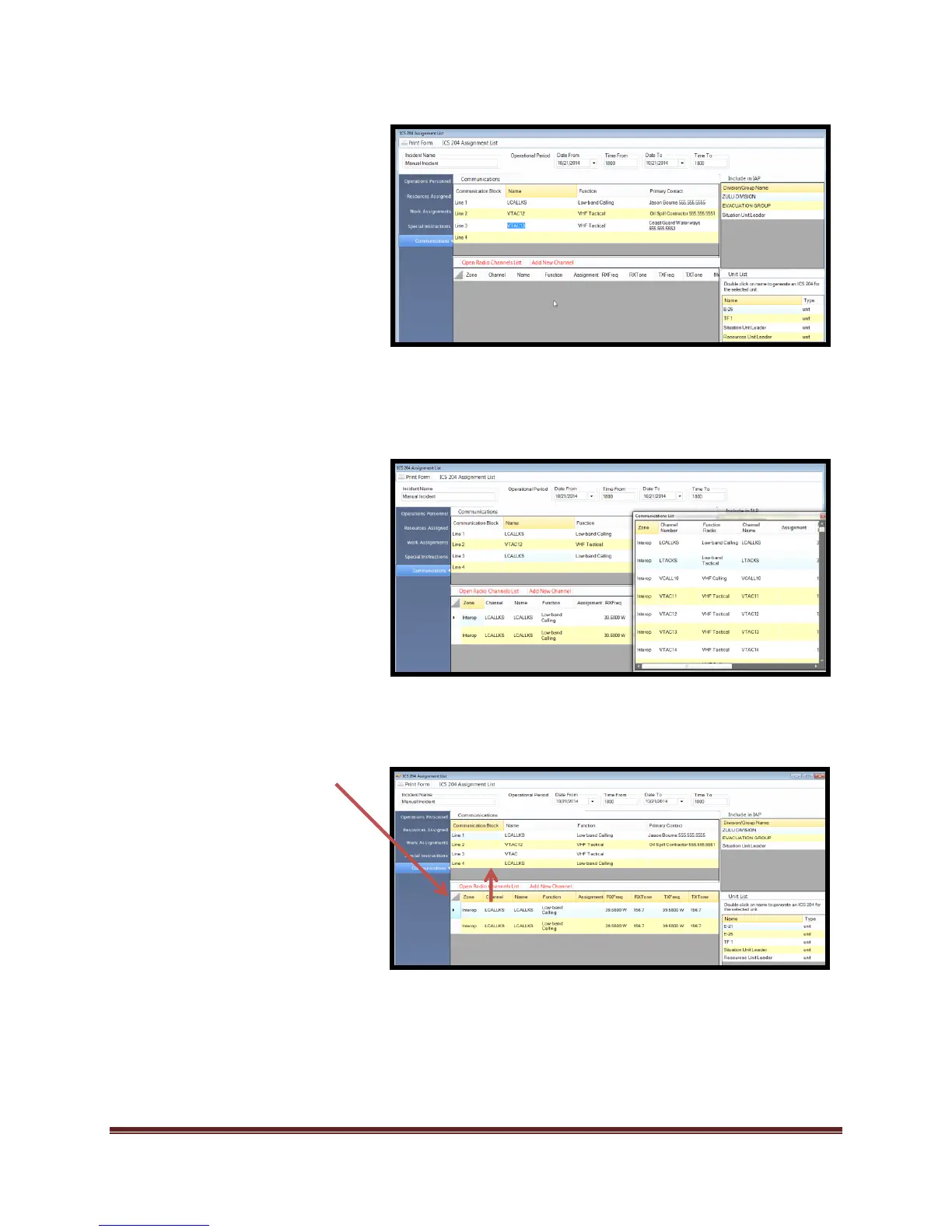
9. Frequencies can be added
through two methods using the
“ICS 205 interface tool” that is
built into the ICS 204. This tool
is directly connected to the ICS
205 form and “Communication
Library”
User can add frequencies
by accessing the “Open
Radio Channel List”
-OR-
User can add frequencies
by accessing the “Add New
Channel” tool
To use the “Open Radio Channel
List” frequencies must be available
in the “Communications List”. This
list is located in the “Setup” tab.
Adding frequencies to the ICS 204
from the “Communication List” is
completed by:
“Drag and Dropping” the
desired frequencies onto the
“ICS 205 interface tool”.
-THEN-
“Drag and Dropping”
frequency on to the desired
Communication Block
Repeat steps for all desired tactical
positions that you want to create
an ICS 204 for.
*By using the “ICS 205 interface
tool” within the ICS 204, the user
will have completed the ICS 205.



 To Next Page