Dragonfly Manual Version 3© Page 77
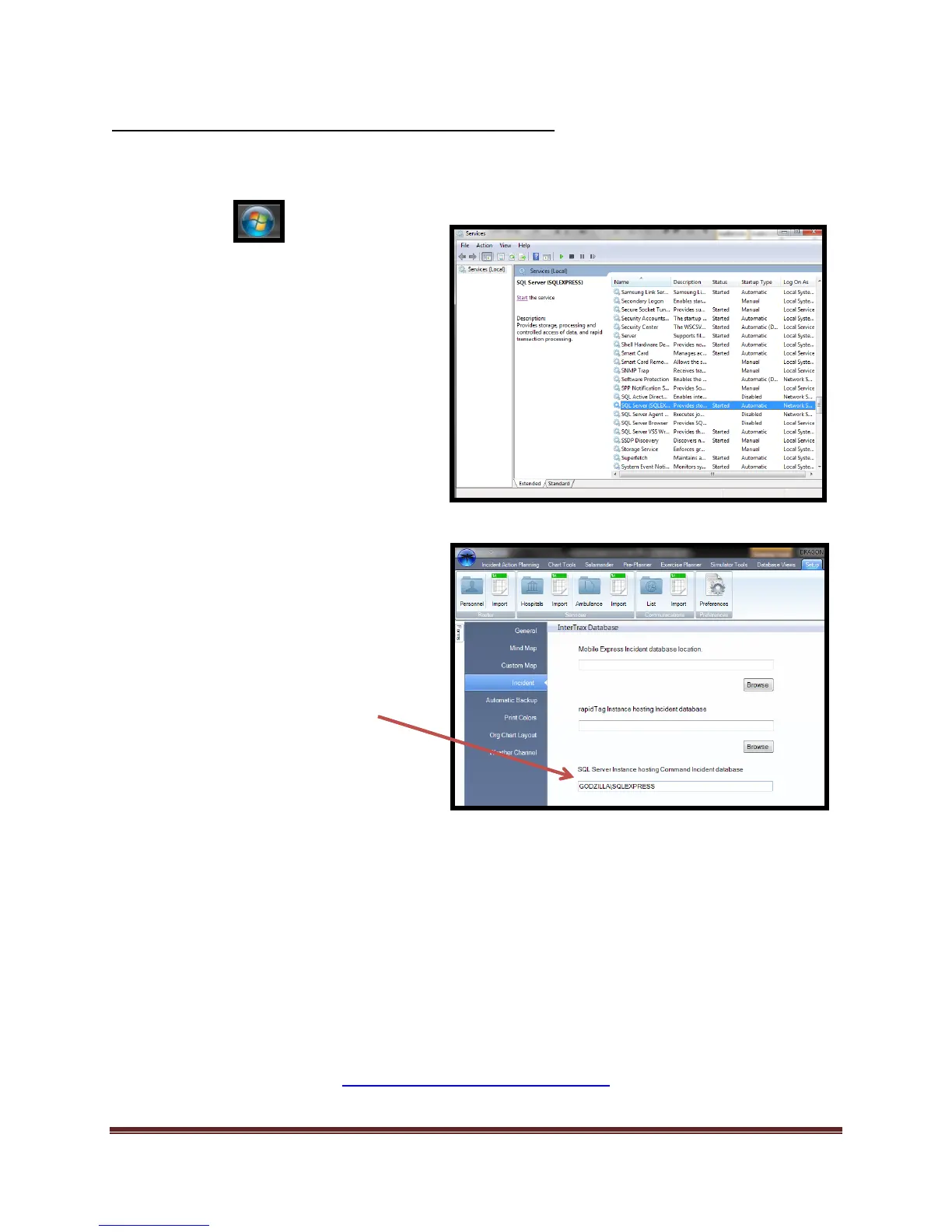
Salamander™ Local Connection Preference Settings-Command
In order for this connection to be performed the user must have “admin” privileges in order to
complete the connection.
Congratulations! You are now ready to import your Command™ incident data into your
Dragonfly IAP.
If you need assistance please contact Dragonfly Technical Support
www.dragonfly-360.com/contact/
1. Select button.
2. Navigate to the “Search programs and
files” bar
a. Type “Services” into the search
field.
b. Select “Services”
c. Navigate to “SQL Server
(SQLEXPRESS)”
d. Select “Start” to start the
service.
e. Wait a moment for the service
to start.
f. Close out any open “Service”
related window.
3. Start Dragonfly™
a. Navigate to “Setup”
b. Select “Preferences”
c. Select “Incident” module
d. Navigate to “SQL Server
Instance hosting Command
Incident database”
e. Type the computer name (ex.)
“LOCALPC\SQLEXPRESS”



 To Next Page