Dragonfly Manual Version 3© Page 80
Salamander™ Local Connection (Networked)
The following configuration for importing of Salamander™ incident data should be used when
Dragonfly™ and an instance of the following software are not installed on the same computer.
a. rapidTAG™
b. Mobile Express™
c. Command™
The only difference between Salamander™ Local Connections and Salamander™ Local
Connections (Networked) is the location of the data and the file path labeling.
Your Dragonfly Technical Support staff should be contacted if you are going to use the
Salamander™ Local Connection (Networked) process.
http://dragonfly-360.com/contact/
Local Connections (Networked) rapidTAG™
To configure for Salamander™ Local Connections (Networked) for rapidTAG™, perform the
following for Window 7 operating systems:
1. Navigate to the following folder:
“C:\ProgramData”
a. If the “ProgramData” folder is
not visible, contact your
“Administrator” and have them
make the folder visible
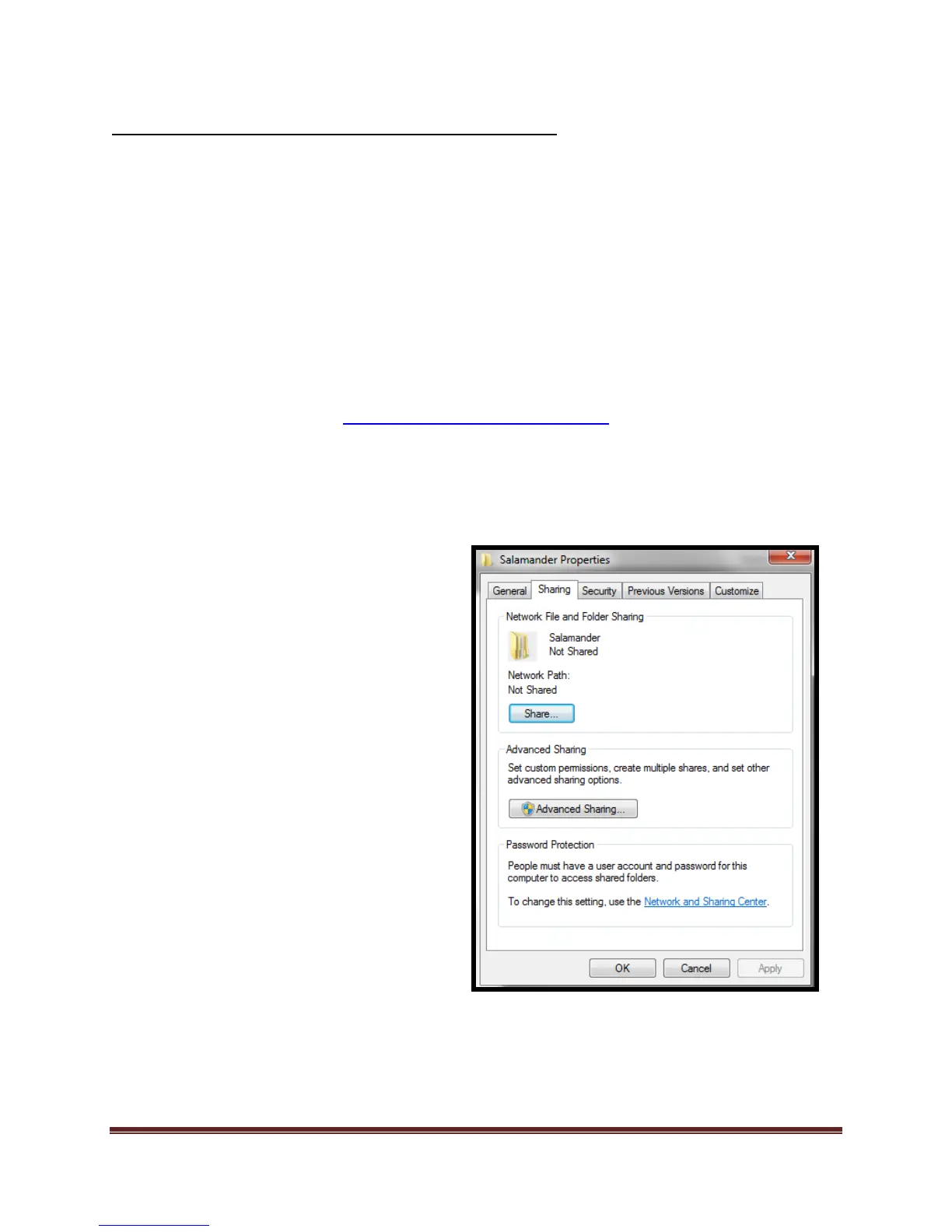
2. Locate the “Salamander” folder and right
click the folder
a. Select “Properties”
b. Select “Sharing” tab
c. Select “Share”



 To Next Page