11
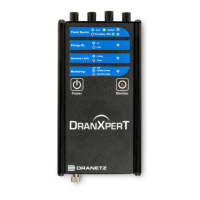
Power Button – press to turn the instrument power ON or OFF
Monitoring Button – press and hold for approximately 5 seconds
until a single beep is heard to turn monitoring ON or OFF
Monitoring Status – LED status indicator
Monitoring Off: LED = OFF (No LED)
Monitoring Limits Within Trigger Limits: LED = GREEN
Monitoring Limits Out of Trigger Limits: LED = RED
Demand Limit – LED status indicator
Under Demand Limit: LED = GREEN
Over Demand Limit: LED = RED
Energy ($) – LED status indicator
Exporting (producing) Energy: LED = GREEN
Importing (consuming) Energy: LED = RED
Power Source – LED status indicators
Top LED – Instrument power source:
Instrument powering up: LED = GREEN
Operating on external power source: LED = BLUE
Operating on internal battery: LED = YELLOW
Bottom LED – Battery status
Depleted (0%): LED = RED
Charging/Discharging: LED = Shades of YELLOW from
charged to discharged & vice versa
Fully charged (100%): LED = GREEN 100%
2
4
5
6


 To Next Page