12
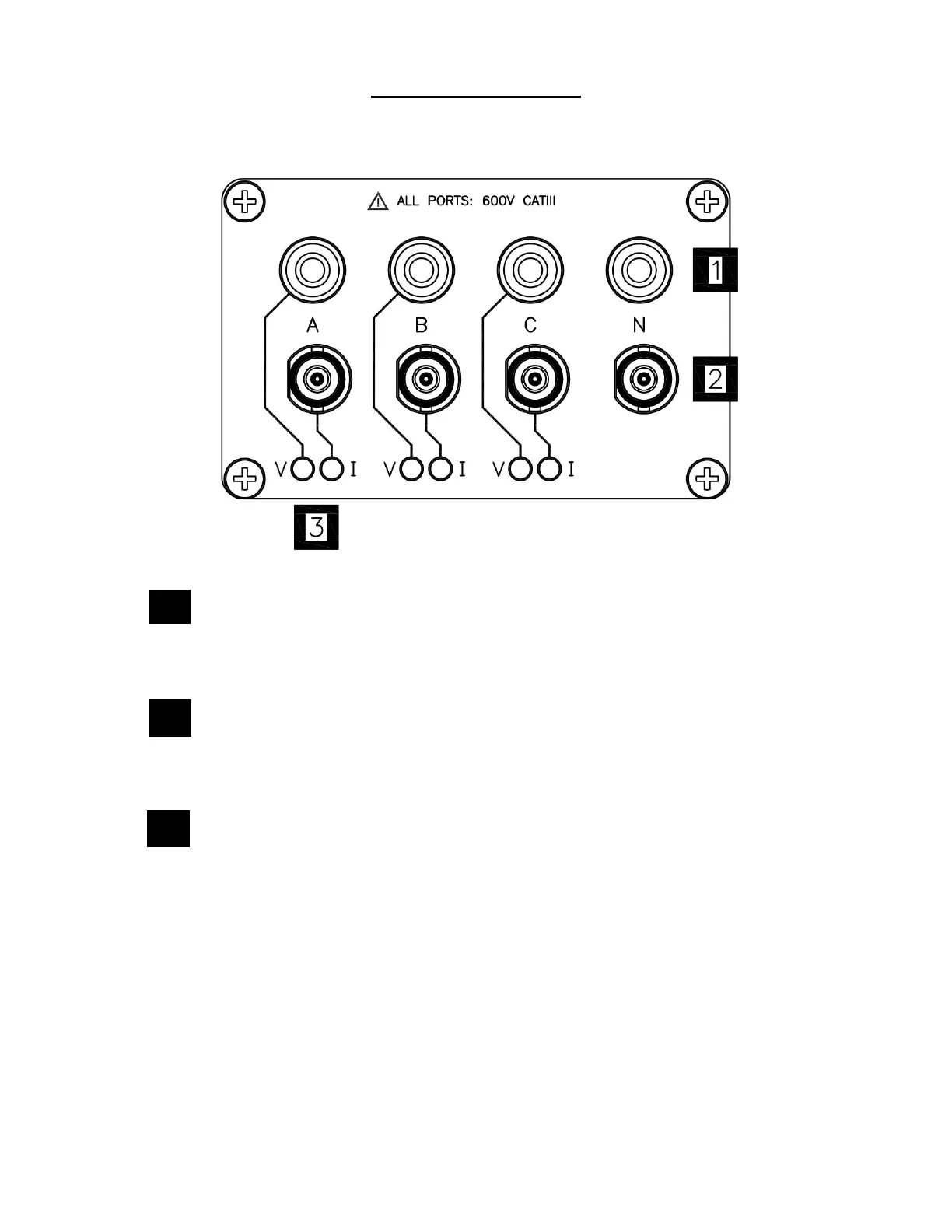
Top End Panel View
This section describes the top end panel view of DranXperT.
Voltage Inputs – use to connect the circuit voltage to the
instrument channels A, B, C, and N using safety cables with
banana connectors. See section Connecting the Voltage and
Current Connectors for circuit connection details.
Current Inputs – use to connect compatible current probes with
an insulated BNC connector to the instrument channels A, B, C
and N. See section Connecting the Voltage and Current
Connectors for circuit connection details.
V and I Connection LEDs – color coded to indicate the status of
channels A, B, C for voltage and current.
LED Colors (colors can be changed in the instrument setups)
Channel A = RED
Channel B = YELLOW
Channel C = BLUE
LED Operation
V or I applied: LED is solid in the channel color above
No V or I applied: LED flashes in the channel color above
V sequence error (if enabled): LED flashes RED if monitoring
= ON
2


 To Next Page