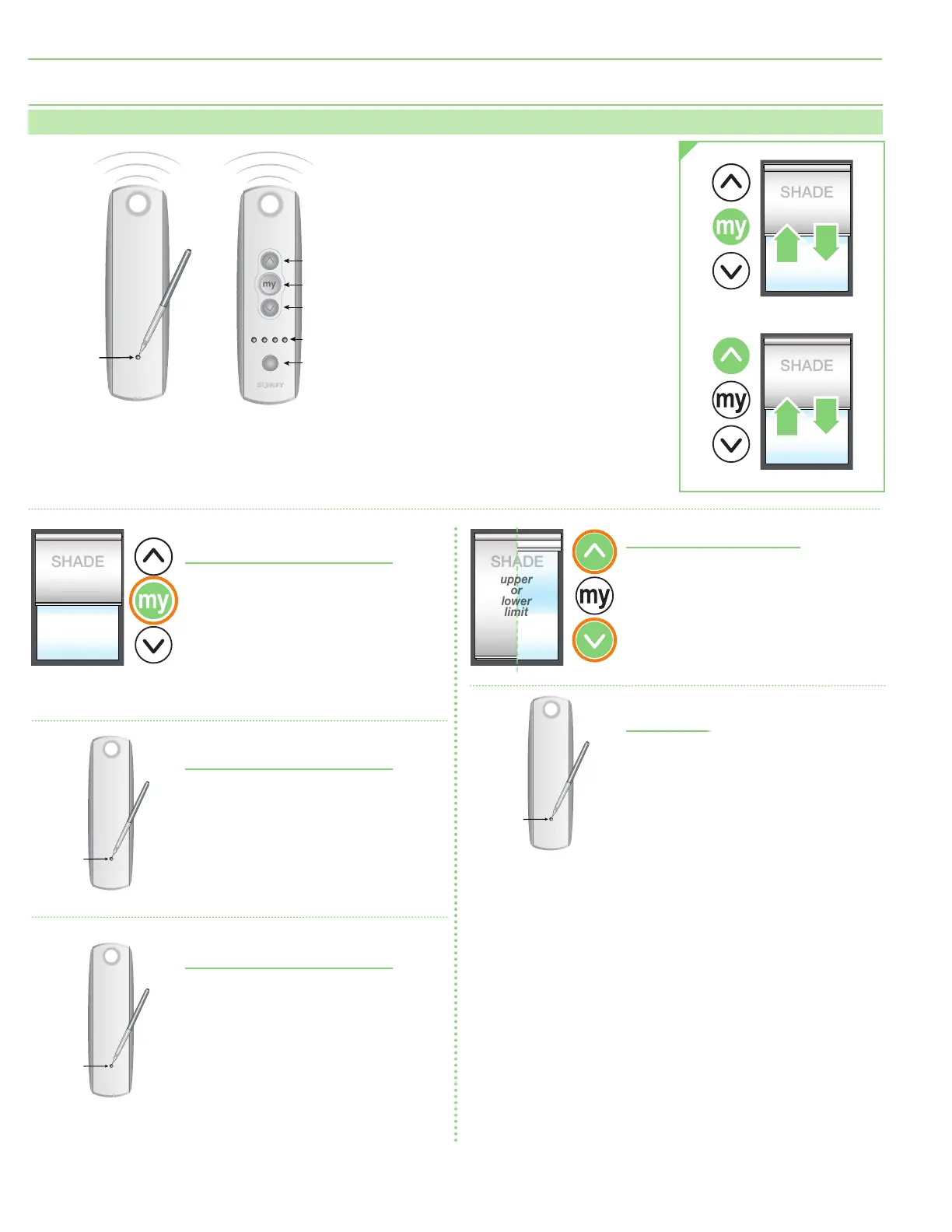
Section 5 - RF Remote Programming Instructions
Please Note: The motor ships with no programming. Follow these instructions to program unit to the desired transmitter.
Setting an Intermediate Stop -
Shade MUST BE in USER mode.
1.
Move shade to desired mid-point
location and hold MY/STOP button
until motor jogs.
2.
To test, press the MY/STOP button
when motor is standing still. The shade
will move to that intermediate location.
3.
To delete an intermediate stop, go to the
intermediate stop and hold the MY/STOP
button until motor jogs.
Add a Channel -
Shade MUST BE in USER mode.
1.
Select channel currently operating
motor, then hold programming button
until motor jogs.
2.
Select new channel to add to motor, then
hold programming button until motor jogs.
3.
The motor should now work on both the
old and new channel.
Delete a Channel -
Shade MUST BE in USER mode.
1.
Select channel operating motor desired,
then hold programming button until
motor jogs.
2.
Select channel to remove, then hold
programming button until motor jogs.
Motor should now only work
on channel kept from Step 1.
1.
Select a transmitter channel to assign motor.
Hold UP and DOWN buttons
until motor jogs, then release.
2.
Check motor direction. To reverse motor
direction, hold MY/STOP button for
5 seconds until motor jogs. Check direction
again.
3.
Move motor to upper limit position. Hold MY/
STOP and DOWN buttons until motor moves
down, then release. Use UP and DOWN buttons
to move shade to correct lower limit and press
M Y/ S TO P.
4.
While motor is at lower limit, hold UP and MY/
STOP buttons until motor moves up, then
release. The shade should move to upper limit
and stop.
5.
Next, hold MY/STOP button until motor jogs.
6.
Put motor into USER MODE by holding small
programming button on the back of transmitter
and waiting for motor to jog.
Adjust Limits in User Mode
1.
Move motor to limit
(upper or lower)
to be
changed. Shade must move to previously
set limit and will stop automatically.
2.
Hold UP and DOWN buttons until motor
jogs.
3.
Move motor to its new limit location and
hold MY/STOP button until motor jogs.
Reset Motor
1.
Disconnect for 3 seconds, reconnect for
10 seconds, disconnect for 3 seconds.
Shade will roll.
2.
Hold program button on remote and wait
for 2 separate jogs.
Motor is now reset.
Channel
Selector
UP
STOP
DOWN
LED Lights
Programming
Button
Programming
Button
Programming
Button
Pen
Programming
Button
page 6 of 12
Exterior Motorized FlexShade
®





 To Next Page