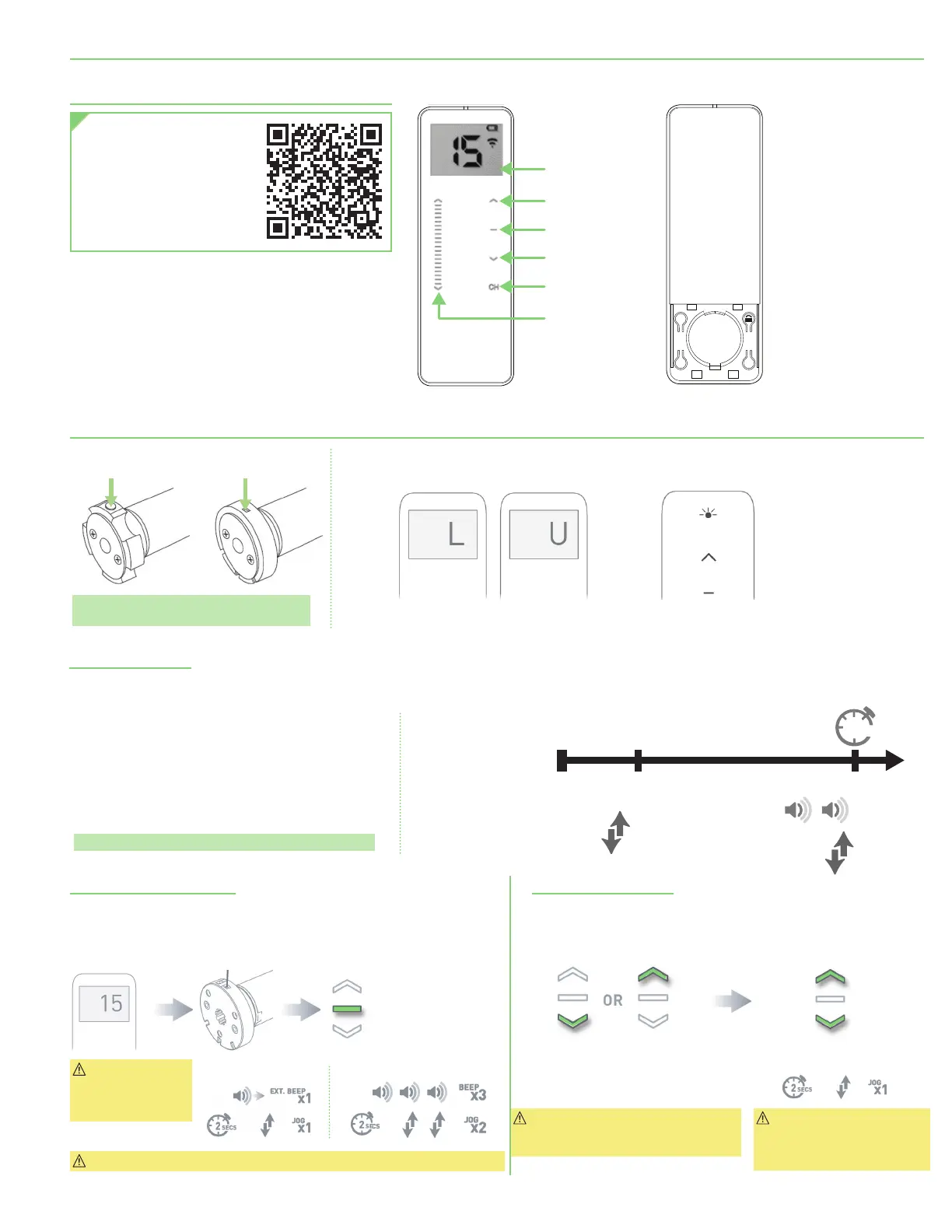
Section 6 - Remote Controller
Scan code with your smart-
phone to view a playlist of
FlexShade
®
Recharge limit
setting videos.
These videos do not replace
the written instructions, but
offer valuable help.
Section 7 - 12 Volt Motor Initial Setup
Please Note: Programming buttons will face
down when shade is installed.
Enter Sleep Mode
To put motor back into
Sleep Mode, press and
hold programming
(P1)
button for 6 seconds, 2
jogs and 2 beeps.
Pair Motor with Controller
1.
Select channel on controller to be paired with motor.
2.
Press and hold P1 button on motor until motor responds with 1 jog and 1 beep.
3.
Within 4 seconds, press and hold Stop button on remote until motor responds.
Check Motor Direction
Caution: Consult
user manual for
information on
selecting channel.
Important: Damage to shade may
occur when operating motor prior to
setting limits. Attention should be given.
Important: Reversing motor
direction using this method
is only possible during initial
set-up.
Motor is now in programming mode and ready for setting limits.
Motor Response:
Approx. Approx.
Approx.
Motor Response:
Quick Press = Step
Long Press = Continuous Travel
To check travel direction of shade,
press UP or DOWN on controller.
To reverse shade direction,
hold both UP and DOWN.
Exiting Sleep Mode
FlexShade Recharge battery motors do not come preprogrammed from Draper
®
unless specified on order. Upon leaving factory each motor is placed into “Sleep
Mode” to avoid accidental operation during shipping. It is necessary to “Wake” motor before operation and setup.
SEC
Approx.
Motor Response:
6
BEEP
X
X
2
1
JOG
X
1
JOG
1.
To “Wake” motor and exit Sleep Mode ensure motor is
installed and secured in mounting hardware.
2.
Press programming
(P1)
button
(button or recessed based
on motor size)
and quickly release. Shade will move to
lower limit if preprogrammed.
3.
The motor is now no longer in “Sleep Mode” and ready
for further setup unless preprogrammed by Draper.
Please Note: Remote will be locked if preprogrammed.
P2
+ +
15 Channel Battery Compartment
(Shown with cover removed)
SLIDE CONTROL
LCD SCREEN
UP
STOP
DOWN
CHANNEL
BUTTON
BUTTON - RECESSED
Press right button for 1 second or less to display current mode.
RESPONSE
LCD displays “L” when locked
LCD displays “U” when unlocked
RESPONSE
LED solid on when locked
LED blinking when unlocked
page 5 of 11
FlexShade
®
Recharge





 To Next Page