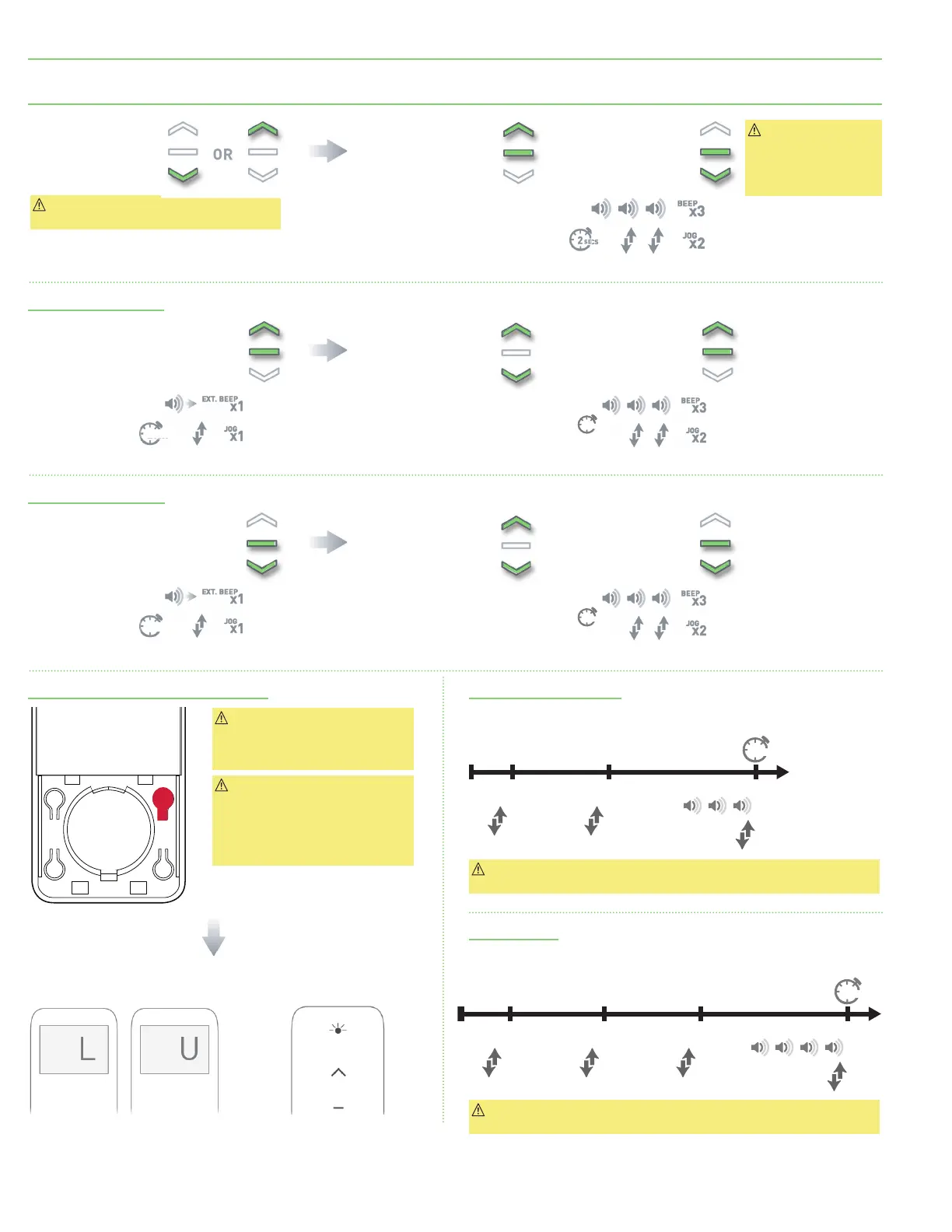
Section 8 - 12 Volt Motor Limits
Important: Cycle shade up and down prior
to setting limits to settle fabric.
Important: After
setting limits, motor
will automatically
exit from initial
programming mode.
Important: It is still possible to
add/delete channels and perform
P2 functions while lock function
is enabled.
Important: This mode is intended
to be used after all shade
programming is completed.
Locked Mode will prevent
accidental or unintended
changing of limits.
Move shade to desired
highest or lowest
position by pressing
UP or DOWN buttons
on controller.
To save upper limit,
hold both UP and STOP.
Move shade to desired
position by pressing
UP or DOWN button.
Move shade to desired
position by pressing
UP or DOWN button.
Hold UP and STOP on controller.
For 10-15 seconds screen will time
out on remote: continue holding.
Hold DOWN and STOP on controller.
For 10-15 seconds screen will time
out on remote: continue holding.
Press and hold P1 button on motor for 10 seconds, 3 jogs and 3 beeps.
Press and hold P1 button on motor for 14 seconds, 4 jogs and 4 beeps.
To save lower limit,
hold DOWN and STOP.
To save upper limit,
hold UP and STOP.
To save lower limit,
hold DOWN and STOP.
Motor Response:
Motor Response:
Motor Response:
Motor Response:
Motor Response:
Adjusting Upper Limit
Adjusting Lower Limit
Disable limit setting function of remote Reverse Motor Direction
Factory Reset
Important: Reversing motor direction using this method is possible
at any time.
Important: Resetting motor to factory settings will erase all programming,
including any set limits.
SECS
5
10 -15 sec
Approx.
Approx.
SECS
5
10 -15 sec
Approx.
Approx.
Approx.
P2
+ +
SEC
Approx.
Motor Response:
10
BEEP
X
X
3
1
JOG
X
1
JOG
X
1
JOG
SEC
Approx.
Motor Response:
14
BEEP
X
X
4
1
JOG
X
1
JOG
X
1
JOG
X
1
JOG
Press right button for 1 second or less to display current mode.
RESPONSE
LCD displays “L” when locked
LCD displays “U” when unlocked
RESPONSE
LED solid on when locked
LED blinking when unlocked
page 6 of 11
FlexShade
®
Recharge





 To Next Page