3. Now, the password has been changed. Next time, use the new password to
access the Web User Interface for this router.
5
5
.
.
3
3
Q
Q
u
u
i
i
c
c
k
k
S
S
t
t
a
a
r
r
t
t
W
W
i
i
z
z
a
a
r
r
d
d
f
f
o
o
r
r
N
N
e
e
t
t
w
w
o
o
r
r
k
k
C
C
o
o
n
n
n
n
e
e
c
c
t
t
i
i
o
o
n
n
Quick Setup is a wizard which is designed for configuring your router accessing
Internet with simply steps. In the Quick Setup group, you can configure the
router to access the Internet with different modes such as Static, DHCP, PPPoE,
or PPTP modes.
S
S
t
t
e
e
p
p
1
1
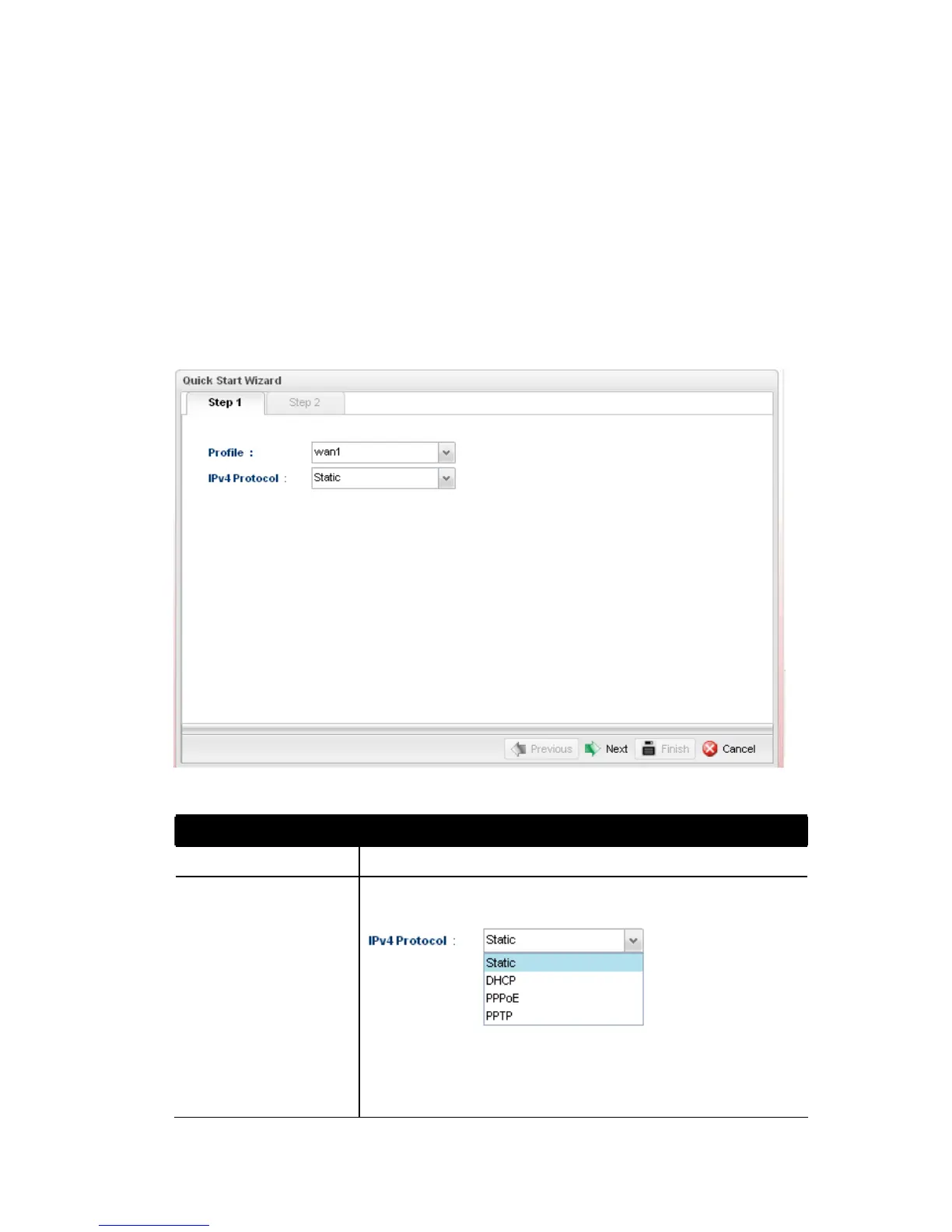
In the first page of Quick Start Wizard, please create a WAN profile.
Available settings are explained as follows:
Item Description
Profile Use the drop down list to choose one WAN profile.
IPv4 Protocol Use the drop down list to choose a connection mode for
such WAN profile.
Static - If Static is selected, you can manually assign a
static IP address to the WAN interface and
complete the configuration by applying the
settings and rebooting your router. Please type














 To Next Page