S
S
t
t
e
e
p
p
2
2
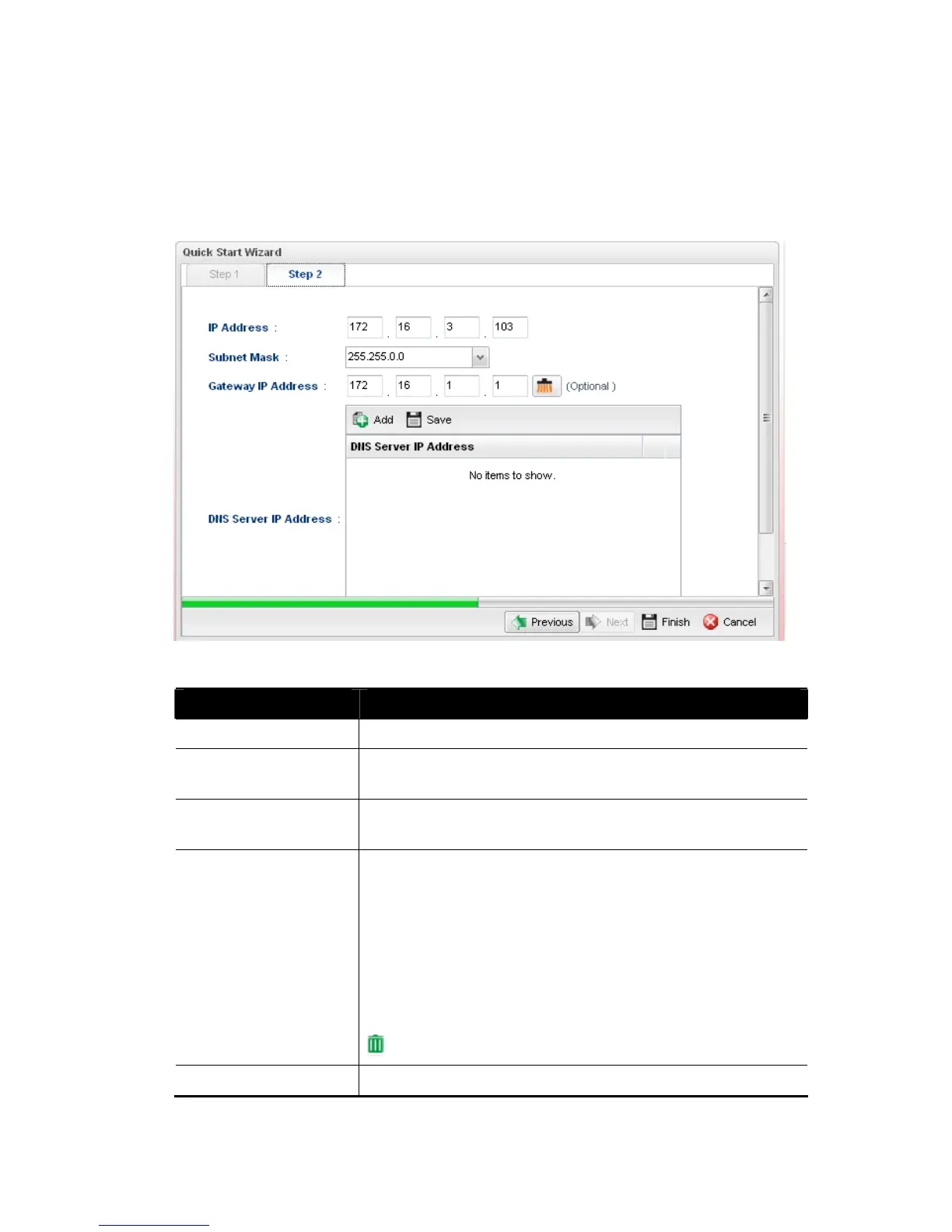
After clicking Next, you can see the following page which will vary according to
the IPv4 protocol type selected in Step 1.
For Static type, the page will be displayed as follows:
Available settings are explained as follows:
Item Description
IP Address Type the IP address of the router for the WAN profile.
Subnet Mask Type the network mask of the router for the WAN
profile.
Gateway IP Address Use the default setting (0.0.0.0). Such IP address is
ready for matching with the function of Virtual System.
DNS Server IP
Address
Type a public IP address as the primary DNS (Domain
Name Server). To add a new IP address, simply Add.
Four boxes will appear for you to type the IP address.
When you finish the settings, click Save.
Add – Click this button to have a field for adding a new
IP address.
Save – Click this button to save the configuration.
– click the icon to remove the selected entry.
Previous Click it to return to previous setting page.














 To Next Page