EasyManua.ls Logo

dreo Pilot Max S - Additional Features; Change Oscillation Angle; Timer; Mute

dreo Pilot Max S
19 pages
Print Icon
To Next Page IconTo Next Page
To Previous Page IconTo Previous Page
Loading...
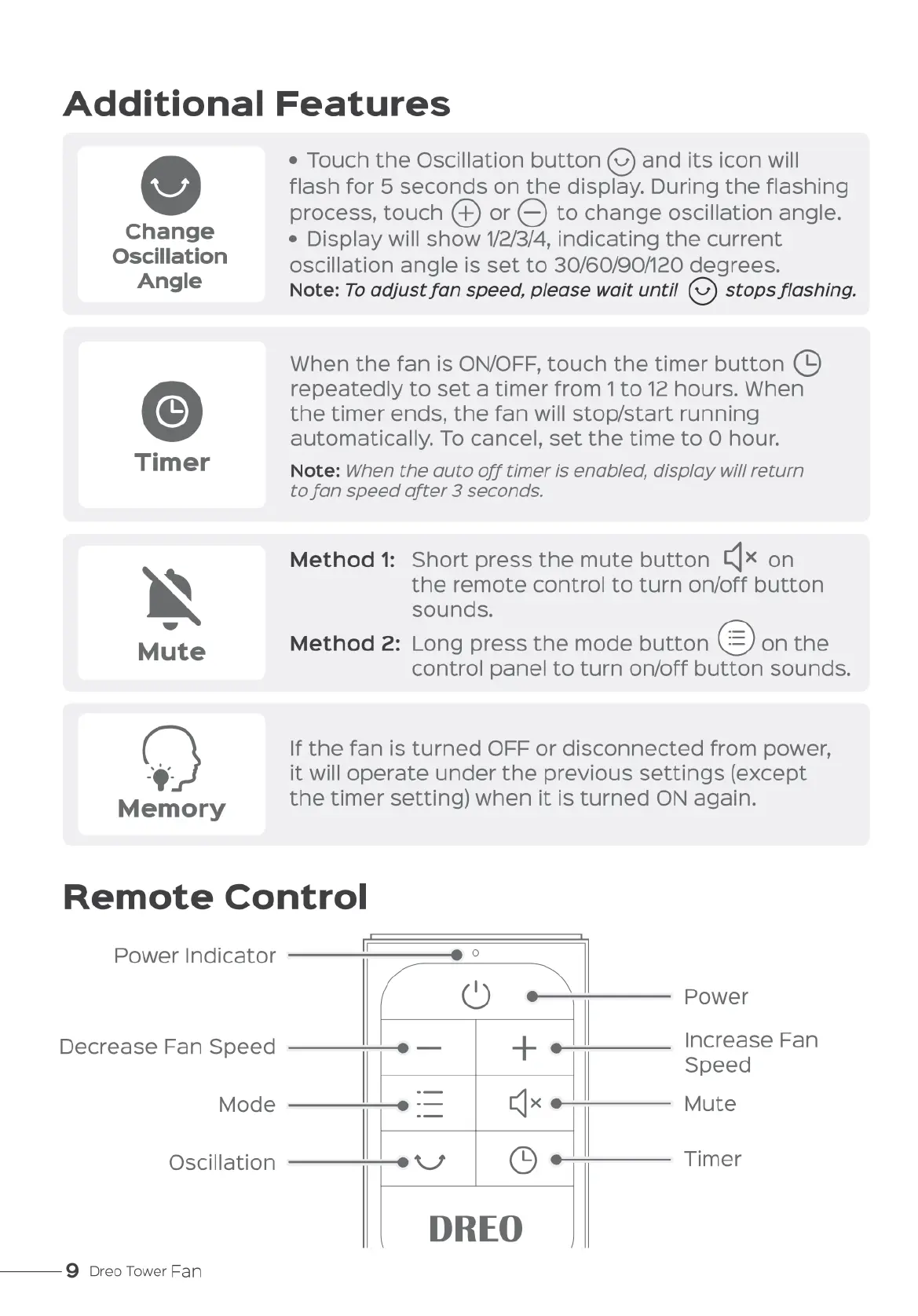
Additional
Features
Change
Oscillation
Angle
Mute
0
Memory
»
Touch
the
Oscillation
button
(5)
and
its
icon
will
flash
for
5
seconds
on
the
display.
During
the
flashing
process,
touch
@
or
@
to
change
oscillation
angle.
¢
Display
will
show
1/2/3/4,
indicating
the
current
oscillation
angle
is
set
to
30/60/90/120
degrees.
Note:
To
adjust
fan
speed,
please
wait
until
@
stops
flashing.
When
the
fan
is
ON/OFF,
touch
the
timer
button
@
repeatedly
to
set
a
timer
from
1to
12
hours.
When
the
timer
ends,
the
fan
will
stop/start
running
automatically.
To
cancel,
set
the
time
to
O
hour.
Note:
When
the
auto
off
timer
is
enabled,
display
will
return
to
fan
speed
after
3
seconds.
Method
1:
Short press
the
mute
button
Iflx
on
the
remote
control
to
turn
on/off
button
sounds.
Method
2:
Long
press
the
mode
button
on
the
control
panel
to
turn
on/off
button
sounds.
If
the
fan
is
turned
OFF
or
disconnected
from
power,
it
will
operate
under
the
previous
settings
(except
the
timer
setting)
when
it
is
turned
ON
again.
Remote
Control
Power
Indicator
(
Q)
Power
Decrease
Fan
Speed
—————eo
+
Increase
Fan
Speed
Mode
—————e
‘=
£]x
e———
Mute
Oscillation
————eo
C)
Timer
———
9
Dreo
Tower
Fan
DREO

Related product manuals