3
INTRODUCTION
Thank you for choosingDrew Technologies! CarDAQ-Plus 2
®
will allow you to re-flash/program
modern vehicle controllers specified by the OEM as well as perform dealer level diagnostics
with select OEM applications. More information for each OEM can also be found in the J2534
Toolbox 3
®
application. This user manual covers the initial setup, features,and common
questions regarding the CarDAQ-Plus 2
®
device and is available at DrewTech.com.
GETTING TO KNOW THE CarDAQ-Plus 2
®
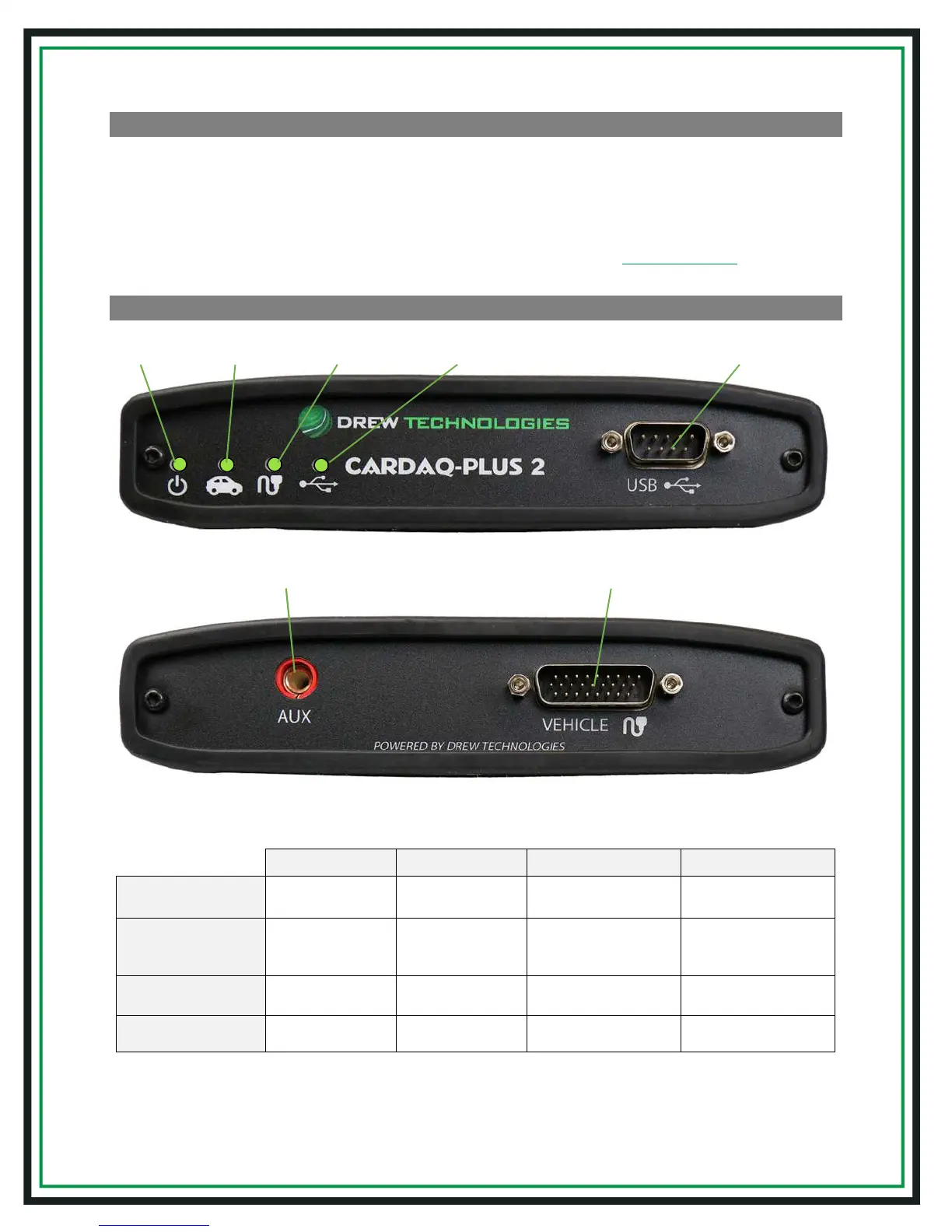
LED Status lights:
Blinking Red Solid Red Blinking Green Solid Green
Power
Firmware error-Call
DrewTech Support
-
Device startup in
progress
Device is functioning
Protocol
Connection
- -
Connected &
communicating with
vehicle
Connected to vehicle
Vehicle Cable
-
Cable not connected
or cable error
-
Cable OK/vehicle power
(communication)
USB Cable
-
Install issue - Call
DrewTech Support
- Connected to PC
Auxiliary Programming
Voltage Connection
Vehicle Cable


 To Next Page