EasyManua.ls Logo

Dri-Eaz F413-115V - User Manual

Dri-Eaz F413-115V
10 pages
Print Icon
To Next Page IconTo Next Page
Loading...
07-01839A F413-115V 2013-11 Warranty 07-00420 1 Dri-Eaz Products, Inc.
Owner’s Manual
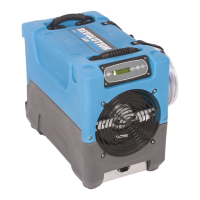
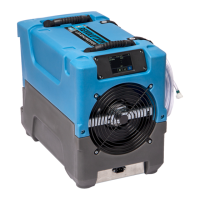
Revolution LGR Dehumidifier
Model F413-115V
DRI-EAZ PRODUCTS, INC.
15180 Josh Wilson Road, Burlington, WA 98233
Phone: 800-932-3030 Fax: 360-757-7950 http://Revo.DriEaz.com
The Dri-Eaz
®
Revolution LGR Dehumidifier reduces humidity in enclosed environments by removing wa-
ter vapor from the air. The Revolution is ideal for water damage restoration, structural drying, construc-
tion, and many other applications requiring temporary, high-performance dehumidification.
Patents: http://www.LBpatents.com
R EAD AND SAVE THESE INSTRUCTIONS
Read and understand manual before operating.
WARNING! Do not alter or modify your Revolution in
any way. Use only replacement parts authorized by
Dri-Eaz Products, Inc. Modifications or use of unap-
proved parts could create a hazard and will void
your warranty. Contact your authorized Dri-Eaz dis-
tributor for assistance.
WARNING! Electric shock hazard, rotating fan, hot
surface hazards. Unplug unit before opening cover
for cleaning or servicing.
WARNING! Unit must be grounded.
Keep motor and wiring dry. Keep out of standing wa-
ter and do not install in area likely to be subject to
water intrusion. Do not expose to rain, water or
snow.
Insert three-prong plug on power cord into a match-
ing electrically grounded outlet. Do not use adapter.
Never cut off third prong.
Do not use an extension cord.
To reduce the risk of fire or electric shock, do not
use this unit with any solid-state speed control de-
vice.
FIRE HAZARD
Keep away from open flames and heat sources.
Do not use or store where vapors from gasoline, sol-
vents, thinners or other flammable materials may be
present.
WARNING! Unplug unit before cleaning or servicing.
Turn off unit and unplug before lifting or moving.
Handle the unit carefully. Always operate the unit on
a stable, level surface. Do not drop, throw, or place
where it could fall. Rough treatment can damage the
unit, and may create a hazardous condition or void
the warranty.
Inspect the power cord before use. If cord is dam-
aged, do not use. Always grasp the plug (not the
cord) to unplug.
The unit must be operated on a 115V/60 Hz circuit
protected by a Ground Fault Circuit Interrupter
(GFCI) device.
Do not attempt to repair the unit. For Authorized
Service Centers, call DriEaz Service at 800-932-
3030.
BEFORE YOU BEGIN
Warranty registration
Visit warranty.drieaz.com to register your purchase.
Registration allows us to better assist you with using,
maintaining or servicing your equipment and to contact
you in case we have important safety information con-
cerning your Dri-Eaz product. If you determine service is
required, have your equipment model, serial number and
original proof of purchase available and call your distrib-
utor for assistance with obtaining a return material au-
thorization (RMA).
INTRODUCTION
The Revolution Dehumidifier reduces humidity in en-
closed structural environments by removing water vapor
from the air. With proper use, the Revolution can help to
dry out damp structural materials, insulation, and con-
tents, and maintain a healthy level of humidity. Using the
Revolution may also prevent secondary damage caused
by high humidity.
WARNING
To Buy: Contact Sylvane at 800-934-9194 or visit www.sylvane.com
Product Support: Contact Dri-Eaz at 800-932-3030

Questions and Answers

  • R
    Robert RodriguezJul 31, 2025
    What to do if my Dri-Eaz Dehumidifier is operating, but the room is not dry?
    • M
      martinezbrittneyJul 31, 2025
      If your Dri-Eaz Dehumidifier is running but the room isn't drying, it could be due to several reasons. First, allow more time for drying. Second, increase air movement in the room using air movers. Finally, seal off the area to reduce moist air infiltration. The causes might be: not enough time to dry, poor air movement in the room or excessive moist air infiltration.
  • J
    James RamseyAug 8, 2025
    Why is my Dri-Eaz Dehumidifier collecting too little water?
    • J
      julie92Aug 8, 2025
      If your Dri-Eaz Dehumidifier is collecting too little water, it could be because the room air is dry, the room temperature is too low, the filter is clogged, or the coils are clogged. To solve this, confirm the humidity level with a hygrometer, increase the room temperature, check and clean/replace the filter if necessary, and check and clean the coils if needed.
  • M
    Melissa GarciaAug 15, 2025
    What to do if my Dri-Eaz Dehumidifier does not operate?
    • D
      David ParsonsAug 15, 2025
      If your Dri-Eaz Dehumidifier isn't operating, first switch the unit on. Then, ensure the unit is properly plugged in and check the power cord connection at both the wall outlet and the base of the unit. The cause may be that the unit is not switched on or there is no power to the machine.
  • V
    Vincent WatkinsAug 23, 2025
    How to stop water drips when moving Dri-Eaz Dehumidifier?
    • A
      Angelica Glover MDAug 23, 2025
      To prevent water from dripping out when moving your Dri-Eaz Dehumidifier, purge the unit before moving it. The reason for the dripping is that the unit was unplugged before purging was complete.

Summary

Read and Save These Instructions

General Safety Warnings

Essential safety precautions including electrical hazards, fire risks, and unit modifications.

Before You Begin

Information on warranty registration and initial setup steps before operating the unit.

Introduction

Overview of the Revolution LGR Dehumidifier's purpose and benefits for drying environments.

Revolution Dehumidifier Operation

Features

Key features of the Revolution LGR Dehumidifier, including water removal capacity and operation modes.

Setup and Controls

Instructions for unit setup, positioning, drain hose, and control panel operation.

Control Panel and User Settings

Control Panel Functions

Detailed explanation of control panel buttons, navigation, and status indicators.

Error Message Handling

Information on interpreting and resolving system error codes.

User Settings and Modes

How to adjust settings like temperature units, language, and use Humidistat mode.

Humidistat Mode Operation

Mode and Setpoint Configuration

Adjusting Humidistat ON/OFF, humidity setpoint, temperature units, and language.

Displaying Operational Status

Understanding various readings like coil temperature, sensor ID, and compressor current.

End of Job Procedures

Transportation and Storage

Maintenance Schedule

Maintenance and Filter Care

Maintenance Intervals

Guidance on pre-operation, monthly, and as-needed maintenance tasks.

Filter Usage and Replacement

Best practices for 3M HAF filters, including cleaning, replacement, and usage guidelines.

System Error Messages

Error Code Explanations

Detailed explanations for each error code (ER1-ER9) and recommended actions to resolve them.

Troubleshooting Common Issues

Product Specifications

Included Components and Resources

Limited Warranty Information

Warranty Duration and Coverage

Outlines the warranty periods for various components and Dri-Eaz's repair/replacement policy.

Warranty Exclusions and Limitations

Details on what the warranty does not cover, including exclusions and legal disclaimers.

Obtaining Warranty Service

Step-by-step guide on how to initiate a warranty claim and get service for the product.

Dri-Eaz F413-115V Specifications

General IconGeneral
BrandDri-Eaz
ModelF413-115V
CategoryDehumidifier
LanguageEnglish

Related product manuals