07-01802C (F412-230V) 2013-01 Warranty 07-00427 4 Dri-Eaz Products, Inc.
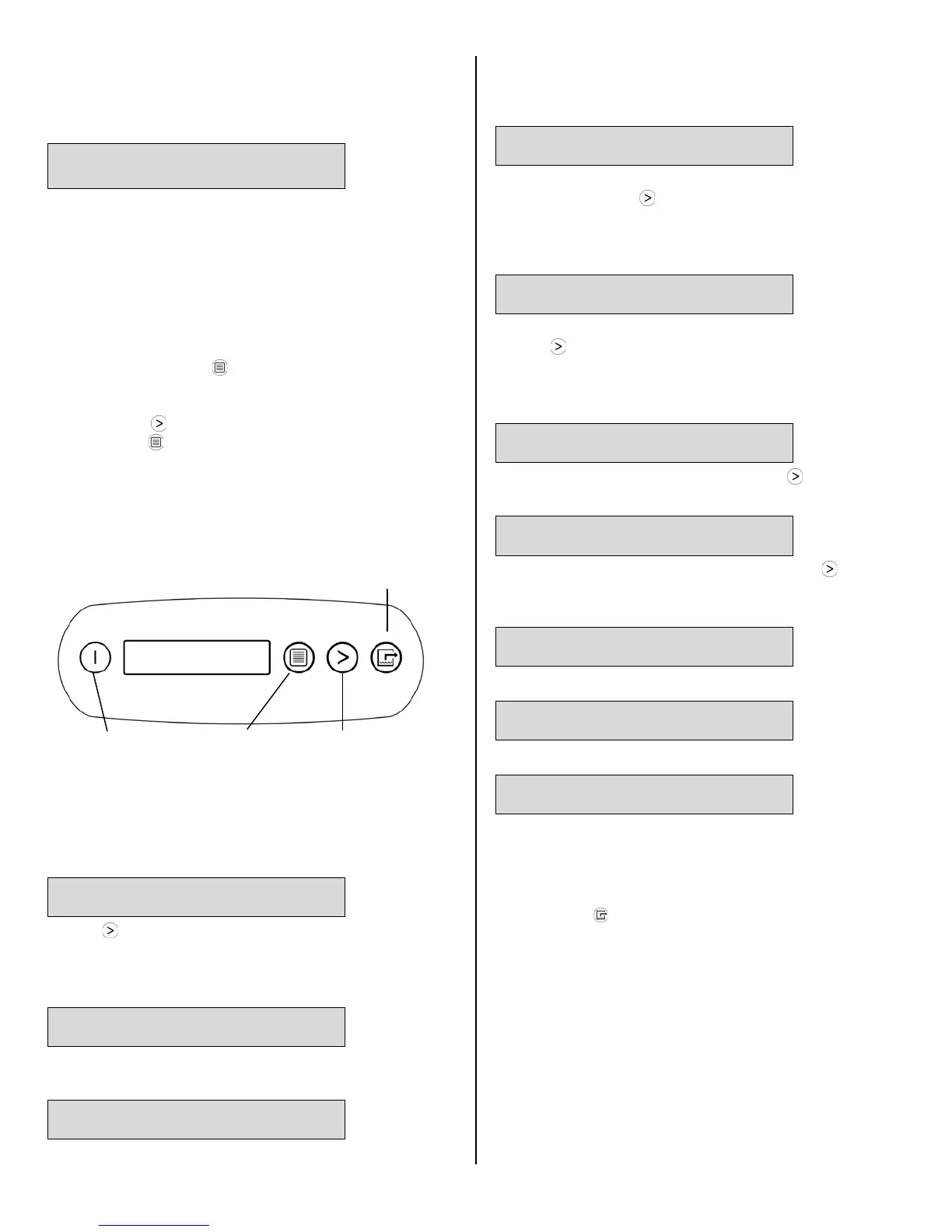
MENU
SELECTION /
UP KEY
displays. This is part of the unit’s self-diagnosis
procedure and no user intervention is required.
Once the self-diagnosis is complete, the display will
show the following information:
UNIT ON 00 HRS
INLET 00°C / INLET 00%
The first line of the display shows the total number of
hours the unit has been in operation. This value may be
reset to zero to track job hours (see “Job Hours Reset”
below). The second line of the display alternates
between inlet temperature and inlet humidity.
User settings menu
A number of settings may be changed by the user.
System information is also available. These items are
accessed by pressing
DISPLAY MENU. Each press
of the key will display the next parameter (see list
below). When you reach the parameter you wish to
adjust, press
MENU SELECTION to increase the
value. Press
DISPLAY MENU again to accept the
setting and re-start the display cycle. If no keys are
selected for 20 seconds the display will automatically
reset and return to the normal display mode.
Note that only menu items followed by a greater-than
symbol ( > ) may be adjusted.
JOB HOURS
RESET? >
Press MENU SELECTION to reset hours to zero.
NOTE: When in Humidistat mode, the unit will display
HUMIDISTAT on the top line during normal operation
rather than JOB HOURS.
LIFE HOURS
00 HRS
Shows total unit operating hours. Value cannot be
modified.
INLET OUTLET
00° 00% 00° 00%
Shows current temperature and RH of inlet and outlet.
Humidistat Mode
HUMIDISTAT MODE
ON/OFF >
In ON mode, unit will maintain the humidistat setpoint
(see below). Press MENU SELECTION to toggle
between ON and OFF. NOTE: When in Humidistat
mode, the unit will display HUMIDISTAT on the top line
during normal operation rather than JOB HOURS.
HUMIDISTAT
SETPOINT 00% >
Sets humidity level when unit is in Humidistat Mode.
Press MENU SELECTION to change RH value. Each
press of the button increases the setting by 5%
increments, cycling through 90%RH and starting again
at 30%RH.
TEMP UNITS
°C >
Shows current temperature scale. Press MENU
SELECTION to select Fahrenheit or Centigrade scale.
LANGUAGE
ENGLISH >
Shows current display panel language. Press MENU
SELECTION to select Spanish, German, French or
English.
COIL TEMP
00°C
Displays the cold (evaporator) coil temperature.
SENSOR ID >
00000000
This function is not used on the 7000XLi.
COMPRSSR CURRENT
0.0 A
Shows compressor current draw in amps.
At the end of the job
Before removing the unit from the job site, make sure the
unit is completely purged of water before moving it:
1. Press the PURGE key. When the purge cycle is
complete, turn the unit off.
2. Remove the external drain hose, drain it carefully, and
return it to the pocket provided on the side of the unit.


 To Next Page