Trident HD Owner’s Manual www.drivemedical.com
Prior to using your power wheelchair, you may want to make adjustments for
optimum comfort. Make all adjustments with the power wheelchair off, and
unoccupied. You may need the tool-kit included with your power wheelchair to make
these adjustments.
WARNING – Some components of your power wheelchair are heavy, and
you may need assistance to lift or carry. Please refer to Section XII
SPECIFICATIONS for component weights.
WARNING – Do not make any adjustments while an occupant is seated in
the power wheelchair.
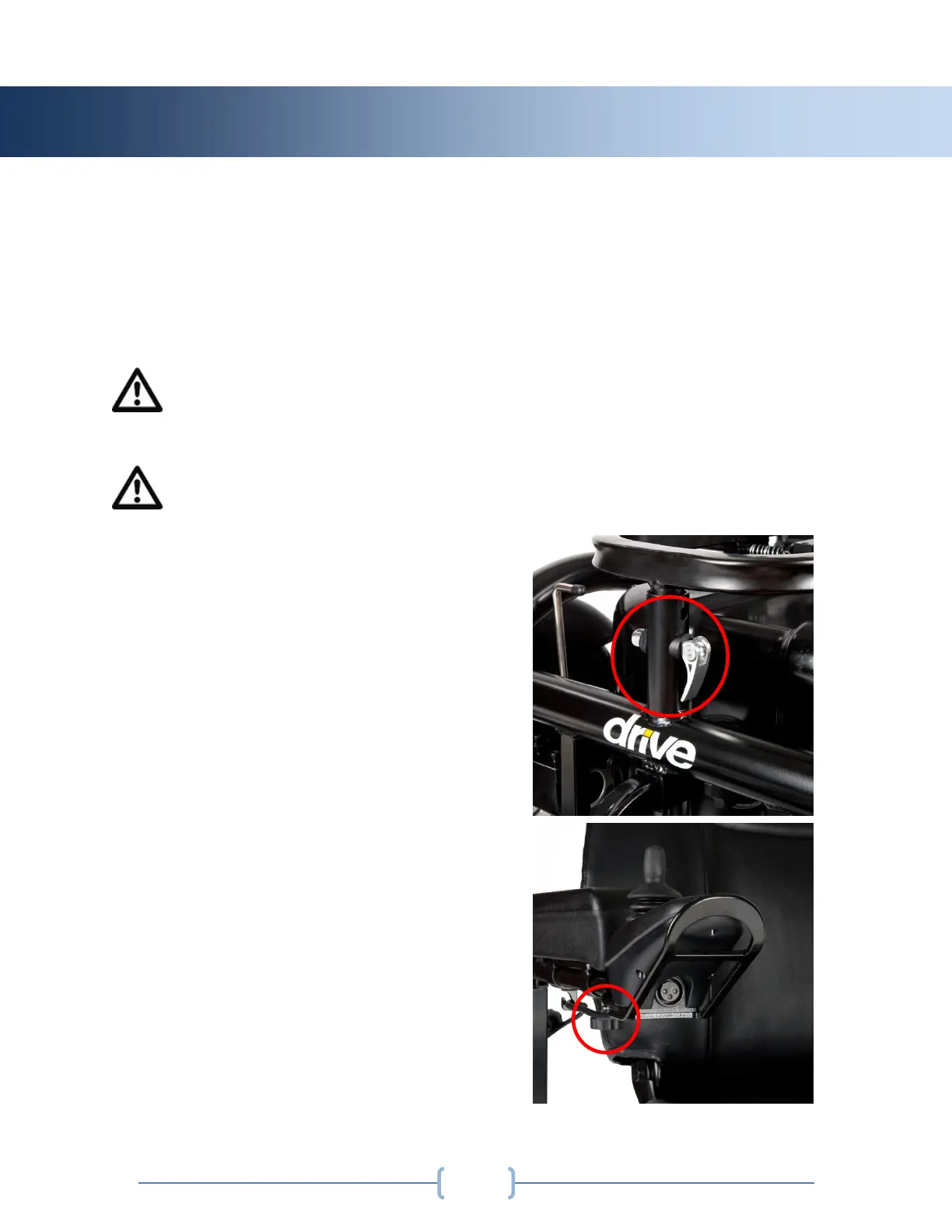
Seat Height Adjustment:
To adjust the seat height unclamp the 3
pins on the frame of the powerchair, and
turn the pins counter-clockwise to
remove the cap from the pin. With the 3
pins removed, adjust the seat to the
desired height, reinsert the pins, and
turn counter-clockwise until clamp
securely holds seat to the base of the
powerchair.
Joystick Position:
To adjust the depth of the joystick loosen
the star knob located underneath the
armrest, and slide the joystick to the
desired position. Retighten the star knob
to secure in place.



 To Next Page