9
Drobo Dashboard is used to set up, configure, and interact with your
Drobo FS.
Drobo Dashboard is the recommended companion application that
keeps you informed of the status of your Drobo FS and allows you to
customize Drobo FS to best fit your storage needs.
Note: To install Drobo Dashboard, you will need to have administrative rights
on your computer.
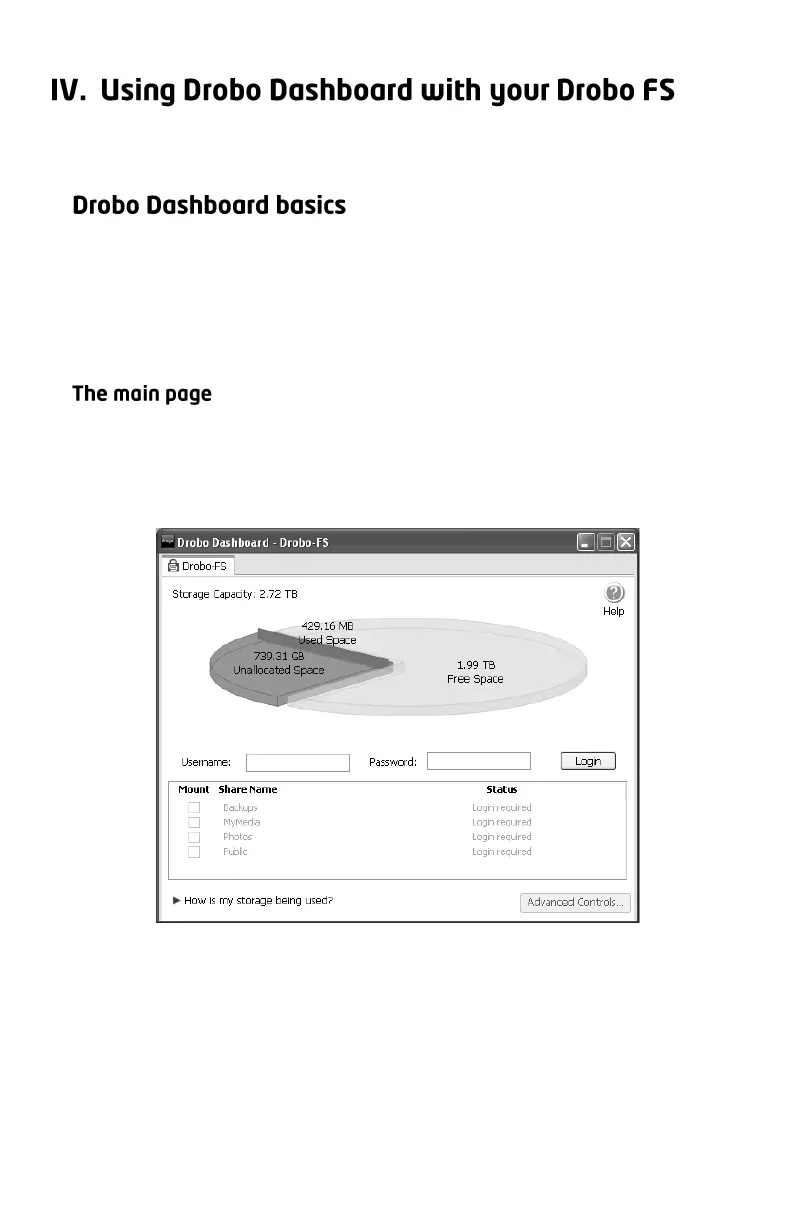
Open Drobo Dashboard and you will see the main page. This page gives
you a quick overview of the status and storage usage your Drobo FS. If
you have more than one Drobo device, you can switch between Drobos
by clicking on the appropriate tab at the top of the window.
The pie chart shows you how much storage space is being used and how
much free space remains. By placing your mouse over the pie chart, you
will see a summary of the health of your Drobo FS. If you have set up an
administrative username and password, this screen allows you to log
into your Drobo FS in order to manage the device. (The first time Drobo
Dashboard launches, you will see a message telling you that the
administrative username and password have not been set up yet.)



 To Next Page