6000-300-000 3–3
3 – Controls and Indicators
Internal Printer
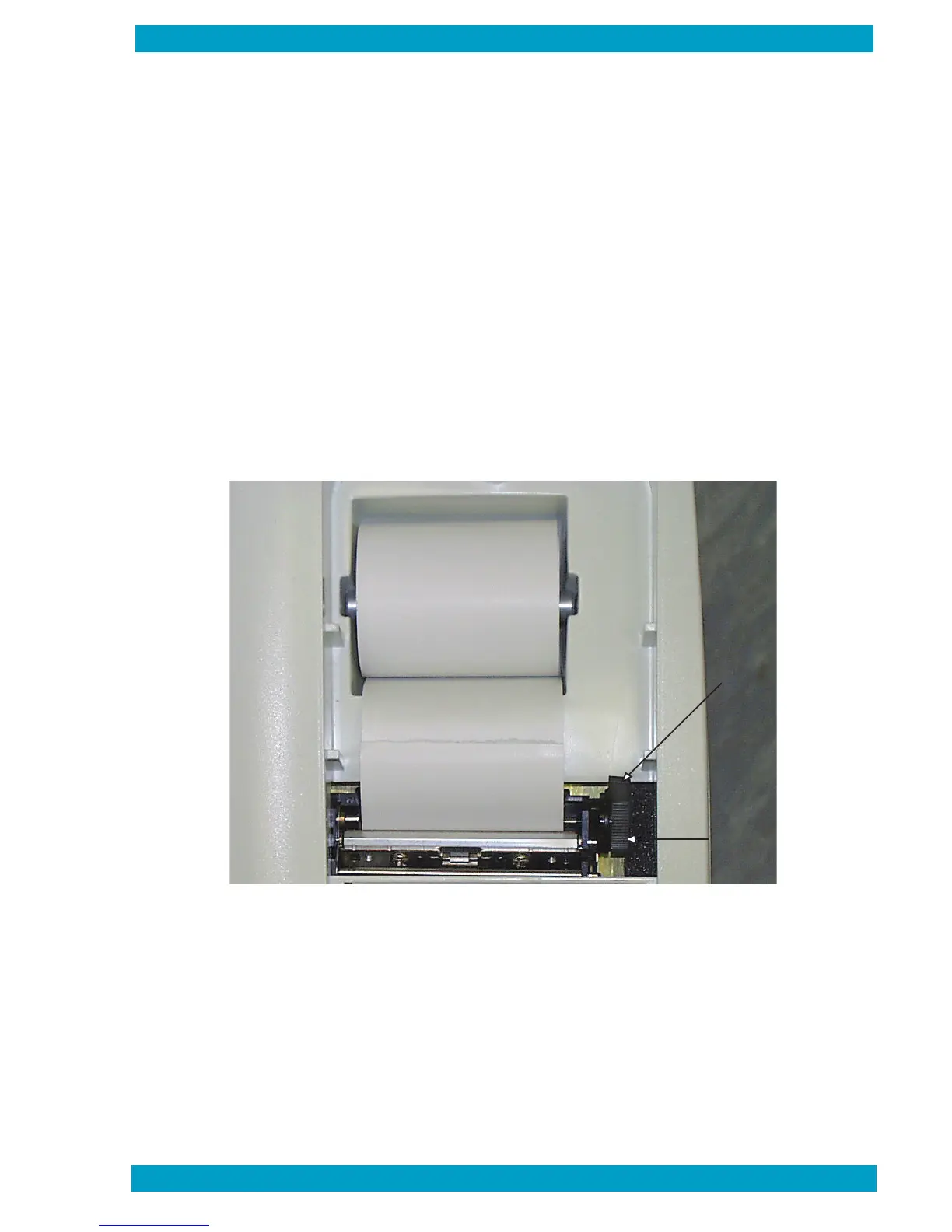
Test results print automatically at the end of the testing cycle. The printer is located on the top panel of the
instrument (Figure 9). Samples of test results printouts are shown in Section 4 – Operation. See Figure 9
for printer controls.
To access printer controls, lift the rear of the printer panel and remove it from the unit.
Paper Release Lever
The paper release lever is located on the right side of the printer. Pull the lever forward to enable loading
paper. When the lever is forward, the manual advance wheel (below) is operational. Push the lever toward
the rear to lock the paper in place.
Manual Advance Wheel
The manual paper advance is located on the right side of the printer. It is a knurled wheel. Rotate the wheel
toward the rear to advance paper when loading. Rotate the wheel forward to retract paper (for example,
to correct a paper jam).
Paper
Release
Lever
Manual
Advance
Wheel
Figure 9 – Printer Controls
6000-300-000 3-3


 To Next Page