EasyManua.ls Logo

DSC 3G2080E - User Manual

DSC 3G2080E
72 pages
Print Icon
To Next Page IconTo Next Page
Loading...
TL280LE(R) / TL280LE-EU /
TL280LE-LAT / TL280LE-AU
Internet and LTE/HSPA Dual-Path Alarm
Communicator
LE2080(R) / LE2080-EU / LE2080-
LAT / LE2080-AU
LTE/HSPA Alarm Communicator
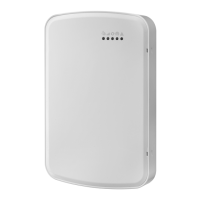
3G2080(R)E
HSPA Cellular Alarm Communicator
TL2803G(R)E
Internet and HSPA Dual-Path Alarm Communicator
TL280(R)E
Internet Alarm Communicator
Installation Manual 5.X
Warning: This manual contains information on limitations regarding product use and function and information on the
limitations as to the liability of the manufacturer. The entire manual should be carefully read.
Please note that not all models and features listed are available in all markets.

Table of Contents

Other manuals for DSC 3G2080E

Questions and Answers

  • P
    Patrick FloydSep 9, 2025
    What does it mean when the yellow LED flashes 5 times on my DSC Computer Hardware?
    • J
      Jamie HardySep 10, 2025
      If the yellow LED on your DSC Computer Hardware flashes 5 times, it signals a cellular trouble. To resolve this, confirm that cellular service is available and active in your area. Check all antenna connections to ensure they are secure. Make sure the average radio signal strength is CSQ 5 or higher. Verify that the SIM card is properly inserted into the SIM card holder and that it has been activated, which can take up to 24 hours after installation. If the trouble persists, consider relocating the panel and communicator or installing an external antenna extension kit.
  • R
    Richard RobertsSep 8, 2025
    What does it mean when all LEDs are flashing together on my DSC Computer Hardware?
    • K
      Kimberly MooreSep 8, 2025
      When all the LEDs on your DSC Computer Hardware are flashing together, it indicates that the boot loader has failed. To resolve this, disconnect the power and then reconnect it to the communicator module.
  • S
    Sarah OlsonAug 22, 2025
    What to do if the yellow LED flashes 5 times on my DSC 3G2080E?
    • K
      Kathleen BauerAug 22, 2025
      If the yellow LED on your DSC Security System is flashing 5 times, it indicates a cellular trouble. First, confirm that cellular service is both available and active in your location. Next, check all antenna connections to ensure they are secure. Make sure your average radio signal strength is CSQ 5 or higher. Verify that the SIM card is correctly inserted into its holder and has been activated, noting that activation can take up to 24 hours. If the issue continues, try relocating the panel and communicator or consider installing an external antenna extension kit.
  • A
    andrea46Sep 6, 2025
    What to do if my DSC Computer Hardware shows no indication?
    • D
      David PerezSep 6, 2025
      If your DSC Computer Hardware shows no indication, the issue might be due to a lack of power. Check the power connections between the panel and the communicator. Also, confirm that the PC-LINK cable is properly installed between the communicator and the panel.
  • J
    Jennifer PetersSep 4, 2025
    What does yellow LED flashing 9 times mean on DSC 3G2080E?
    • J
      James MatthewsSep 5, 2025
      If the yellow LED on your DSC Security System is flashing 9 times, it indicates an FTC trouble. Restart the system, if trouble persists, contact the dealer.
  • C
    Charles TuckerSep 3, 2025
    Why are only the green LEDs flashing on my DSC 3G2080E Security System?
    • A
      Austin MartinSep 4, 2025
      If only the green LEDs are flashing on your DSC Security System, it means the hardware default jumper is installed and must be removed.
  • L
    Lisa MackSep 2, 2025
    What does yellow LED flashing 8 times mean on DSC Security System?
    • H
      hallgregorySep 2, 2025
      If the yellow LED on your DSC Security System is flashing 8 times, it indicates a receiver supervision trouble. If this trouble persists, contact the central station.
  • M
    mthomasSep 1, 2025
    What does it mean when red and yellow LEDs are flashing together on my DSC 3G2080E Security System?
    • R
      Reginald ArnoldSep 1, 2025
      If the red and yellow LEDs on your DSC Security System are flashing together, the unit is still initializing. Please wait while the unit gets its programming and establishes a connection to all programmed receivers. Note that this process may take several minutes to complete.
  • A
    Amanda GriffinAug 31, 2025
    Why are the green LEDs alternating on my DSC 3G2080E?
    • H
      Heather RamirezAug 31, 2025
      If the green LEDs on your DSC Security System are alternating, it may indicate a radio reset or radio initialization. If this status persists and the yellow LED shows 5 flashes, confirm that the SIM card is active.
  • J
    jonathanwilliamsAug 30, 2025
    How to solve LED flashing 2 times on DSC 3G2080E?
    • O
      orodriguezAug 30, 2025
      If the LED on your DSC Security System flashes 2 times, it indicates a supervision trouble. Ensure the PC-LINK cable between the panel and communicator is connected properly (not reversed) and is securely in place.

Summary

Installer Warnings and Guidance

General Product Overview

User Safety Information

Instructions for users on safe operation, servicing, and handling of the equipment.

Supported Model Information

Lists the alarm communicator models covered by the manual and their regional specifications.

Product Features and Specifications

Detailed Technical Specifications

Provides technical specifications for the communicator, including standards compliance.

EN50131-1 Installation Requirements

Programming options required for EN50131-1 compliant installations.

Communicator Installation Configuration

Ethernet Cable Installation

Instructions for installing the CAT 5 Ethernet cable for TL models.

SIM Card and RS-232 Cable Installation

Communicator Placement and Signal Testing

Placement Test Procedure

Procedure to test cellular antenna location suitability for radio operation.

Initial Panel Programming and Activation

Initial Panel Programming Steps

Steps for initial programming of the panel and communicator.

SMS Command and Control Features

Yellow Trouble LED Interpretation

Meaning of the yellow trouble LED and its flash codes.

Trouble Indicators and LED Status

Communicator Reset and Firmware Update

Factory Defaults Reset Procedure

Steps to restore the communicator to its factory default settings.

Firmware Update Process

Information on how to update the communicator's firmware.

Communicator Troubleshooting Guide

Trouble Indications and Solutions

Table detailing trouble indications, possible causes, and solutions.

Ethernet;Cellular Programming Options

System Options Configuration

Configuration settings related to the system's operation and network.

Ethernet Network Settings

Settings for Ethernet IP Address, Subnet Mask, and Gateway.

Communication and System Settings

System Test Transmission Configuration

Ethernet Receiver Configuration

Cellular Receiver Configuration

Cellular Network and SMS Options

Integration Settings

Diagnostic Testing and System Information

Receiver Diagnostic Testing Procedure

Procedure to force test transmissions to verify communications paths.

Response Code Descriptions and Actions

Communicator Status and Signal Strength

Communicator Status Interpretation

Details on how communicator status is displayed and interpreted.

Radio Signal Strength Indicators

Table showing radio signal strength indicators and actions.

Network Usage and Security Recommendations

DSC 3G2080E Specifications

General IconGeneral
Weatherproof RatingIP66
Communication TechnologyEthernet
Resolution1920x1080 (Full HD)
Video CompressionH.264
IR RangeUp to 30m
Power SupplyDC 12V
Day/NightYes (ICR)
Min. Illumination0.01 Lux
Network ProtocolsTCP/IP, HTTP, DHCP, DNS, DDNS, RTP, RTSP, PPPoE, SMTP, NTP, HTTPS, FTP
InterfaceRJ45
Operating Conditions-30 °C to 60 °C (-22 °F to 140 °F), humidity: 95% or less (non-condensing)

Related product manuals