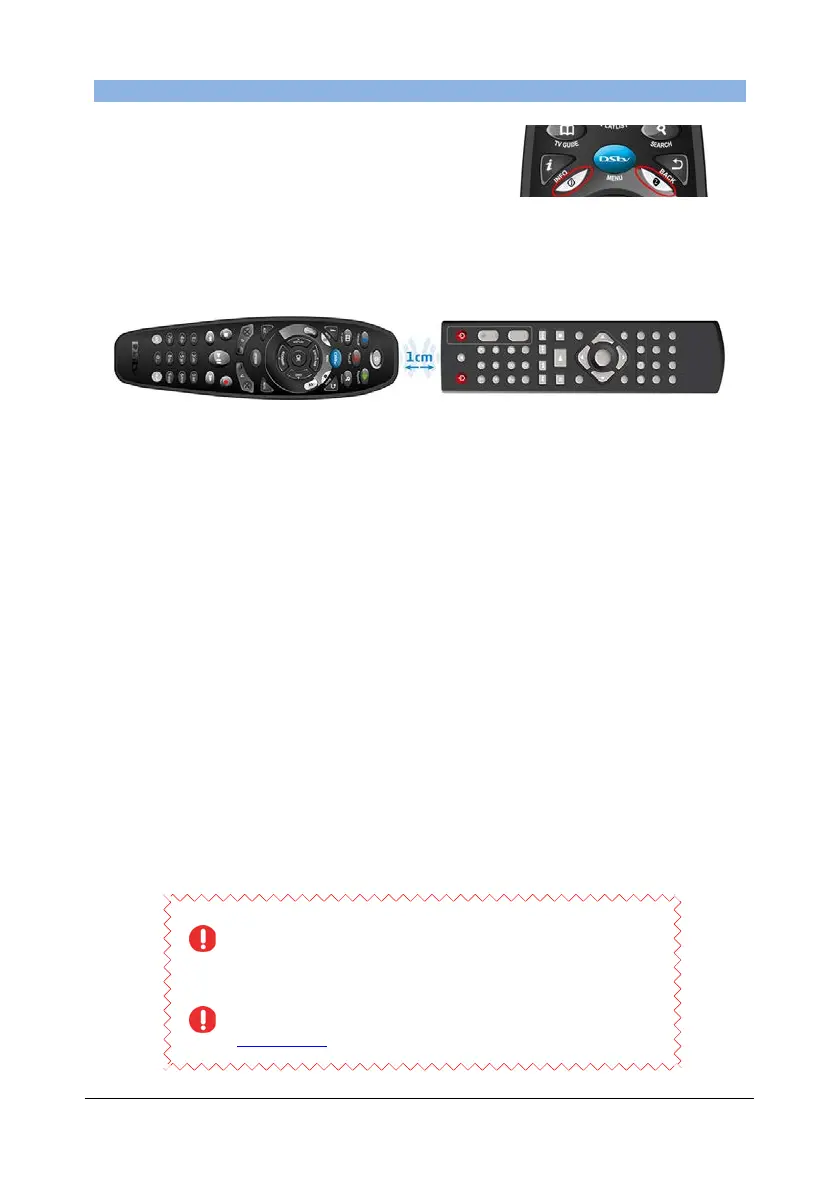
• The lights (LEDs) on the remote referred to in
these instructions are below the i and BACK
buttons. The colour of the LEDs can be
GREEN, AMBER or RED.
• When programming the A6 to duplicate another remote’s function - lie both remotes
on a flat surface, no more than 1cm apart and with the infrared “eyes” facing each
other
• When the LEDs blink repeatedly in AMBER, the A6 remote is in “learning mode” (this
means it’s ready to “learn” a command from another remote). If the A6 is in “learning
mode” and more than 20 seconds go by without interaction, the programming
sequence will time out.
• Two RED blinks (at any stage) indicate an error. If you see these two RED blinks
while programming the remote, start the sequence from Step 1.
• To delete all programming on the remote (and return the A6 remote back to factory
defaults) :
1. Press and hold ARC and STANDBY for three seconds. (LEDs are now solid
AMBER)
2. While continuing to press down ARC, release the STANDBY button (LEDs
remain sold AMBER)
3. Press 9949 (The LEDs will blink AMBER each time you press a button,
followed by three GREEN blinks when you press the last 9). This confirms
that the remote has returned to factory defaults (and all programming has
been deleted)
4. Release the ARC button
• And don’t forget, if you get a new TV or replace any of the devices that you have
used when programming the A6 remote, you will need to delete and reprogramme
the necessary sequences.
Although the DStv A6 Remote is able to “listen” (or learn”) from
other remote controls, we cannot guarantee that it is compatible
with all remotes, across all models of audio/visual equipment.
For queries and support when using the Advanced Options of your
A6 remote, please make use of our interactive forums on
www.dstv.com where our team will be able to assist you.


 To Next Page