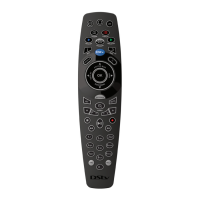
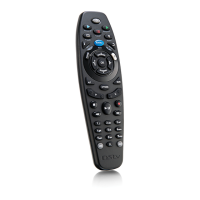
DStv Remote A6 (Advanced Options)
How do I know if the buttons I programme are working correctly?
What do you see on the
A6?
LED below i is solid GREEN while
the LED below BACK blinks
AMBER
! “Standby relay” is active and the DStv
Explora is running the sequence of steps as
you programmed them
One GREEN blink (either below i,
below BACK or below both)
Nothing has been programmed on this
button and it works as normal (ie. switches
the DStv Explora in and out of standby)
" “Standby relay” is active, but there is
an error. The DStv Explora (and other
equipment) will not respond.
To get out of “standby relay” mode and
delete all programming on this button,
press and hold ARC and STANDBY until
you see the LEDs blink AMBER
continuously. Release both buttons (and
wait until the blinks stop before using the
remote again).
! “Volume Relay” is active and the volume
button on the A6 will change volume on the
other equipment.
One GREEN blink (either below i,
below BACK or below both)
Nothing has been programmed on this
button and it works as normal (ie. controls
the volume on the DStv Explora).
" “Volume relay” is active, but there is an
error. The DStv Explora (and other
equipment) will not respond.
To get out of “volume relay” mode, press
and hold ARC and any volume button until
you see the LEDs blink AMBER
continuously. Release both buttons (and
wait until the blinks stop before using the
remote again).
Press ARC and a
number button that
has a macro
programmed on it
The LED below i will be GREEN
and the LED below BACK will
give an AMBER blink for each
step of the macro.
! The DStv Explora is responding to the
steps in the macro.
Press ARC and a
number button that
has a macro
programmed on it
One GREEN blink (either below i,
below BACK or below both)
There is no macro on that number button,
or there was too much time between
pressing ARC and the number button
Press ARC and a
number button that
has a macro
programmed on it
" The macro has an error.
To clear the macro on that number button,
press and hold ARC and that number
button until you see the LEDs blink AMBER
continuously. Release both buttons (and
wait until the blinks stop before using the
remote again).
If you get a new TV or replace any of the devices that you have used when programming the A6 remote, you will
need to delete and reprogramme the necessary sequences.


 To Previous Page